
AMap 高德地图 JS API 2.0
地图 JS API 2.0 是高德开放平台免费提供的第四代 Web 地图渲染引擎, 以 WebGL 为主要绘图手段,本着“更轻、更快、更易用”的服务原则,广泛采用了各种前沿技术,交互体验、视觉体验大幅提升,同时提供了众多新增能力和特性。
基础配置
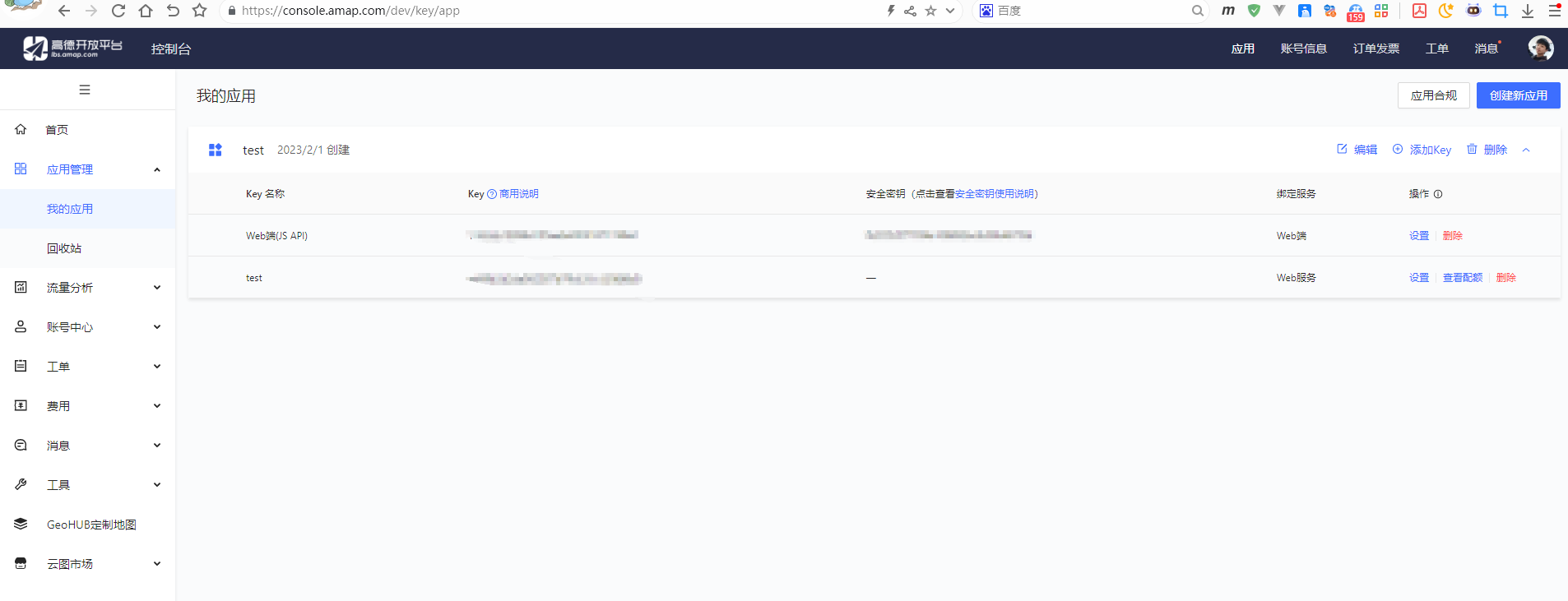
获取 Key
- 登录 高德开放平台 ,获取 Key
安装官方加载器
pnpm add @amap/amap-jsapi-loader@1.0.1配置 Key
.env.development
VITE_API_BASE=http://localhost:8080
VITE_AMAP_KEY=1143xxxxx
VITE_AMAP_SECURITY_CODE=9a92xxxxx创建类型声明文件
src/types/amap.d.ts
ts
export {}

declare global {
    interface Window {
        _AMapSecurityConfig: {
            securityJsCode: string
        }
    }
}创建加载器
src/utils/amap.ts
ts
import AMapLoader from '@amap/amap-jsapi-loader'

let amapInstance: Promise<any> | null = null

export function loadAMap() {
    if (amapInstance) return amapInstance

    window._AMapSecurityConfig = {
        securityJsCode: import.meta.env.VITE_AMAP_SECURITY_CODE
    }

    amapInstance = AMapLoader.load({
        key: import.meta.env.VITE_AMAP_KEY,
        version: '2.0',
        plugins: []
    })

    return amapInstance
}最简示例
vue
<template>
  <div ref="containerRef" class="map"></div>
</template>

<script setup lang="ts">
import { onMounted, onUnmounted, ref } from 'vue'
import { loadAMap } from '@/utils/amap'

const containerRef = ref<HTMLDivElement | null>(null)
let map: any = null

onMounted(async () => {
  const AMap = await loadAMap()

  map = new AMap.Map(containerRef.value!, {
    viewMode: '3D',
    zoom: 12,
    center: [106.551787,29.56268],
    resizeEnable: true
  })

  AMap.plugin(['AMap.Scale', 'AMap.ToolBar'], () => {
    map.addControl(new AMap.Scale())
    map.addControl(new AMap.ToolBar())
  })
})

onUnmounted(() => {
  map?.destroy()
})
</script>

<style scoped>
.map {
  width: 100%;
  height: 100vh;
}
</style>添加 Marker 示例
vue
<template>
  <div ref="containerRef" class="map"></div>
</template>

<script setup lang="ts">
import { ref, onMounted, onUnmounted } from 'vue'
import { loadAMap } from '@/utils/amap'

const containerRef = ref<HTMLDivElement | null>(null)
let map: any = null

onMounted(async () => {
  const AMap = await loadAMap()

  map = new AMap.Map(containerRef.value!, {
    zoom: 13,
    center: [106.551787, 29.56268]
  })

  const marker = new AMap.Marker({
    position: [106.551787, 29.56268],
    title: '重庆'
  })

  map.add(marker)
})

onUnmounted(() => {
  map?.destroy()
})
</script>

<style scoped>
.map {
  width: 100%;
  height: 100vh;
}
</style>Marker + 信息窗体 示例
vue
<template>
  <div ref="containerRef" class="map"></div>
</template>

<script setup lang="ts">
import { ref, onMounted, onUnmounted } from 'vue'
import { loadAMap } from '@/utils/amap'

const containerRef = ref<HTMLDivElement | null>(null)
let map: any = null

onMounted(async () => {
  const AMap = await loadAMap()

  map = new AMap.Map(containerRef.value!, {
    zoom: 13,
    center: [106.55, 29.56]
  })

  const marker = new AMap.Marker({
    position: [106.55, 29.56]
  })

  const infoWindow = new AMap.InfoWindow({
    content: '<div>这里是重庆</div>',
    offset: new AMap.Pixel(0, -30)
  })

  marker.on('click', () => {
    infoWindow.open(map, marker.getPosition())
  })

  map.add(marker)
})

onUnmounted(() => {
  map?.destroy()
})
</script>

<style scoped>
.map {
  width: 100%;
  height: 100vh;
}
</style>绘制圆形覆盖物
vue
<template>
  <div ref="containerRef" class="map"></div>
</template>

<script setup lang="ts">
import { ref, onMounted, onUnmounted } from 'vue'
import { loadAMap } from '@/utils/amap'

const containerRef = ref<HTMLDivElement | null>(null)
let map: any = null

onMounted(async () => {
  const AMap = await loadAMap()

  map = new AMap.Map(containerRef.value!, {
    zoom: 12,
    center: [106.55, 29.56]
  })

  const circle = new AMap.Circle({
    center: [106.55, 29.56],
    radius: 1000,
    fillColor: '#1791fc',
    strokeColor: '#0f5caa'
  })

  map.add(circle)
})

onUnmounted(() => {
  map?.destroy()
})
</script>

<style scoped>
.map {
  width: 100%;
  height: 100vh;
}
</style>浏览器定位示例
vue
<template>
  <div ref="containerRef" class="map"></div>
</template>

<script setup lang="ts">
import { ref, onMounted, onUnmounted } from 'vue'
import { loadAMap } from '@/utils/amap'

const containerRef = ref<HTMLDivElement | null>(null)
let map: any = null

onMounted(async () => {
  const AMap = await loadAMap()

  map = new AMap.Map(containerRef.value!, {
    zoom: 13
  })

  AMap.plugin(['AMap.Geolocation'], () => {
    const geolocation = new AMap.Geolocation({
      enableHighAccuracy: true
    })

    map.addControl(geolocation)

    geolocation.getCurrentPosition((status: string, result: any) => {
      if (status === 'complete') {
        console.log('定位成功:', result.position)
      }
    })
  })
})

onUnmounted(() => {
  map?.destroy()
})
</script>

<style scoped>
.map {
  width: 100%;
  height: 100vh;
}
</style>路径规划示例
vue
<template>
  <div ref="containerRef" class="map"></div>
</template>

<script setup lang="ts">
import { ref, onMounted, onUnmounted } from 'vue'
import { loadAMap } from '@/utils/amap'

const containerRef = ref<HTMLDivElement | null>(null)
let map: any = null

onMounted(async () => {
  const AMap = await loadAMap()

  map = new AMap.Map(containerRef.value!, {
    zoom: 12,
    center: [106.55, 29.56]
  })

  AMap.plugin(['AMap.Driving'], () => {
    const driving = new AMap.Driving({
      map
    })

    driving.search(
      [106.55, 29.56],
      [106.60, 29.58]
    )
  })
})

onUnmounted(() => {
  map?.destroy()
})
</script>

<style scoped>
.map {
  width: 100%;
  height: 100vh;
}
</style>加载本地 GeoJSON(多边形)
适用于:
- 后端返回区域边界
- 自定义区域展示
- 行政区高亮
示例:渲染一个 Polygon GeoJSON
vue
<template>
  <div ref="containerRef" class="map"></div>
</template>

<script setup lang="ts">
import { ref, onMounted, onUnmounted } from 'vue'
import { loadAMap } from '@/utils/amap'

const containerRef = ref<HTMLDivElement | null>(null)
let map: any = null

const geojson = {
  type: 'FeatureCollection',
  features: [
    {
      type: 'Feature',
      properties: {
        name: '测试区域'
      },
      geometry: {
        type: 'Polygon',
        coordinates: [[
          [106.54, 29.55],
          [106.58, 29.55],
          [106.58, 29.58],
          [106.54, 29.58],
          [106.54, 29.55]
        ]]
      }
    }
  ]
}

onMounted(async () => {
  const AMap = await loadAMap()

  map = new AMap.Map(containerRef.value!, {
    zoom: 13,
    center: [106.56, 29.565]
  })

  AMap.plugin(['AMap.GeoJSON'], () => {
    const geoJSONLayer = new AMap.GeoJSON({
      geoJSON: geojson,
      getPolygon: (_: any, lnglats: any) => {
        return new AMap.Polygon({
          path: lnglats,
          fillColor: '#1791fc',
          fillOpacity: 0.4,
          strokeColor: '#0f5caa',
          strokeWeight: 2
        })
      }
    })

    map.add(geoJSONLayer)
  })
})

onUnmounted(() => {
  map?.destroy()
})
</script>

<style scoped>
.map {
  width: 100%;
  height: 100vh;
}
</style>GeoJSON 点数据(批量 Marker)
适用于:
- 后端返回点位列表
- 门店分布
- 设备分布
示例:GeoJSON Point 批量渲染
vue
<template>
  <div ref="containerRef" class="map"></div>
</template>

<script setup lang="ts">
import { ref, onMounted, onUnmounted } from 'vue'
import { loadAMap } from '@/utils/amap'

const containerRef = ref<HTMLDivElement | null>(null)
let map: any = null

const geojson = {
  type: 'FeatureCollection',
  features: [
    {
      type: 'Feature',
      properties: { name: '点1' },
      geometry: {
        type: 'Point',
        coordinates: [106.55, 29.56]
      }
    },
    {
      type: 'Feature',
      properties: { name: '点2' },
      geometry: {
        type: 'Point',
        coordinates: [106.57, 29.57]
      }
    }
  ]
}

onMounted(async () => {
  const AMap = await loadAMap()

  map = new AMap.Map(containerRef.value!, {
    zoom: 13,
    center: [106.56, 29.565]
  })

  AMap.plugin(['AMap.GeoJSON'], () => {

    const geoJSONLayer = new AMap.GeoJSON({
      geoJSON: geojson,
      getMarker: (feature: any, lnglat: any) => {
        return new AMap.Marker({
          position: lnglat,
          title: feature.properties.name
        })
      }
    })

    map.add(geoJSONLayer)

    // 自动适配视野(防止看不到)
    map.setFitView()
  })
})

onUnmounted(() => {
  map?.destroy()
})
</script>

<style scoped>
.map {
  width: 100%;
  height: 100vh;
}
</style>动态加载远程 GeoJSON
适用于:
- 后端接口返回 GeoJSON
- 地图大屏
- 行政区可视化
示例:接口加载
vue
<template>
  <div ref="containerRef" class="map"></div>
</template>

<script setup lang="ts">
import { ref, onMounted, onUnmounted } from 'vue'
import { loadAMap } from '@/utils/amap'

const containerRef = ref<HTMLDivElement | null>(null)
let map: any = null
let geoJSONLayer: any = null

async function fetchGeoJSON() {
  const res = await fetch('/api/geo.json')
  if (!res.ok) throw new Error('GeoJSON 加载失败')
  return await res.json()
}

onMounted(async () => {
  const AMap = await loadAMap()

  map = new AMap.Map(containerRef.value!, {
    zoom: 12,
    center: [106.56, 29.565]
  })

  AMap.plugin(['AMap.GeoJSON'], async () => {

    try {
      const data = await fetchGeoJSON()

      geoJSONLayer = new AMap.GeoJSON({
        geoJSON: data,
        getPolygon: (_: any, lnglats: any) =>
          new AMap.Polygon({
            path: lnglats,
            fillColor: '#ff0000',
            fillOpacity: 0.3,
            strokeColor: '#cc0000',
            strokeWeight: 2
          })
      })

      map.add(geoJSONLayer)

      // 自动适配视野
      map.setFitView()

    } catch (err) {
      console.error(err)
    }
  })
})

onUnmounted(() => {
  geoJSONLayer?.clearOverlays?.()
  map?.destroy()
})
</script>

<style scoped>
.map {
  width: 100%;
  height: 100vh;
}
</style>GeoJSON + 点击高亮
企业常见需求:
点击区域 → 改变颜色 → 显示名称
vue
<template>
  <div ref="containerRef" class="map"></div>
</template>

<script setup lang="ts">
import { ref, onMounted, onUnmounted } from 'vue'
import { loadAMap } from '@/utils/amap'

const containerRef = ref<HTMLDivElement | null>(null)
let map: any = null
let geoJSONLayer: any = null
let activePolygon: any = null  // 当前高亮

onMounted(async () => {
  const AMap = await loadAMap()

  map = new AMap.Map(containerRef.value!, {
    zoom: 13,
    center: [106.56, 29.565]
  })

  AMap.plugin(['AMap.GeoJSON'], () => {

    geoJSONLayer = new AMap.GeoJSON({
      url: '/geo.json',

      getPolygon: (feature: any, lnglats: any) => {
        const polygon = new AMap.Polygon({
          path: lnglats,
          fillColor: '#1791fc',
          fillOpacity: 0.4,
          strokeColor: '#0f5caa',
          strokeWeight: 2
        })

        polygon.on('click', () => {

          // 恢复之前选中的
          if (activePolygon) {
            activePolygon.setOptions({
              fillColor: '#1791fc'
            })
          }

          // 设置当前高亮
          polygon.setOptions({
            fillColor: '#ff0000'
          })

          activePolygon = polygon

          console.log('点击区域:', feature.properties.name)
        })

        return polygon
      }
    })

    map.add(geoJSONLayer)

    // 等数据加载完成后自动适配
    geoJSONLayer.on('complete', () => {
      map.setFitView()
    })
  })
})

onUnmounted(() => {
  geoJSONLayer?.clearOverlays?.()
  map?.destroy()
})
</script>

<style scoped>
.map {
  width: 100%;
  height: 100vh;
}
</style>绘制
绘制点线面
vue
<template>
  <div class="toolbar">
    <button @click="drawMarker">点</button>
    <button @click="drawPolyline">线</button>
    <button @click="drawPolygon">面</button>
  </div>
  <div ref="containerRef" class="map"></div>
</template>

<script setup lang="ts">
import { ref, onMounted, onUnmounted } from 'vue'
import { loadAMap } from '@/utils/amap'

const containerRef = ref<HTMLDivElement | null>(null)

let map: any = null
let mouseTool: any = null

onMounted(async () => {
  const AMap = await loadAMap()

  map = new AMap.Map(containerRef.value!, {
    zoom: 13,
    center: [106.56, 29.565]
  })

  await new Promise<void>((resolve) => {
    AMap.plugin(['AMap.MouseTool'], () => {
      mouseTool = new AMap.MouseTool(map)
      resolve()
    })
  })

  mouseTool.on('draw', (e: any) => {
    const obj = e.obj
    const overlayType = obj.type

    console.log('overlay 类型:', overlayType)

    if (overlayType === 'AMap.Marker') {
      const pos = obj.getPosition()
      console.log('点坐标:', [pos.lng, pos.lat])
    }

    if (overlayType === 'AMap.Polyline') {
      const path = obj.getPath().map((p: any) => [p.lng, p.lat])
      console.log('线坐标:', path)
    }

    if (overlayType === 'AMap.Polygon') {
      const path = obj.getPath().map((p: any) => [p.lng, p.lat])
      console.log('面坐标:', path)
    }
  })

})

function drawMarker() {
  mouseTool?.close(true)
  mouseTool?.marker()
}

function drawPolyline() {
  mouseTool?.close(true)
  mouseTool?.polyline()
}

function drawPolygon() {
  mouseTool?.close(true)
  mouseTool?.polygon()
}

onUnmounted(() => {
  mouseTool?.close()
  map?.destroy()
})
</script>

<style scoped>
.map {
  width: 100%;
  height: 90vh;
}
.toolbar {
  padding: 10px;
}
</style>坐标系问题
| 系统 | 使用坐标系 |
|---|---|
| 高德开放平台 | GCJ-02(火星坐标) |
| PostgreSQL + PostGIS | 默认 WGS-84 |
方案一(推荐):后端统一转换
在 Node / Java / Python 层做 WGS84 → GCJ02。
优点:
- 前端不用关心
- 统一处理
- 性能可控
方案二:前端转换(小数据量可用)
使用转换算法库。
示例(WGS84 → GCJ02):
import coordtransform from 'coordtransform'

const [lng, lat] = coordtransform.wgs84togcj02(106.56, 29.565)