MQTT
MQTT 是一种基于发布/订阅模式的轻量级消息传输协议,专为低带宽、高延迟和不稳定网络环境设计,具有高性能、低功耗、强解耦等特点,广泛应用于物联网、实时监控、大屏系统和消息推送场景。
服务端
EMQX
参考文档:- 服务端EMQX安装文档
RabbitMQ
参考 安装RabbitMQ 文档,然后开启 MQTT 插件
rabbitmq-plugins enable rabbitmq_mqtt
rabbitmq-plugins enable rabbitmq_web_mqtt| 端口 | 说明 |
|---|---|
| 1883 | MQTT TCP |
| 8883 | MQTT SSL |
| 15675 | MQTT over WebSocket |
| 15672 | RabbitMQ 管理后台 |
MQTT 客户端通过唯一的 clientId 标识连接,每个客户端 subscribe(topic) 时订阅的是 MQTT Topic(不是 Queue),RabbitMQ 的 MQTT 插件会基于每个不同的 clientId 自动创建独立 Queue 并按该 Topic(斜杠转点)绑定到 amq.topic,因此只要多个客户端订阅同一个 Topic 且 clientId 各不相同,它们就可以互相通过 publish(topic) 实现消息广播,而无需自行管理 Queue 或路由。
基础配置
安装依赖
pnpm add mqtt@5.14.1组合式函数
src/composables/useMqttClient.ts
ts
import { ref, onBeforeUnmount } from 'vue'
import mqtt, { type MqttClient, type IClientOptions } from 'mqtt'

interface ConnectOptions extends IClientOptions {
    url: string
}

export function useMqttClient() {
    const client = ref<MqttClient | null>(null)
    const isConnected = ref(false)

    const pendingTopics = new Set<string>()
    const messageHandlers = new Set<(topic: string, payload: string) => void>()

    let connectedOnce = false

    const connect = (options: ConnectOptions) => {
        if (client.value) return

        const { url, ...mqttOptions } = options
        client.value = mqtt.connect(url, mqttOptions)

        client.value.on('connect', () => {
            isConnected.value = true

            pendingTopics.forEach(topic => {
                client.value?.subscribe(topic)
            })

            connectedOnce = true
        })

        client.value.on('reconnect', () => {
            isConnected.value = false
        })

        client.value.on('close', () => {
            isConnected.value = false
        })

        client.value.on('error', () => {
            isConnected.value = false
        })

        client.value.on('message', (topic, message) => {
            const payload = message.toString()
            messageHandlers.forEach(cb => cb(topic, payload))
        })
    }

    const publish = (topic: string, message: string | Buffer) => {
        if (!client.value) return
        client.value.publish(topic, message, { qos: 1 })
    }

    const subscribe = (topic: string) => {
        pendingTopics.add(topic)

        if (client.value && isConnected.value) {
            client.value.subscribe(topic)
        }
    }

    const onMessage = (cb: (topic: string, payload: string) => void) => {
        messageHandlers.add(cb)
        return () => messageHandlers.delete(cb)
    }

    const disconnect = () => {
        client.value?.end(true)
        client.value = null
        isConnected.value = false
        pendingTopics.clear()
        messageHandlers.clear()
        connectedOnce = false
    }

    onBeforeUnmount(disconnect)

    return {
        connect,
        publish,
        subscribe,
        onMessage,
        disconnect,
        isConnected,
    }
}创建 Provider
src/composables/useMqttClientProvider.ts
ts
import { provide, inject, type InjectionKey } from 'vue'
import { useMqttClient } from './useMqttClient'

/**
 * 定义 MQTT Provider 类型(包含 useMqttClient 返回的内容)
 */
export type MqttClientContext = ReturnType<typeof useMqttClient>

/**
 * 创建全局唯一的 MQTT 注入 Key
 */
export const MQTT_KEY: InjectionKey<MqttClientContext> = Symbol('MQTT_KEY')

/**
 * Provider:在父级组件执行,用于全局提供 MQTT 客户端
 */
export function provideMqttClient() {
    const mqtt = useMqttClient()
    provide(MQTT_KEY, mqtt)
    return mqtt
}

/**
 * Inject:在任意子组件调用,用于获取 MQTT 客户端
 */
export function useMqttClientInject(): MqttClientContext {
    const mqtt = inject(MQTT_KEY)
    if (!mqtt) {
        throw new Error('[MQTT] inject 失败:请确保父级已调用 provideMqttClient()')
    }
    return mqtt
}基本使用
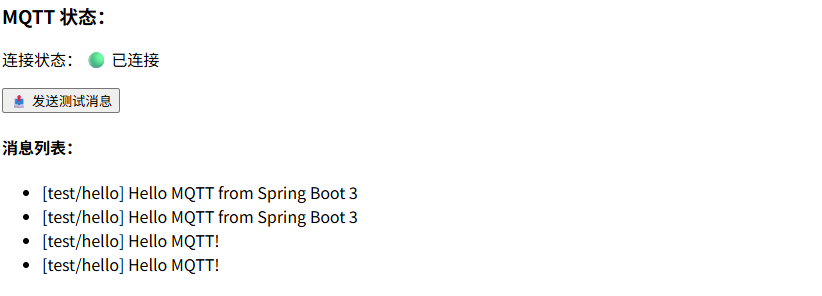
创建 views/MqttDemo.vue
vue
<script setup lang="ts">
import { onMounted, ref } from 'vue'
import { useMqttClientInject } from '@/composables/useMqttClientProvider'

// inject 全局 MQTT
const mqtt = useMqttClientInject()

const list = ref<string[]>([])

onMounted(() => {
  mqtt.subscribe('test/#')

  mqtt.onMessage((topic, payload) => {
    list.value.unshift(`[${topic}] ${payload}`)
  })
})

const send = () => {
  mqtt.publish('test/hello', 'Hello MQTT!')
}
</script>

<template>
  <div>
    <h3>MQTT 状态:</h3>
    <p>
      连接状态:
      <span v-if="mqtt.isConnected">🟢 已连接</span>
      <span v-else>🔴 未连接</span>
    </p>

    <button @click="send" :disabled="!mqtt.isConnected">
      📤 发送测试消息
    </button>

    <h4>消息列表:</h4>
    <ul>
      <li v-for="(item, i) in list" :key="i">{{ item }}</li>
    </ul>
  </div>
</template>App.vue
vue
<script setup lang="ts">
import { onMounted } from 'vue'
import { provideMqttClient } from '@/composables/useMqttClientProvider'
import MqttDemo from "@/views/MqttDemo.vue";

// 创建并 provide 全局 MQTT
const mqtt = provideMqttClient()

onMounted(() => {
  mqtt.connect({
    url: 'ws://192.168.1.12:8083/mqtt',
    username: 'admin',
    password: 'public',
    clientId: 'vue-' + Math.random().toString(16).slice(2),
    clean: true,
  })
})
</script>

<template>
  <MqttDemo />
</template>