VitePress
VitePress 是由 Vue.js 团队打造的一款静态站点生成器(SSG),基于 Vite 和 Vue 3。
👉 核心定位:写文档 / 博客 / 技术站点(极致轻量 + 超快)
基础配置
初始化项目
pnpm dlx create-vite@7.1.3 my-docs --template vue-ts
cd my-docs安装 vitepress
pnpm add -D vitepress@1.6.4初始化 docs
pnpm vitepress init交互日志
┌  Welcome to VitePress!
│
◇  Where should VitePress initialize the config?
│  ./docs
│
◇  Site title:
│  阿腾网站
│
◇  Site description:
│  阿腾网站描述
│
◇  Theme:
│  Default Theme
│
◇  Use TypeScript for config and theme files?
│  Yes
│
◇  Add VitePress npm scripts to package.json?
│  Yes
│
└ Done! Now run pnpm run docs:dev and start writing.会自动生成:
.
├─ docs
│  ├─ .vitepress
│  │  └─ config.js
│  ├─ api-examples.md
│  ├─ markdown-examples.md
│  └─ index.md
└─ package.json启动项目
pnpm run docs:dev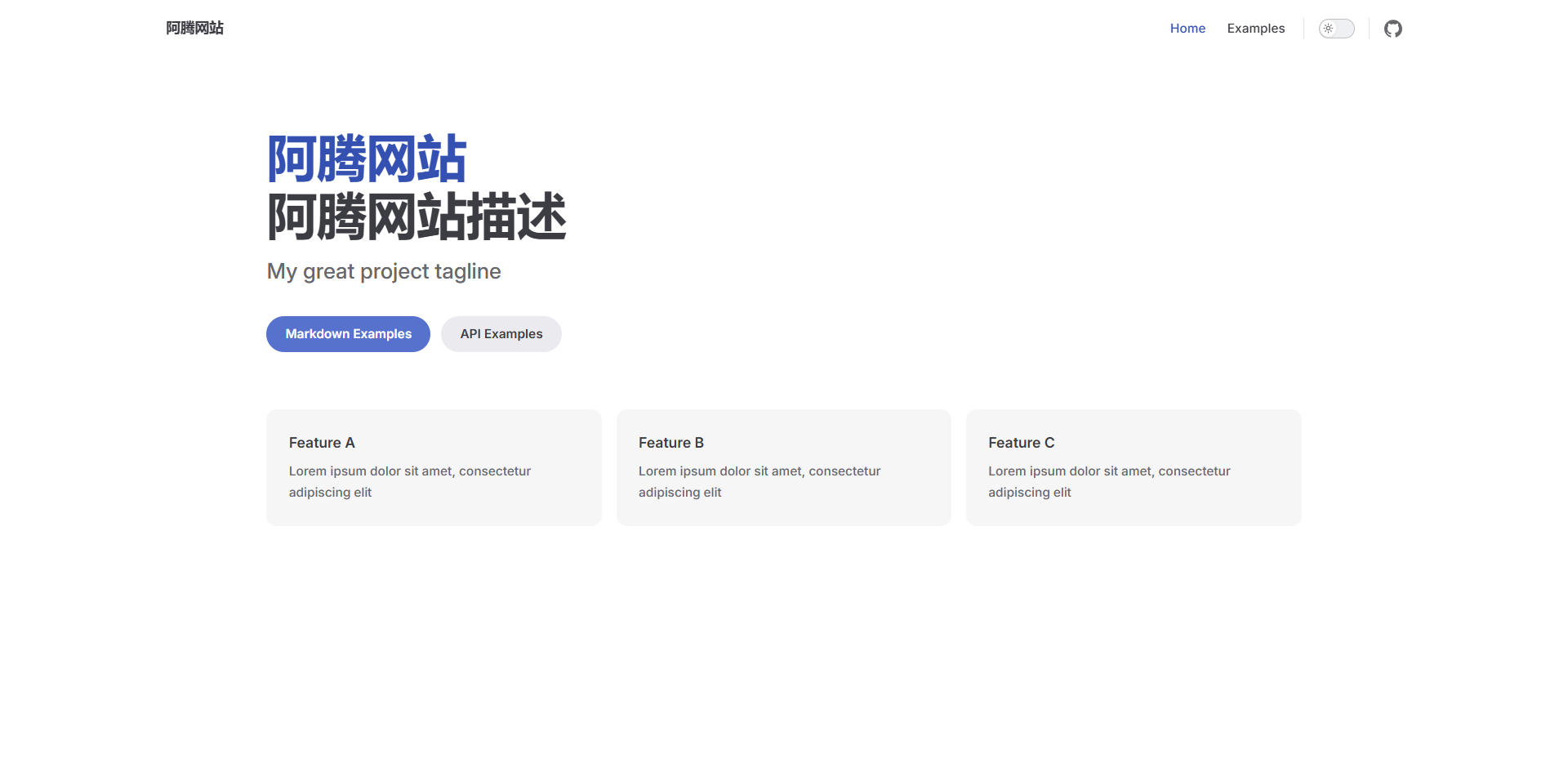
基础配置(纯净版)
VitePress 天生支持在 Markdown 里直接写 Vue3 组件
完全不需要创建 Vue 项目(安装 Vue),也照样能用 Vue。
创建目录
👉 不要用 create-vite,不要创建 Vue 项目
mkdir my-docs
cd my-docs初始化 package.json
一路回车即可
pnpm init安装 VitePress
pnpm add -D vitepress@1.6.4初始化 VitePress
👉 关键选择:
- Where should VitePress initialize the config?
- 👉 选择:
.(根目录)
- 👉 选择:
- 其他全部默认即可
pnpm vitepress init启动项目
pnpm run docs:dev
添加目录和文档
创建目录和文档
创建目录 docs/java
docs/
├─ java/创建入口页面 docs/java/index.md
# Java

这里是 Java 学习笔记

## 内容
- 基础
- 集合
- 并发新增具体文章
docs/java/jdk8.md
# JDK8 新特性

## Lambda 表达式

```java
list.forEach(item -> System.out.println(item));
```docs/java/concurrent.md
# Java 并发

## 线程

- Thread
- Runnable修改配置
修改配置文件 .vitepress/config.ts
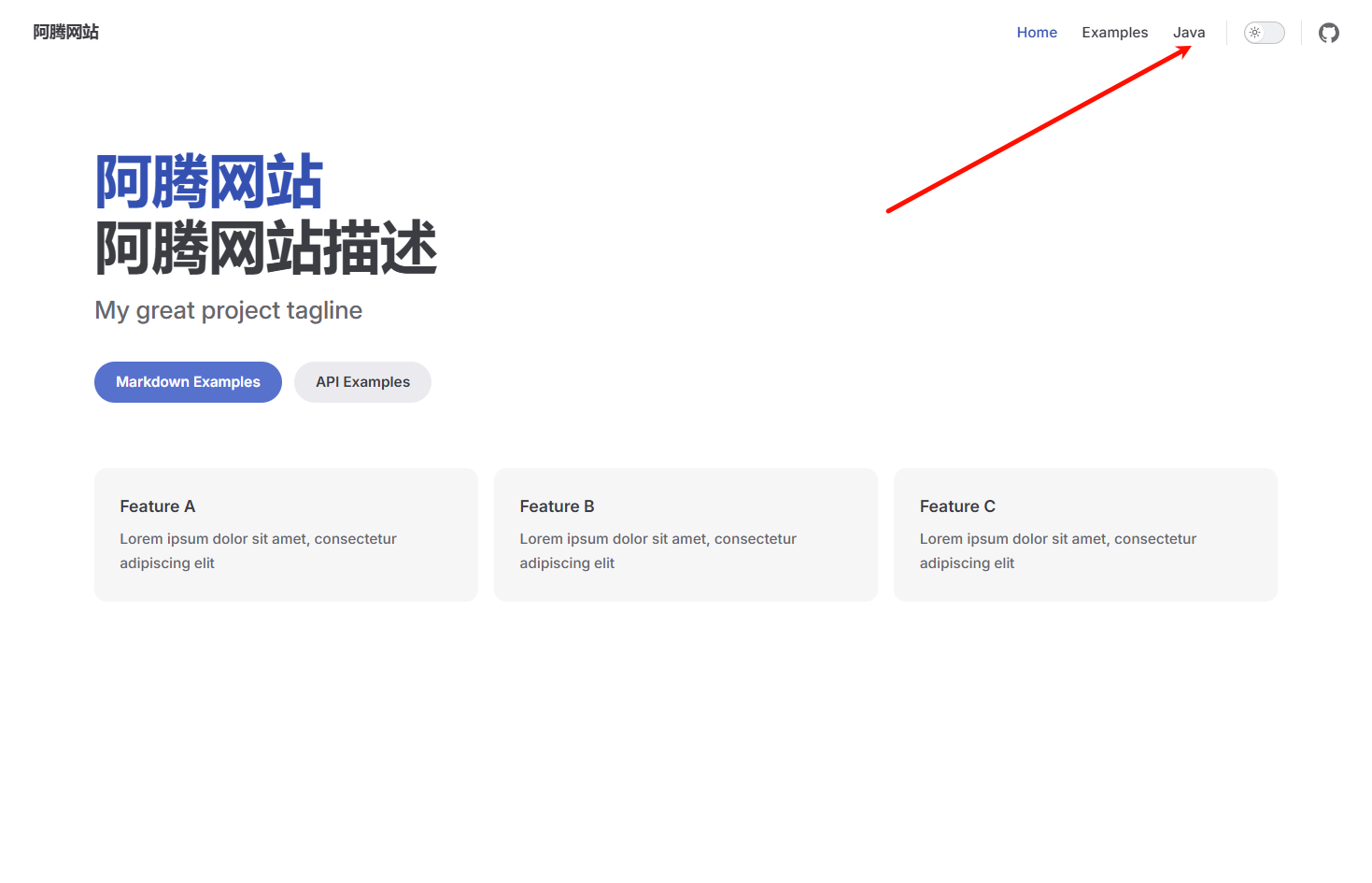
导航栏
添加 Java 模块的导航栏
themeConfig: {
    nav: [
        {text: 'Home', link: '/'},
        {text: 'Examples', link: '/markdown-examples'},
        {text: 'Java', link: '/java/'}
    ],
}
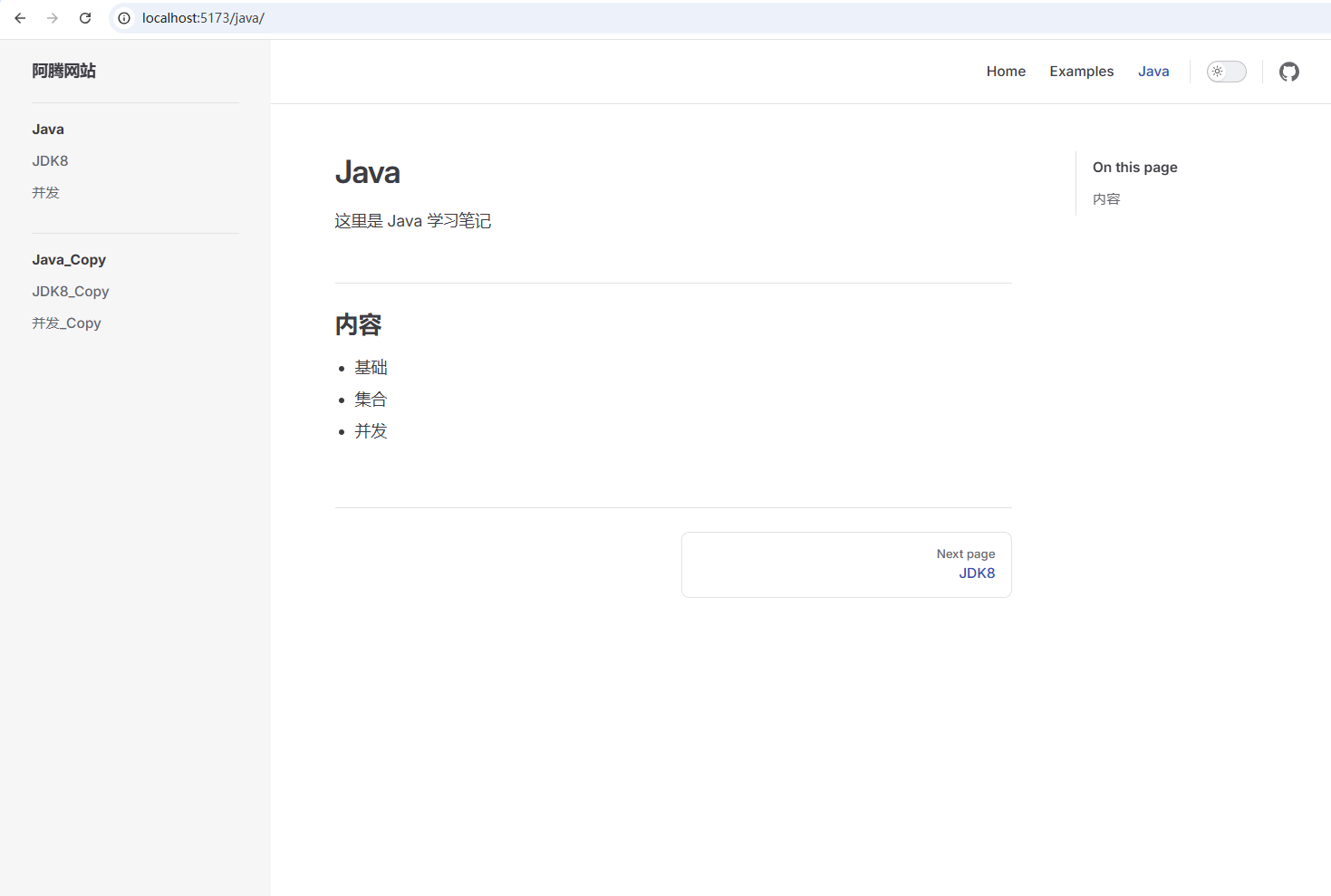
添加侧边栏
添加 Java 模块的侧边栏
sidebar: {
    '/java/': [
        {
            text: 'Java',
            items: [
                {text: 'JDK8', link: '/java/jdk8'},
                {text: '并发', link: '/java/concurrent'}
            ]
        },
        {
            text: 'Java_Copy',
            items: [
                {text: 'JDK8_Copy', link: '/java/jdk8'},
                {text: '并发_Copy', link: '/java/concurrent'}
            ]
        }
    ]
},
完整的配置如下
import {defineConfig} from 'vitepress'

// https://vitepress.dev/reference/site-config
export default defineConfig({
    title: "阿腾网站",
    description: "阿腾网站描述",
    themeConfig: {
        // https://vitepress.dev/reference/default-theme-config
        nav: [
            {text: 'Home', link: '/'},
            {text: 'Examples', link: '/markdown-examples'},
            {text: 'Java', link: '/java/'}
        ],

        sidebar: {
            '/markdown-examples': [
                {
                    text: 'Examples',
                    items: [
                        {text: 'Markdown Examples', link: '/markdown-examples'},
                        {text: 'Runtime API Examples', link: '/api-examples'}
                    ]
                }
            ],
            '/java/': [
                {
                    text: 'Java',
                    items: [
                        {text: 'JDK8', link: '/java/jdk8'},
                        {text: '并发', link: '/java/concurrent'}
                    ]
                },
                {
                    text: 'Java_Copy',
                    items: [
                        {text: 'JDK8_Copy', link: '/java/jdk8'},
                        {text: '并发_Copy', link: '/java/concurrent'}
                    ]
                }
            ]
        },

        socialLinks: [
            {icon: 'github', link: 'https://github.com/vuejs/vitepress'}
        ]
    }
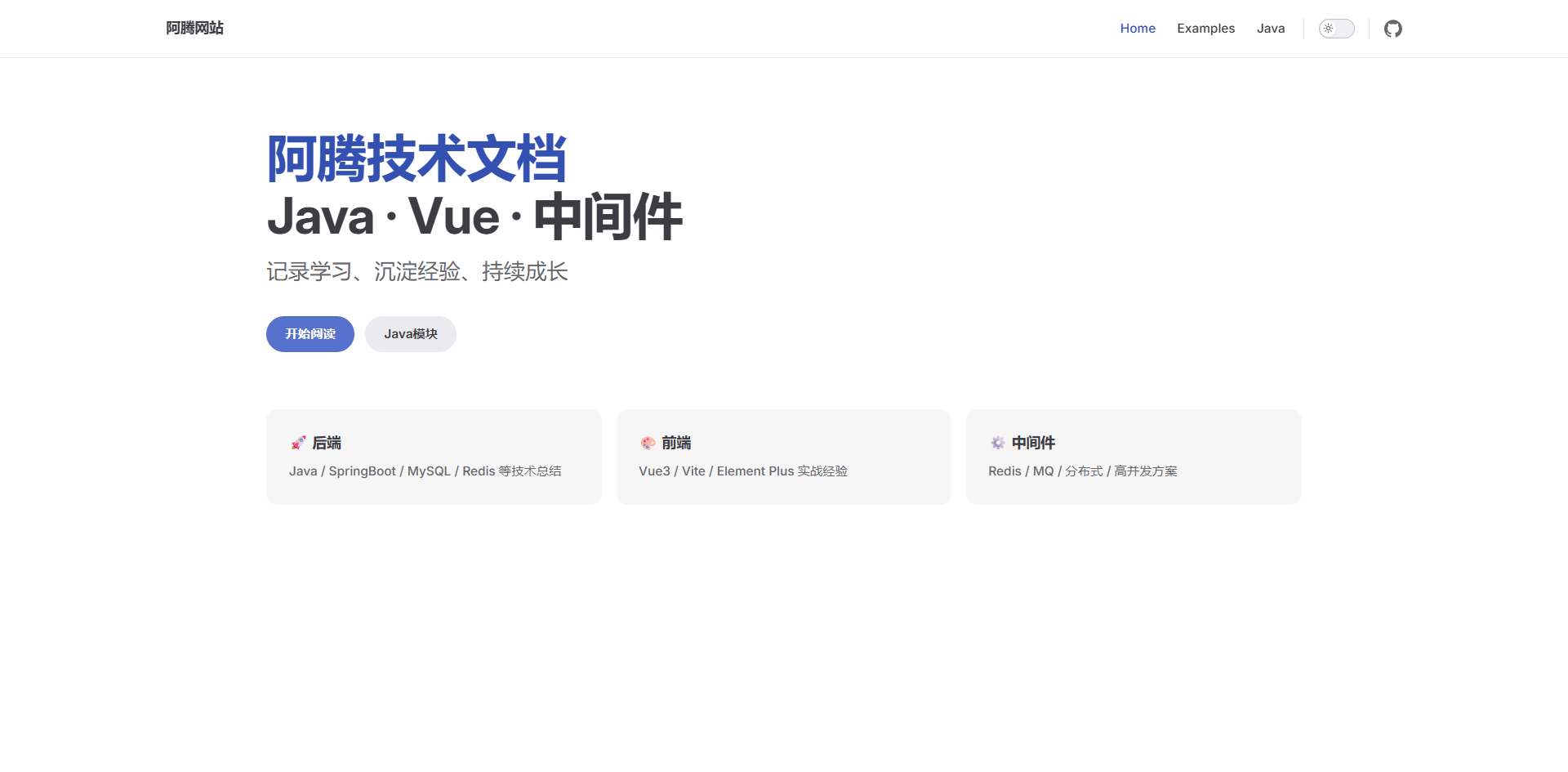
})修改 index.md
---
# https://vitepress.dev/reference/default-theme-home-page
layout: home

hero:
  name: "阿腾技术文档"
  text: "Java · Vue · 中间件"
  tagline: 记录学习、沉淀经验、持续成长
  actions:
    - theme: brand
      text: 开始阅读
      link: /markdown-examples
    - theme: alt
      text: Java模块
      link: /java

features:
  - title: 🚀 后端
    details: Java / SpringBoot / MySQL / Redis 等技术总结
  - title: 🎨 前端
    details: Vue3 / Vite / Element Plus 实战经验
  - title: ⚙️ 中间件
    details: Redis / MQ / 分布式 / 高并发方案
---
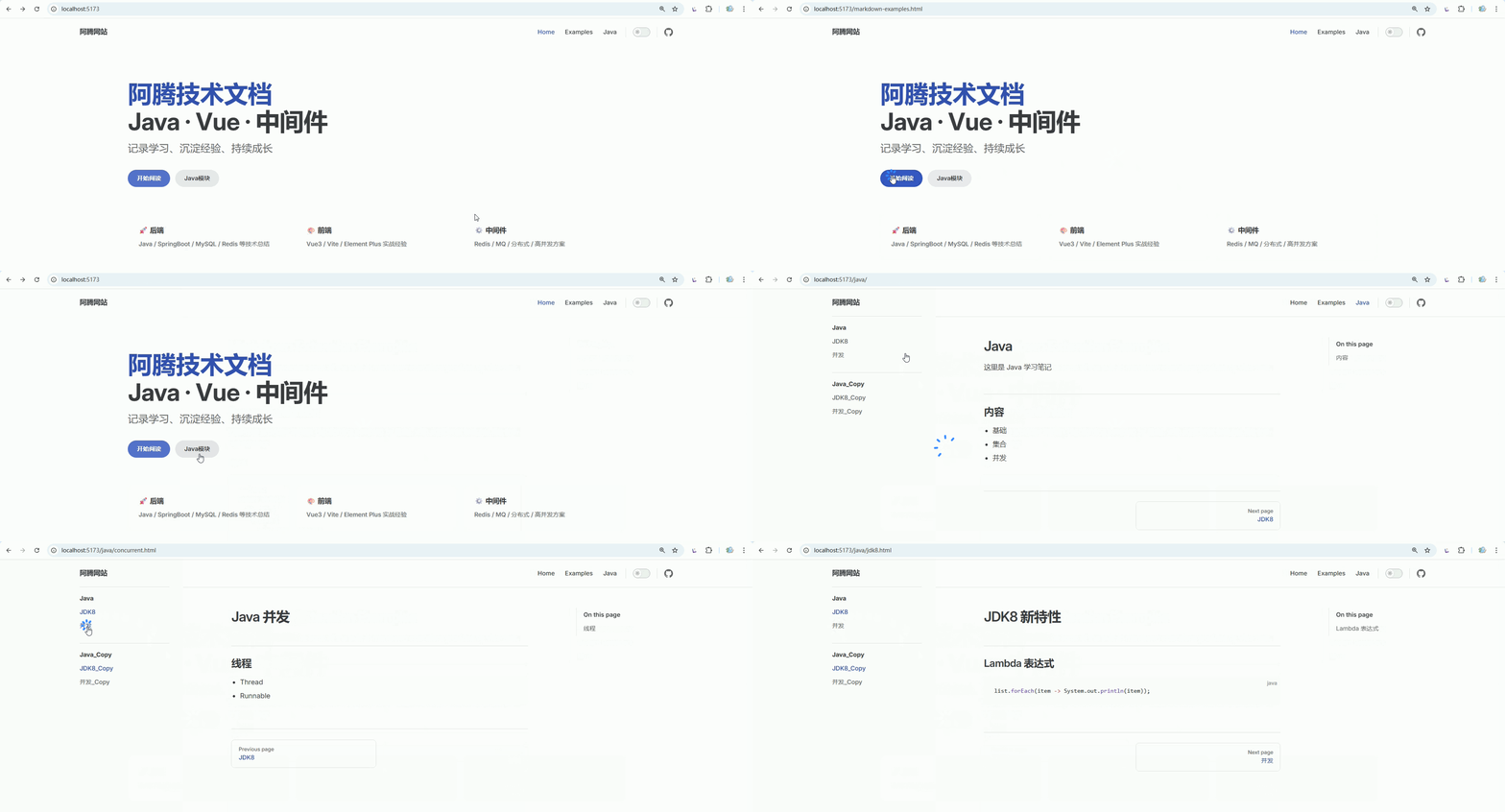
最终效果
常用配置
官网配置:链接
网站基础信息(必须有)
export default defineConfig({
  title: '阿腾技术文档',
  description: 'Java / Vue / 中间件学习笔记',
})👉 作用:
- 浏览器标题
- SEO 描述
base URL
站点将部署到的 base URL。如果计划在子路径例如 GitHub 页面下部署站点,则需要设置此项。如果计划将站点部署到 https://foo.github.io/bar/,那么应该将 base 设置为 '/bar/'。它应该始终以 / 开头和结尾。
export default {
  base: '/base/'
}导航栏(nav)
themeConfig: {
  nav: [
    { text: '首页', link: '/' },
    { text: 'Java', link: '/java/' },
    { text: '前端', link: '/vue/' },
    { text: '关于', link: '/about' }
  ]
}👉 核心作用:
- 顶部导航
- 控制模块入口
侧边栏(sidebar)【最重要】
sidebar: {
  '/java/': [
    {
      text: 'Java',
      items: [
        { text: '介绍', link: '/java/' },
        { text: 'JDK8', link: '/java/jdk8' },
        { text: '并发', link: '/java/concurrent' }
      ]
    }
  ]
}👉 控制:
- 左侧菜单
- 文档结构
社交链接(右上角)
socialLinks: [
  { icon: 'github', link: 'https://github.com/xxx' }
]👉 常见:
- GitHub
- Gitee
自定义 SVG(推荐)
socialLinks: [
    {
        icon: {
            svg: `<svg viewBox="0 0 100 100" xmlns="http://www.w3.org/2000/svg">
<circle cx="50" cy="50" r="30" fill="#6366f1"/>
</svg>`
        },
        link: 'https://gitee.com/xxx'
    }
]页脚(footer)
footer: {
  message: 'Released under MIT License',
  copyright: 'Copyright © 2026 阿腾'
}👉 放版权信息
上一页 / 下一页(Prev / Next)导航
themeConfig: {
  docFooter: {
    prev: '上一页',
    next: '下一页'
  }
}编辑链接(非常实用)
editLink: {
  pattern: 'https://github.com/xxx/docs/:path',
  text: '在 GitHub 上编辑此页'
}👉 每页底部会出现:
✏️ 编辑此页
文档目录(右侧大纲)
outline: {
  level: [2, 3],
  label: '目录'
}👉 控制:
- 右侧 TOC(Table of Contents)
- 显示 h2 / h3
outline: 'deep' // h2 ~ h6 全部显示搜索(默认就有)
search: {
  provider: 'local'
}👉 VitePress 内置本地搜索(够用了)
最后更新时间(Git)
lastUpdated: {
  text: '最后更新',
  formatOptions: {
    dateStyle: 'short',
    timeStyle: 'short' // short medium
  }
}👉 页面会显示:
Last updated: xxxx
侧边栏折叠
sidebarMenuLabel: '菜单'代码块复制按钮(默认有)
👉 不用配置,但你要知道:
System.out.println("Hello");
👉 会自动带复制按钮Markdown增强(稍微进阶)
和 themeConfig 配置同级
markdown: {
  lineNumbers: true, // 显示行号
  image: {
    lazyLoading: true // 基于浏览器原生懒加载
  }
}👉 代码行号:
1 public class Test {}logo(网站 Logo)
文件放在 docs/public/ 目录下
themeConfig: {
  logo: '/logo.png'
}👉 显示在左上角 👉 支持深色模式:
logo: {
  light: '/logo-light.png',
  dark: '/logo-dark.png'
}📌 官网明确支持 (VitePress)
siteTitle(控制标题显示)
siteTitle: '阿腾文档'👉 或者隐藏:
siteTitle: false👉 用 logo 替代文字
aside(右侧目录位置)
aside: true        // 默认右侧
aside: 'left'      // 左侧
aside: false // 关闭📌 控制右边“目录栏” (VitePress)
sidebar 折叠(很实用)
sidebar: {
  '/java/': [
    {
      text: 'Java',
      collapsed: true, // 默认折叠
      items: [...]
    }
  ]
}📌 官方支持 collapsed (VitePress)
externalLinkIcon(外链图标)
externalLinkIcon: true👉 Markdown 中外链显示小图标
导航与主题相关配置
themeConfig: {
    langMenuLabel: '多语言',
    returnToTopLabel: '回到顶部',
    sidebarMenuLabel: '菜单',
    darkModeSwitchLabel: '主题',
    lightModeSwitchTitle: '切换到浅色模式',
    darkModeSwitchTitle: '切换到深色模式'
}404 页面定制
themeConfig: {
  notFound: {
    code: '404',
    title: '页面未找到',
    quote: '您访问的页面不存在',
    linkLabel: '返回首页',
    linkText: '点击这里返回主页'
  }
}首页配置
docs/index.md
---
layout: home

hero:
  name: "阿腾技术文档"
  text: "Java · Vue · 中间件"
  tagline: 记录学习、沉淀经验、持续成长
  image:
    src: /logo.svg
    alt: logo
    width: 400
    height: 400
  actions:
    - theme: brand
      text: 🚀 开始阅读
      link: /java/
    - theme: alt
      text: 🎨 前端模块
      link: /vue/

features:
  - title: 🚀 后端
    details: Java / SpringBoot / MySQL / Redis 等技术总结
    link: /java/

  - title: 🎨 前端
    details: Vue3 / Vite / Element Plus 实战经验
    link: /vue/

  - title: ⚙️ 中间件
    details: Redis / MQ / 分布式 / 高并发方案
    link: /middleware/
---

## 📚 快速导航

### 🚀 后端
- 👉 [Java 基础](/java/)
- 👉 [JDK8 新特性](/java/jdk8)
- 👉 [并发编程](/java/concurrent)

### 🎨 前端
- 👉 [Vue3 入门](/vue/)
- 👉 [响应式原理](/vue/reactivity)
- 👉 [Vue Router](/vue/router)

### ⚙️ 中间件
- 👉 [Redis](/middleware/redis)
- 👉 [消息队列](/middleware/mq)
- 👉 [分布式](/middleware/distributed)

---

## 🔥 最近更新

- 🆕 [JDK8 新特性](/java/jdk8)
- 🆕 [Vue3 响应式原理](/vue/reactivity)
- 🆕 [Redis 基础](/middleware/redis)

---

## ✨ 关于本站

这是一个用于记录技术成长的文档站点,涵盖:

- 后端:Java / Spring / 数据库
- 前端:Vue3 / Vite / UI 框架
- 架构:中间件 / 分布式 / 高并发

👉 持续更新中...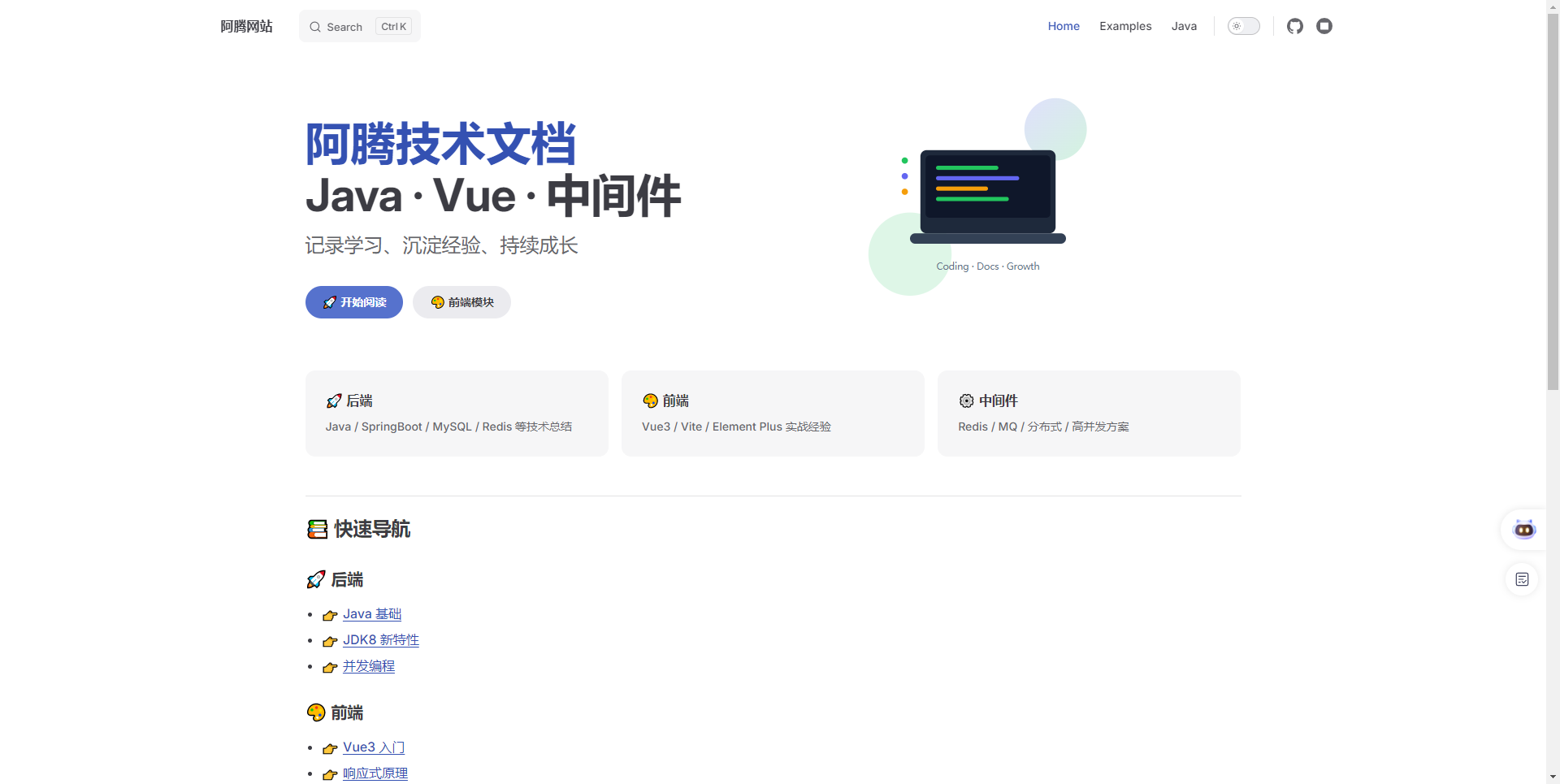
集成 Element Plus
安装依赖和配置
安装依赖
安装 Element Plus
pnpm add element-plus@2.13.0 @element-plus/icons-vue@2.3.2安装 Sass
pnpm add -D sass@1.97.3扩展 VitePress 主题(.vitepress/theme/index.ts)
import DefaultTheme from 'vitepress/theme'
import ElementPlus from 'element-plus'
import 'element-plus/dist/index.css'
import zhCn from 'element-plus/es/locale/lang/zh-cn'
import * as ElementPlusIconsVue from '@element-plus/icons-vue'

export default {
    ...DefaultTheme,
    enhanceApp({ app }) {
        app.use(ElementPlus, {
            locale: zhCn,
        })
        for (const [key, component] of Object.entries(ElementPlusIconsVue)) {
            app.component(key, component)
        }
    }
}按需引入
安装插件
pnpm add -D unplugin-vue-components@30.0.0 unplugin-auto-import@20.3.0配置vite.config.ts
import { defineConfig } from 'vite'
import AutoImport from 'unplugin-auto-import/vite'
import Components from 'unplugin-vue-components/vite'
import { ElementPlusResolver } from 'unplugin-vue-components/resolvers'

export default defineConfig({
  // ...
  plugins: [
    // ...
    AutoImport({
      resolvers: [ElementPlusResolver()],
    }),
    Components({
      resolvers: [ElementPlusResolver()],
    }),
  ],
})使用示例
在 Markdown 中直接用 Vue + Element Plus
# JDK8 新特性

## Lambda 表达式

```java
list.forEach(item -> System.out.println(item));
```

<script setup lang="ts">
import { ref } from 'vue'

const count = ref(0)
</script>

<el-button type="primary" @click="count++">
点击次数:{{ count }}
</el-button>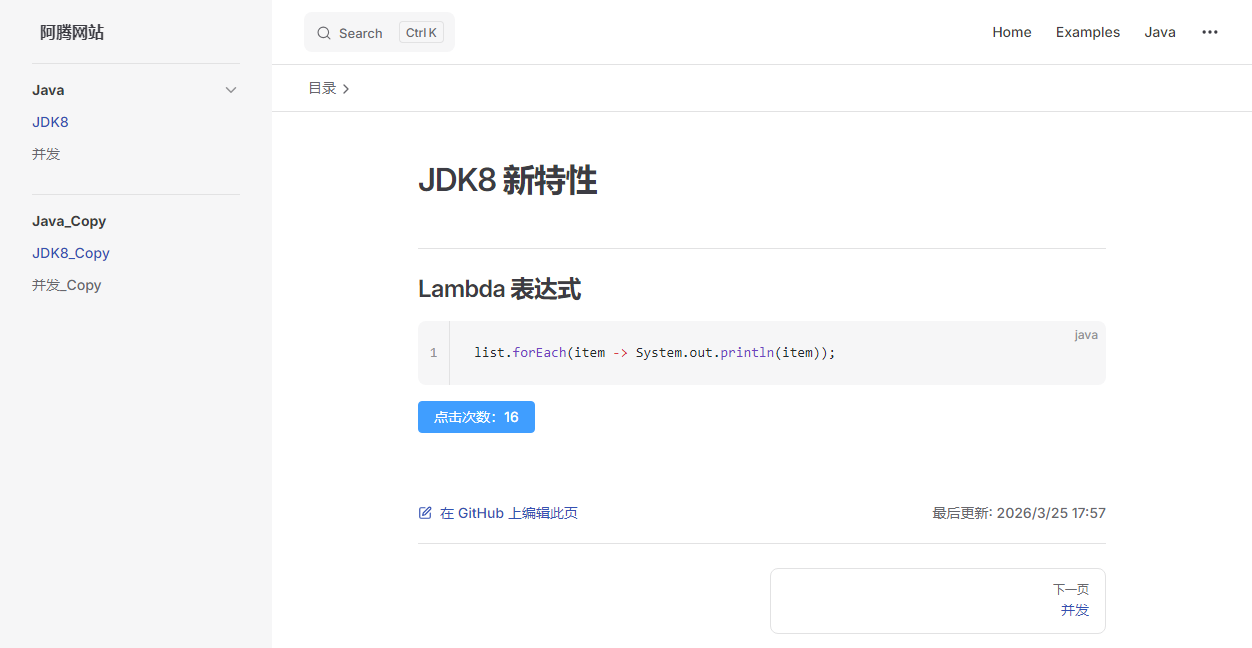
混合内容示例
# 混合内容示例

## 动态列表 + 过渡动画

<script setup>
import { ref } from 'vue'

const list = ref(['Vue', 'VitePress', 'Element Plus'])

const addItem = () => {
  list.value.push('New Item ' + Date.now())
}
</script>

<div class="list-box">
  <el-button type="primary" @click="addItem">
    添加
  </el-button>

  <transition-group name="fade">
    <div v-for="item in list" :key="item" class="item">
      {{ item }}
    </div>
  </transition-group>
</div>

<style lang="scss">
.list-box {
  margin-top: 20px;

  .item {
    padding: 10px;
    margin-top: 10px;
    background: #f5f7fa;
    border-radius: 6px;
  }
}

.fade-enter-active,
.fade-leave-active {
  transition: all 0.3s;
}
.fade-enter-from {
  opacity: 0;
  transform: translateY(10px);
}
.fade-leave-to {
  opacity: 0;
  transform: translateY(-10px);
}
</style>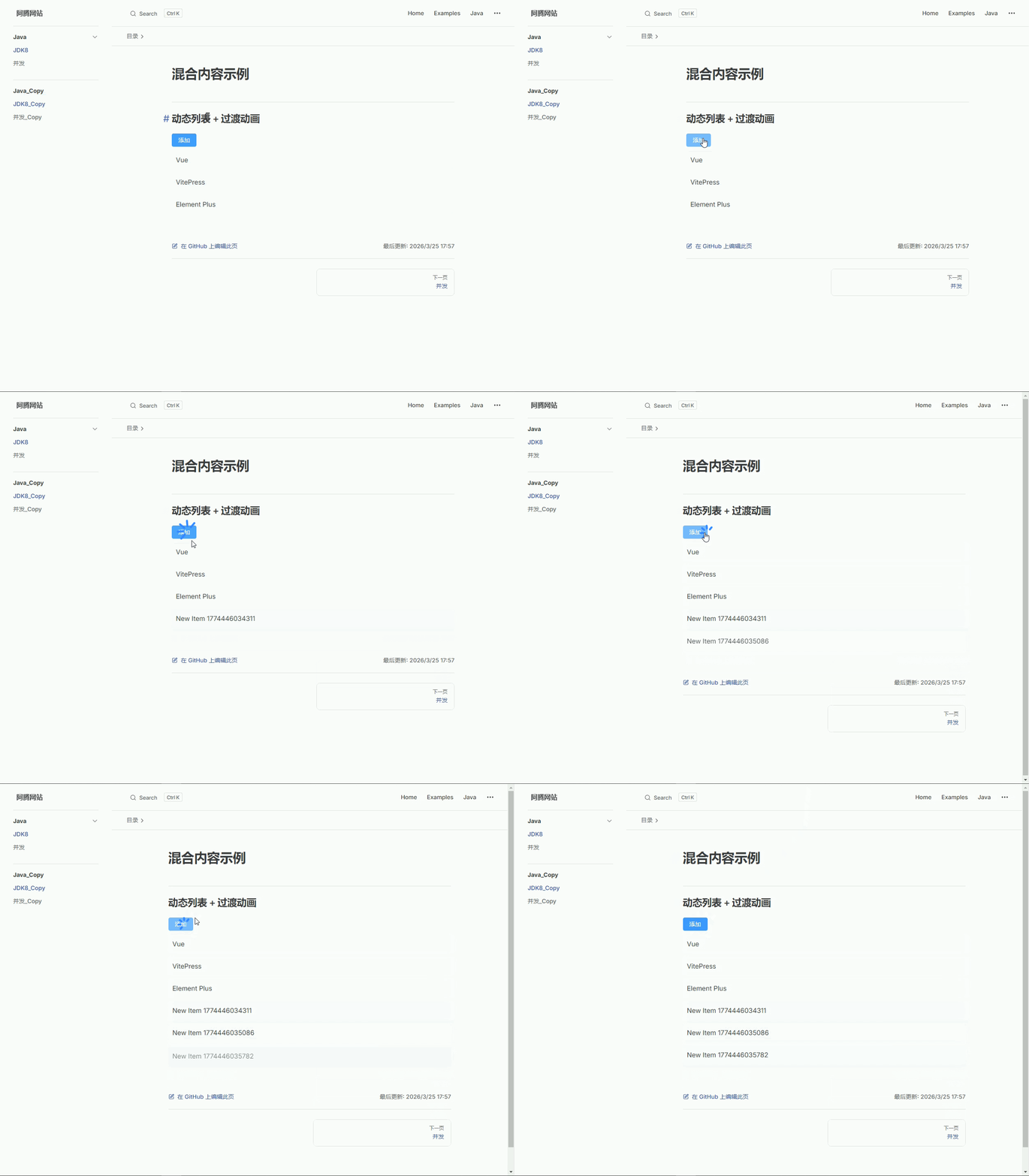
集成 Antdv Next
安装依赖和配置
安装依赖
安装 Antdv Next
pnpm add antdv-next@1.1.0安装 Sass
pnpm add -D sass@1.97.3扩展 VitePress 主题(.vitepress/theme/index.ts)
import DefaultTheme from 'vitepress/theme'
import AntdvNext from 'antdv-next'

export default {
    ...DefaultTheme,
    enhanceApp({ app }) {
        app.use(AntdvNext)
    }
}按需引入
安装插件
pnpm add -D @antdv-next/auto-import-resolver unplugin-vue-components@30.0.0 unplugin-auto-import@20.3.0配置vite.config.ts
import { defineConfig } from 'vite'
import AutoImport from 'unplugin-auto-import/vite'
import Components from 'unplugin-vue-components/vite'
import { AntdvNextResolver } from '@antdv-next/auto-import-resolver'

export default defineConfig({
  // ...
  plugins: [
    // ...
    AutoImport({
      resolvers: [AntdvNextResolver()]
    }),
    Components({
      resolvers: [AntdvNextResolver()]
    })
  ],
})使用示例
在 Markdown 中直接用 Vue + Element Plus
# JDK8 新特性

## Lambda 表达式

```java
list.forEach(item -> System.out.println(item));
```

<script setup lang="ts">
import { ref } from 'vue'

const count = ref(0)
</script>

<a-button type="primary" @click="count++">
点击次数:{{ count }}
</a-button>
混合内容示例
# 混合内容示例

## 动态列表 + 过渡动画

<script setup>
import { ref } from 'vue'

const list = ref(['Vue', 'VitePress', 'Element Plus'])

const addItem = () => {
  list.value.push('New Item ' + Date.now())
}
</script>

<div class="list-box">
  <a-button type="primary" @click="addItem">
    添加
  </a-button>

  <transition-group name="fade">
    <div v-for="item in list" :key="item" class="item">
      {{ item }}
    </div>
  </transition-group>
</div>

<style lang="scss">
.list-box {
  margin-top: 20px;

  .item {
    padding: 10px;
    margin-top: 10px;
    background: #f5f7fa;
    border-radius: 6px;
  }
}

.fade-enter-active,
.fade-leave-active {
  transition: all 0.3s;
}
.fade-enter-from {
  opacity: 0;
  transform: translateY(10px);
}
.fade-leave-to {
  opacity: 0;
  transform: translateY(-10px);
}
</style>
部署 GitHub Pages
创建部署文件
在项目的 .github/workflows 目录中创建一个名为 deploy.yml 的文件,其中包含这样的内容:
name: Deploy VitePress to GitHub Pages

on:
  push:
    branches: [main]
  workflow_dispatch:

permissions:
  contents: read
  pages: write
  id-token: write

concurrency:
  group: vitepress-pages
  cancel-in-progress: true

jobs:
  build:
    runs-on: ubuntu-latest

    steps:
      - name: Checkout
        uses: actions/checkout@v4
        with:
          fetch-depth: 0

      # 安装 pnpm
      - name: Setup pnpm
        uses: pnpm/action-setup@v3
        with:
          version: 8

      # Node + pnpm缓存
      - name: Setup Node
        uses: actions/setup-node@v4
        with:
          node-version: 20
          cache: pnpm

      - name: Setup Pages
        uses: actions/configure-pages@v4

      # 安装依赖
      - name: Install dependencies
        run: pnpm install

      # 构建
      - name: Build VitePress
        run: pnpm docs:build

      - name: Upload artifact
        uses: actions/upload-pages-artifact@v3
        with:
          path: docs/.vitepress/dist

  deploy:
    needs: build
    runs-on: ubuntu-latest

    environment:
      name: github-pages
      url: ${{ steps.deployment.outputs.page_url }}

    steps:
      - name: Deploy
        id: deployment
uses: actions/deploy-pages@v4- 分支:当前只部署
main分支,其他分支不会触发。 - Node / pnpm 版本:GitHub Actions 的版本要和本地一致,否则可能构建失败。
- dist 目录:确保
docs/.vitepress/dist路径正确,和项目结构匹配。 - 依赖缓存:使用
pnpm缓存时,确保有pnpm-lock.yaml,否则--frozen-lockfile会报错。 - 自定义域 / base URL:VitePress 配置需要同步修改,否则页面路径可能错。
- 多文档 / 多分支:如有测试分支或多个文档目录,需要单独配置 job 或 path。
GitHub Pages 设置
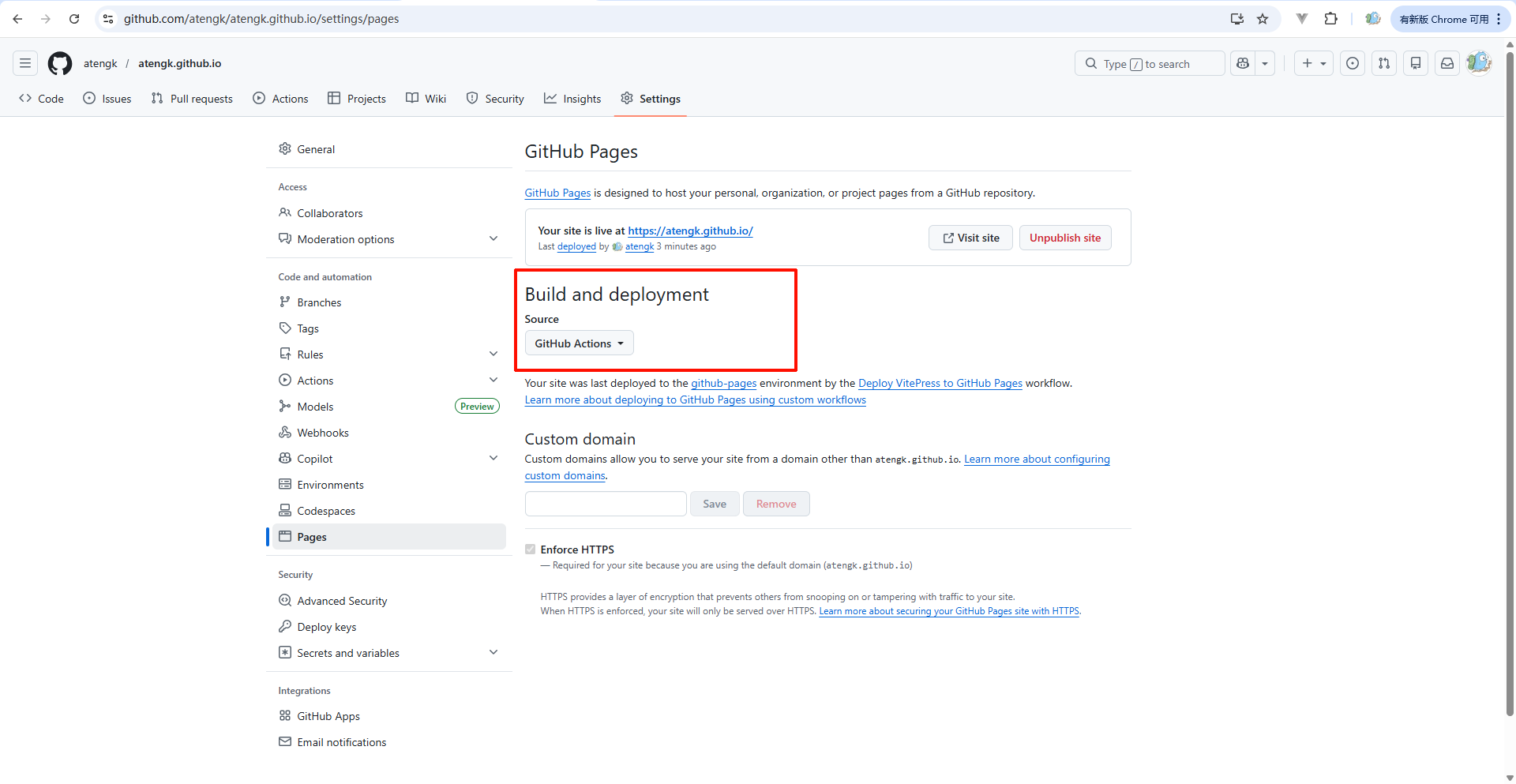
构建和部署选择 GitHub Actions
Settings → Pages → Build and deployment → GitHub Actions
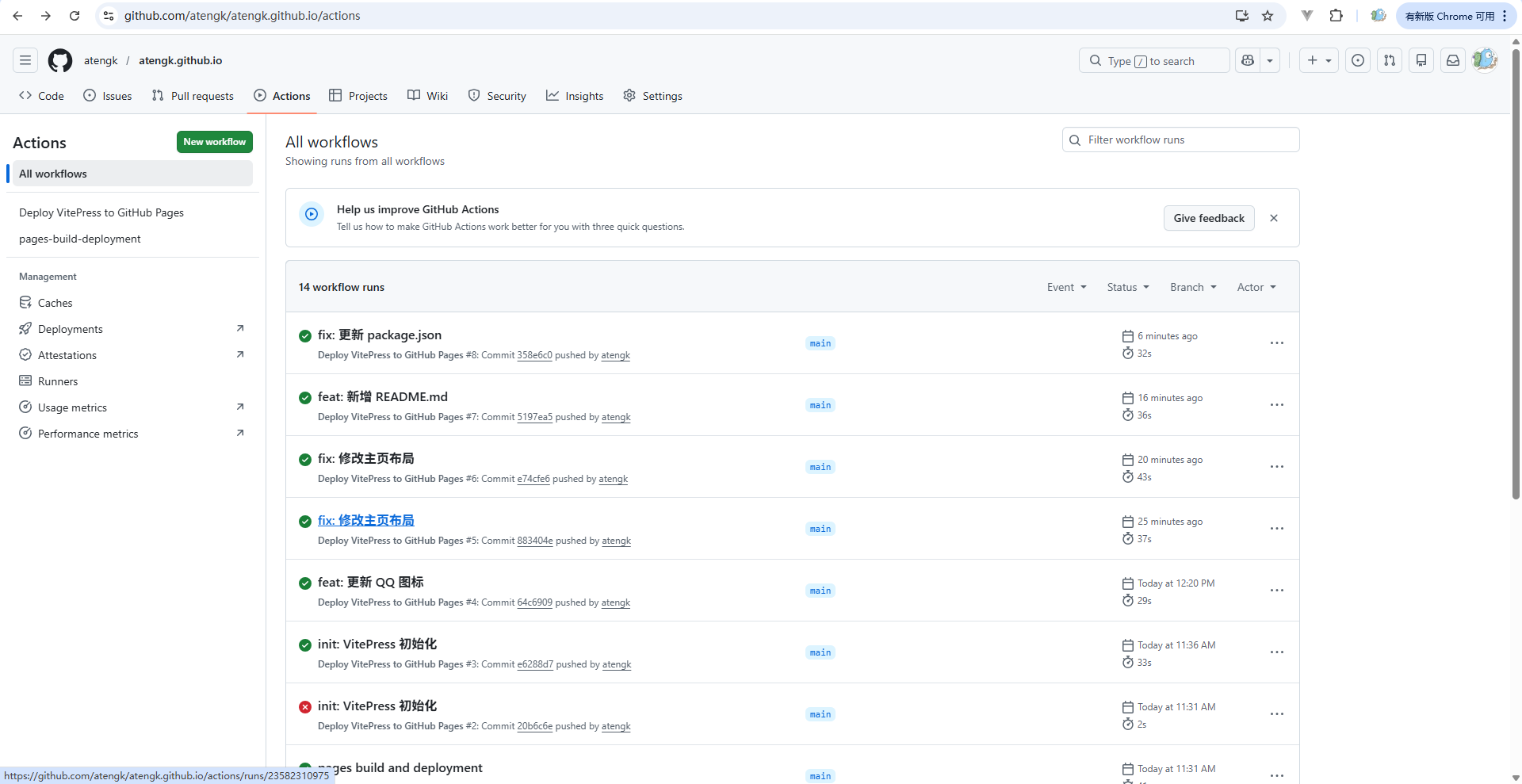
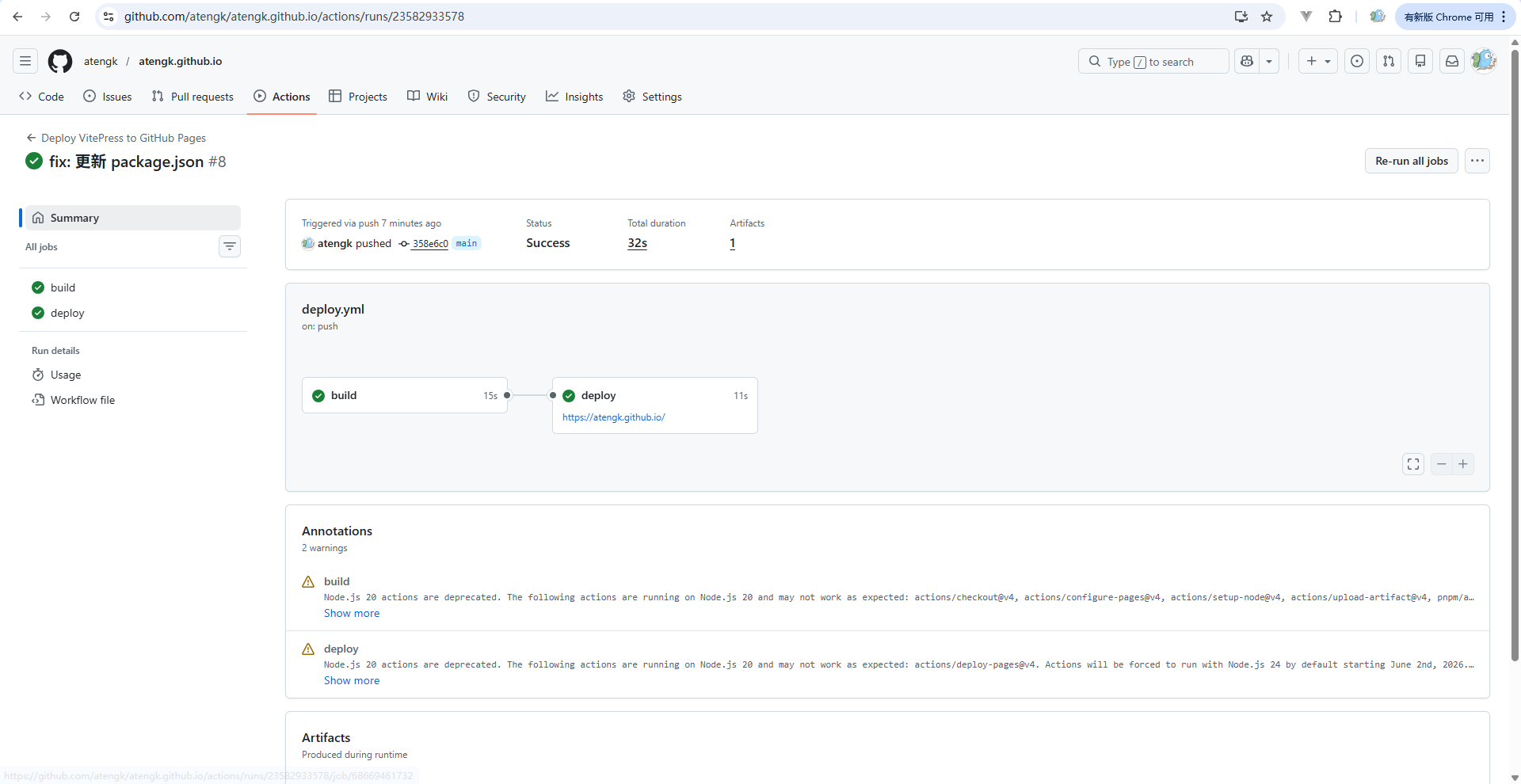
当推送代码到指定分支时,自动拉取代码、安装依赖、构建 VitePress,并将生成的静态文件部署到 GitHub Pages
图片单击放大
medium-zoom
安装依赖
pnpm add medium-zoom配置 index.css
.vp-doc img:not(.no-zoom) {
    cursor: zoom-in;
    border-radius: 10px;
    transform: translateZ(0);
    transition: transform 0.25s ease;
}

@media (hover: hover) and (pointer: fine) {
    .vp-doc img:not(.no-zoom):hover {
        transform: scale(1.02);
    }
}

.medium-zoom-overlay {
    z-index: 9999;
    background: rgba(0, 0, 0, 0.85);
    backdrop-filter: blur(10px);
    pointer-events: auto;
    backdrop-filter: blur(6px);
}

.medium-zoom-image {
    transform: translateZ(0);
}

.medium-zoom-image--opened {
    z-index: 10000;
    border-radius: 14px;
    box-shadow: 0 18px 50px rgba(0, 0, 0, 0.35);
    cursor: zoom-out;
}

@media (max-width: 768px) {
    .vp-doc img:not(.no-zoom) {
        transition: none;
    }

    .medium-zoom-overlay {
        backdrop-filter: blur(4px);
    }

    .medium-zoom-image--opened {
        border-radius: 10px;
        box-shadow: 0 10px 30px rgba(0, 0, 0, 0.35);
        max-width: 100vw !important;
        max-height: 100vh !important;
    }
}配置 index.ts
.vitepress/theme/index.ts
import { useRoute } from 'vitepress'
import DefaultTheme from 'vitepress/theme'
import { nextTick, onMounted, watch } from 'vue'
import mediumZoom from 'medium-zoom'
import './index.css'

let zoom: ReturnType<typeof mediumZoom> | null = null

export default {
    ...DefaultTheme,

    setup() {
        const route = useRoute()

        const init = () => {
            if (!zoom) {
                // @ts-ignore
                zoom = mediumZoom({
                    background: 'rgba(0,0,0,0.85)',
                    margin: window.innerWidth < 768 ? 0 : 24,
                    scrollOffset: 0,
                    animationDuration: window.innerWidth < 768 ? 200 : 260
                })
            }

            zoom.detach()
            zoom.attach('.vp-doc img:not(.no-zoom)')
        }

        const run = () => requestAnimationFrame(() => nextTick(init))

        onMounted(run)
        watch(() => route.path, run)
    }
}markdown图片配置
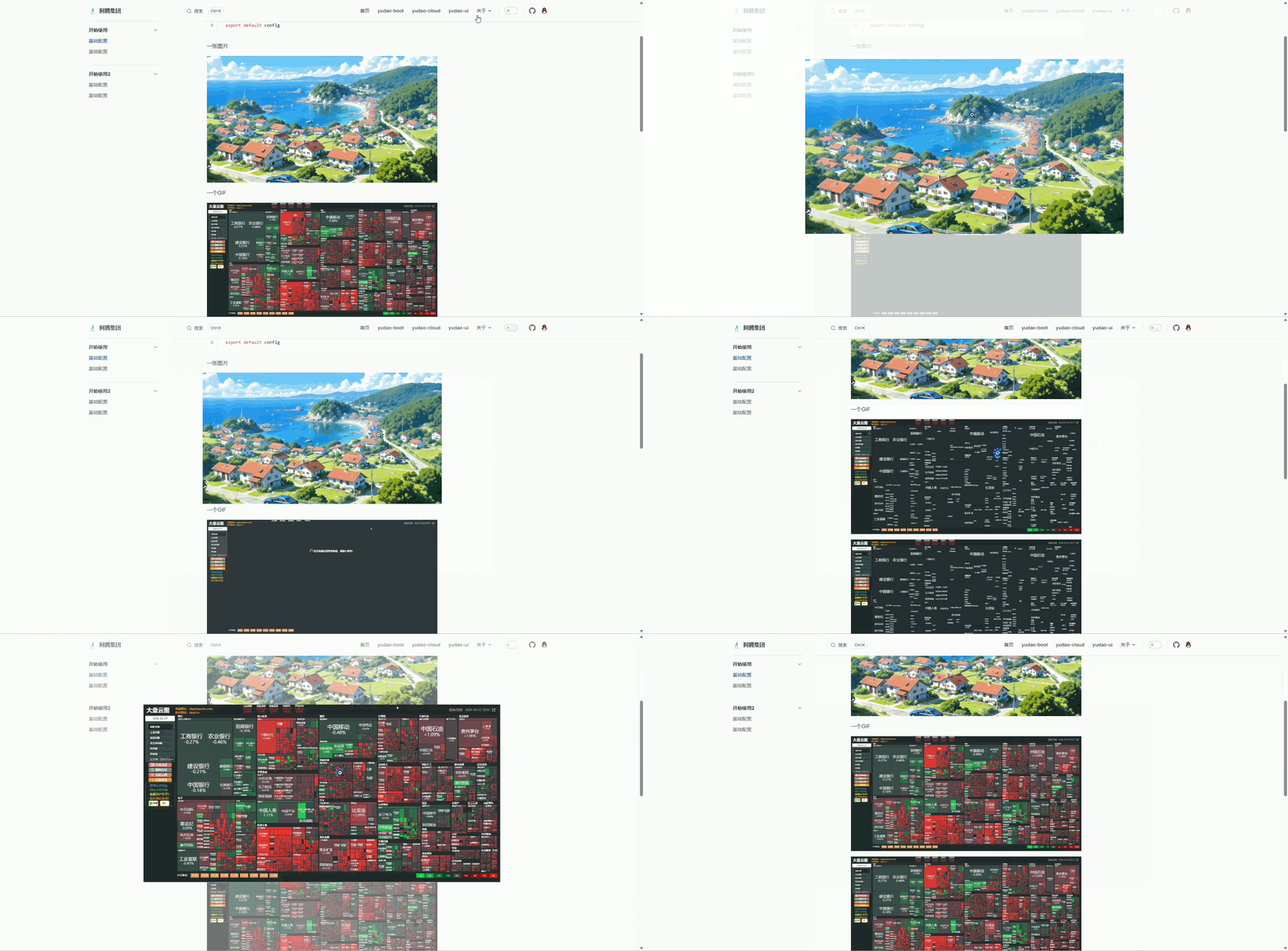
默认情况下,所有 Markdown 图片都支持点击放大。加了 {.no-zoom} 就不会放大
{.no-zoom}
medium-zoom(加强版)
安装依赖
pnpm add medium-zoom配置 index.css
/* .vitepress/theme/index.css */

/* ===============================
   图片基础交互
================================= */
.vp-doc img {
    border-radius: 10px;
    transition: all 0.3s cubic-bezier(0.4, 0, 0.2, 1);
}

/* hover 微动效(高级感关键) */
.vp-doc img:hover {
    transform: scale(1.02);
    filter: brightness(1.05);
}

/* 鼠标提示 */
.vp-doc img:not(.no-zoom) {
    cursor: zoom-in;
}

/* ===============================
   放大遮罩层(核心视觉)
================================= */
.medium-zoom-overlay {
    z-index: 999;

    /* 毛玻璃 + 渐变 */
    backdrop-filter: blur(12px);
    background: radial-gradient(
            circle at center,
            rgba(0, 0, 0, 0.65) 0%,
            rgba(0, 0, 0, 0.85) 100%
    );

    transition: all 0.3s ease;
}

/* ===============================
   放大图片
================================= */
.medium-zoom-image--opened {
    z-index: 1000;

    border-radius: 16px;

    /* 阴影增强立体感 */
    box-shadow:
            0 10px 40px rgba(0, 0, 0, 0.25),
            0 30px 100px rgba(0, 0, 0, 0.45);

    cursor: zoom-out;
}

/* ===============================
   动画优化(丝滑)
================================= */
.medium-zoom-image {
    transition: transform 0.35s cubic-bezier(0.22, 1, 0.36, 1) !important;
}

/* ===============================
   移动端优化
================================= */
@media (max-width: 768px) {
    .medium-zoom-image--opened {
        border-radius: 10px;
    }

    .medium-zoom-overlay {
        backdrop-filter: blur(6px);
    }
}配置 Layout.vue
.vitepress/theme/Layout.vue
<script setup lang="ts">
import { nextTick, onBeforeUnmount, onMounted, watch } from 'vue'
import { useRoute } from 'vitepress'
import DefaultTheme from 'vitepress/theme'
import mediumZoom, { type Zoom } from 'medium-zoom'

const { Layout } = DefaultTheme
const route = useRoute()

let zoom: Zoom | null = null
let observer: MutationObserver | null = null

const createZoom = () => {
  if (!zoom) {
    zoom = mediumZoom({
      background: 'rgba(10, 10, 10, 0.75)',
      margin: 32,
      scrollOffset: 80
    })

    // 增强交互
    zoom.on('open', () => {
      document.body.style.overflow = 'hidden'
    })

    zoom.on('close', () => {
      document.body.style.overflow = ''
    })
  }
}

const attachImages = () => {
  const images = document.querySelectorAll(
      '.vp-doc img:not(.no-zoom):not([data-no-zoom])'
  )

  zoom?.detach()
  zoom?.attach(images)
}

const initZoom = async () => {
  if (typeof window === 'undefined') return

  await nextTick()

  createZoom()
  attachImages()

  // 监听 DOM 变化(适配 VitePress 动态渲染)
  observer?.disconnect()
  observer = new MutationObserver(() => {
    attachImages()
  })

  observer.observe(document.querySelector('.vp-doc')!, {
    childList: true,
    subtree: true
  })
}

onMounted(initZoom)

watch(
    () => route.path,
    async () => {
      await initZoom()
    }
)

onBeforeUnmount(() => {
  zoom?.detach()
  observer?.disconnect()
  zoom = null
})
</script>

<template>
  <Layout />
</template>配置 index.ts
// .vitepress/theme/index.ts
import type { Theme } from 'vitepress'
import DefaultTheme from 'vitepress/theme'
import Layout from './Layout.vue'
import './index.css'

export default {
    extends: DefaultTheme,
    Layout
} satisfies Thememarkdown图片配置
默认情况下,所有 Markdown 图片都支持点击放大。加了 {.no-zoom} 就不会放大
{.no-zoom}

vitepress-plugin-image-viewer
使用插件 vitepress-plugin-image-viewer
安装依赖
pnpm add viewerjs vitepress-plugin-image-viewer编辑配置文件
.vitepress/theme/index.ts
import { useRoute } from 'vitepress'
import imageViewer from 'vitepress-plugin-image-viewer'
// @ts-ignore
import vImageViewer from 'vitepress-plugin-image-viewer/lib/vImageViewer.vue'
import DefaultTheme from 'vitepress/theme'
import 'viewerjs/dist/viewer.min.css'

export default {
    ...DefaultTheme,
    enhanceApp(ctx) {
        DefaultTheme.enhanceApp(ctx)
        // 注册全局组件,如果你不想使用也可以不添加
        ctx.app.component('vImageViewer', vImageViewer)
        // ...
    },
    setup() {
        // 获取路由
        const route = useRoute()
        // 使用
        imageViewer(route)
    }
}markdown图片配置
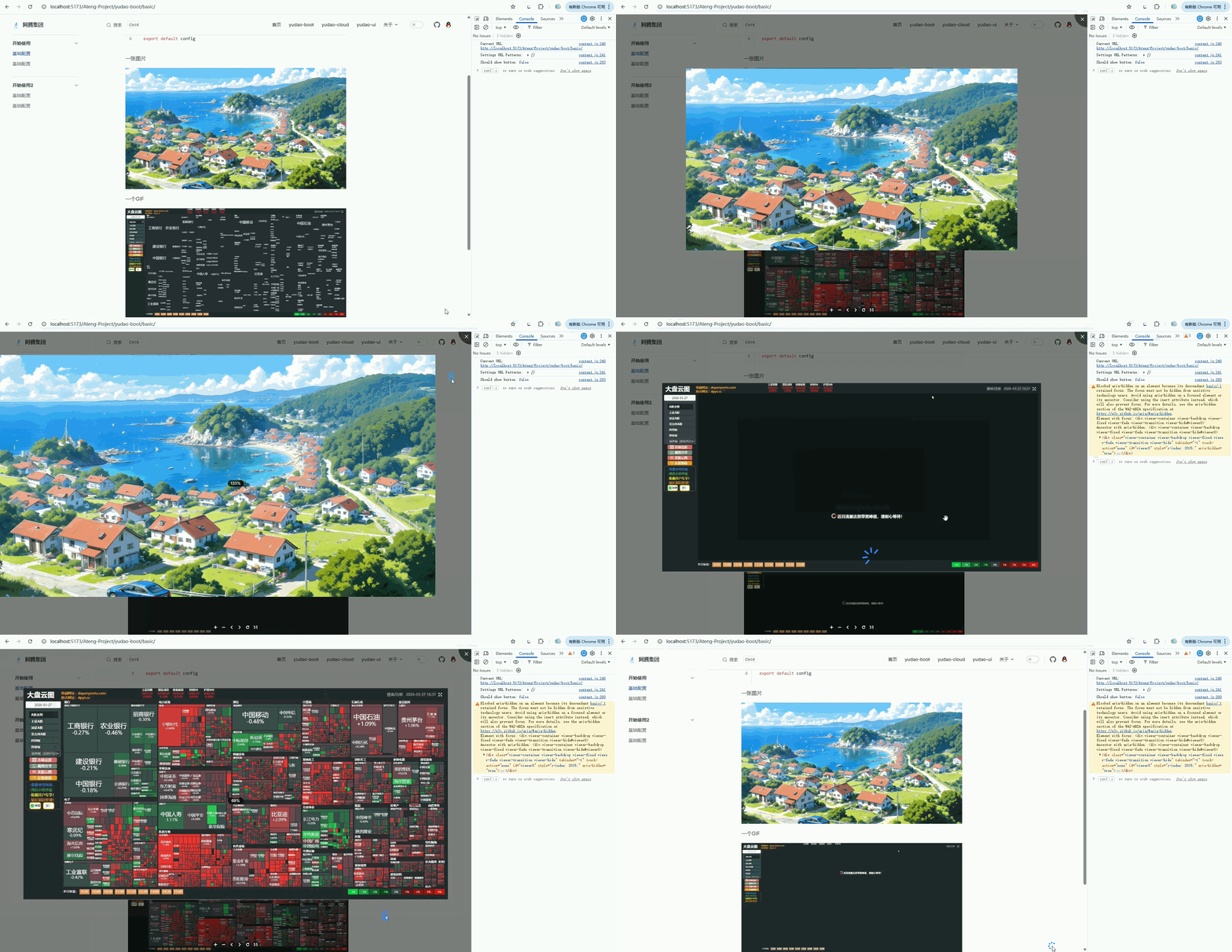
在编辑Markdown中图片或者GIF正常配置,如下

最终效果
这里图片关闭后控制台出现警告,参考 issue
这个不影响使用,viewjs 的问题。
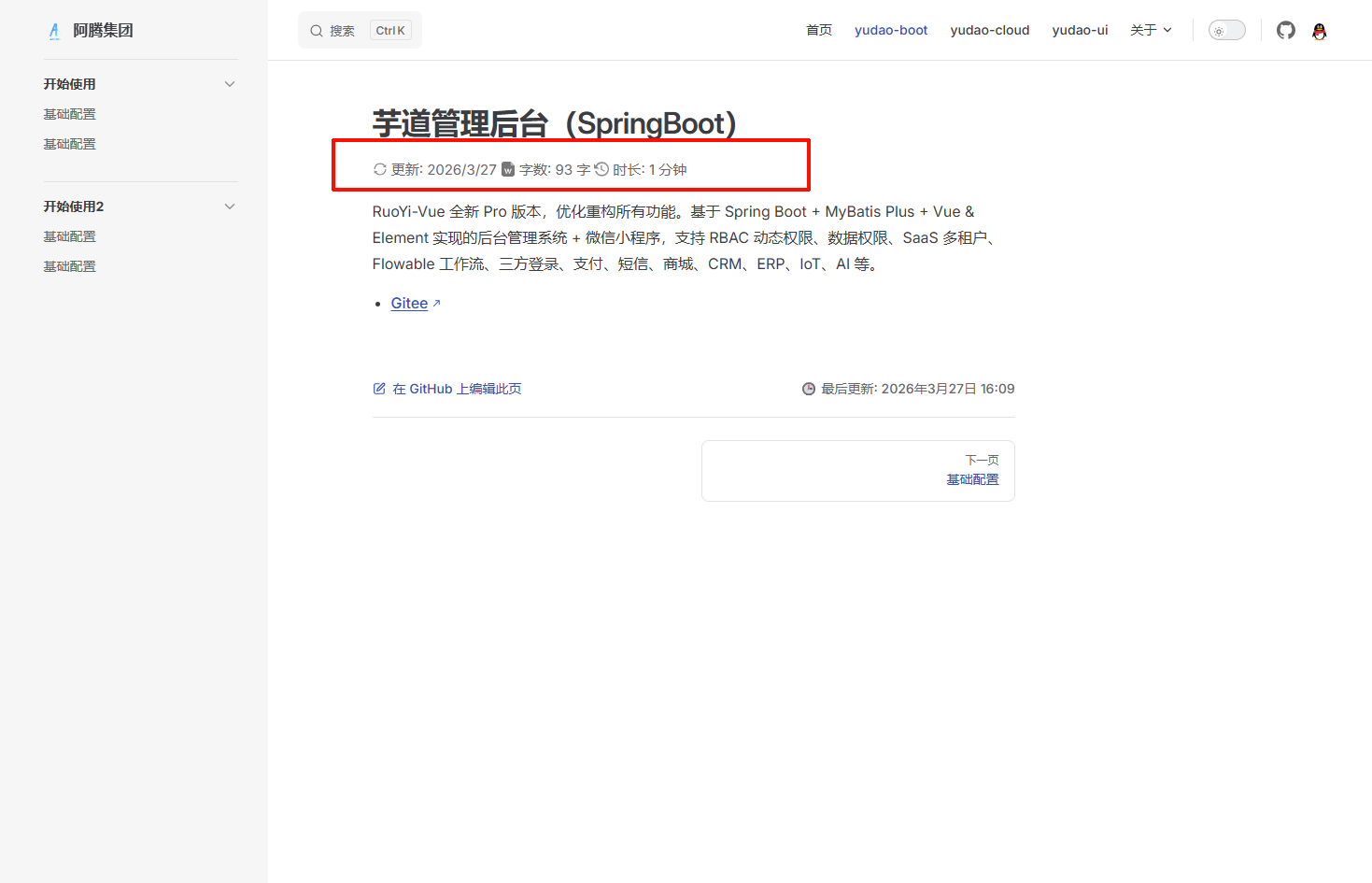
字数及阅读时间
theme/components/ArticleMetadata.vue
<script lang="ts" setup>
import { useData } from 'vitepress'
import { computed, ref, onMounted } from 'vue'
import { countWord } from '../untils/functions'

const { page } = useData()
const date = computed(
  () => new Date(page.value.lastUpdated!)
)

const wordCount = ref(0)
const imageCount = ref(0)

const wordTime = computed(() => {
    return ((wordCount.value / 275) * 60)
})

const imageTime = computed(() => {
    const n = imageCount.value
    if (imageCount.value <= 10) {
        // 等差数列求和
        return n * 13 + (n * (n - 1)) / 2
    }
    return 175 + (n - 10) * 3
})

// 阅读时间
const readTime = computed(() => {
    return Math.ceil((wordTime.value + imageTime.value) / 60)
})


function analyze() {
    document.querySelectorAll('.meta-des').forEach(v => v.remove())
    const docDomContainer = window.document.querySelector('#VPContent')
    const imgs = docDomContainer?.querySelectorAll<HTMLImageElement>(
        '.content-container .main img'
    )
    imageCount.value = imgs?.length || 0
    const words = docDomContainer?.querySelector('.content-container .main')?.textContent || ''
    wordCount.value = countWord(words)
}

onMounted(() => {
    // 初始化时执行一次
    analyze()
})
</script>


<template>
    <div class="word">
        <p>
            <svg t="1724572866572" class="icon" viewBox="0 0 1024 1024" version="1.1" xmlns="http://www.w3.org/2000/svg" p-id="18131" width="16" height="16"><path d="M168.021333 504.192A343.253333 343.253333 0 0 1 268.629333 268.8a342.229333 342.229333 0 0 1 243.285334-100.778667A341.504 341.504 0 0 1 755.029333 268.8c9.856 9.898667 19.2 20.394667 27.733334 31.402667l-60.16 46.976a8.021333 8.021333 0 0 0 2.986666 14.122666l175.701334 43.008a8.021333 8.021333 0 0 0 9.898666-7.68l0.810667-180.906666a7.936 7.936 0 0 0-12.885333-6.314667L842.666667 253.44a418.858667 418.858667 0 0 0-330.922667-161.493333c-229.12 0-415.488 183.594667-419.797333 411.818666a8.021333 8.021333 0 0 0 8.021333 8.192H160a7.978667 7.978667 0 0 0 8.021333-7.808zM923.946667 512H864a7.978667 7.978667 0 0 0-8.021333 7.808 341.632 341.632 0 0 1-26.88 125.994667 342.186667 342.186667 0 0 1-73.685334 109.397333 342.442667 342.442667 0 0 1-243.328 100.821333 342.229333 342.229333 0 0 1-270.976-132.224l60.16-46.976a8.021333 8.021333 0 0 0-2.986666-14.122666l-175.701334-43.008a8.021333 8.021333 0 0 0-9.898666 7.68l-0.682667 181.034666c0 6.698667 7.68 10.496 12.885333 6.314667L181.333333 770.56a419.072 419.072 0 0 0 330.922667 161.408c229.205333 0 415.488-183.722667 419.797333-411.818667a8.021333 8.021333 0 0 0-8.021333-8.192z" fill="#8a8a8a" p-id="18132"></path></svg>
            更新: {{ date.toLocaleDateString() }}
            <svg t="1724571760788" class="icon" viewBox="0 0 1024 1024" version="1.1" xmlns="http://www.w3.org/2000/svg" p-id="6125" width="16" height="16"><path d="M204.8 0h477.866667l273.066666 273.066667v614.4c0 75.093333-61.44 136.533333-136.533333 136.533333H204.8c-75.093333 0-136.533333-61.44-136.533333-136.533333V136.533333C68.266667 61.44 129.706667 0 204.8 0z m307.2 607.573333l68.266667 191.146667c13.653333 27.306667 54.613333 27.306667 61.44 0l102.4-273.066667c6.826667-20.48 0-34.133333-20.48-40.96s-34.133333 0-40.96 13.653334l-68.266667 191.146666-68.266667-191.146666c-13.653333-27.306667-54.613333-27.306667-68.266666 0l-68.266667 191.146666-68.266667-191.146666c-6.826667-13.653333-27.306667-27.306667-47.786666-20.48s-27.306667 27.306667-20.48 47.786666l102.4 273.066667c13.653333 27.306667 54.613333 27.306667 61.44 0l75.093333-191.146667z" fill="#777777" p-id="6126"></path><path d="M682.666667 0l273.066666 273.066667h-204.8c-40.96 0-68.266667-27.306667-68.266666-68.266667V0z" fill="#E0E0E0" opacity=".619" p-id="6127"></path></svg>
            字数: {{ wordCount }} 字
            <svg t="1724572797268" class="icon" viewBox="0 0 1060 1024" version="1.1" xmlns="http://www.w3.org/2000/svg" p-id="15031" width="16" height="16"><path d="M556.726857 0.256A493.933714 493.933714 0 0 0 121.929143 258.998857L0 135.021714v350.390857h344.649143L196.205714 334.482286a406.820571 406.820571 0 1 1-15.908571 312.649143H68.937143A505.819429 505.819429 0 1 0 556.726857 0.256z m-79.542857 269.531429v274.907428l249.197714 150.966857 42.422857-70.070857-212.114285-129.389714V269.787429h-79.542857z" fill="#8a8a8a" p-id="15032"></path></svg>
            时长: {{ readTime }} 分钟
        </p>
    </div>
</template>

<style>
.word {
  color: var(--vp-c-text-2);
  font-size: 15px;
}

.icon {
    display: inline-block;
    transform: translate(0px , 2px);
}
</style>theme/untils/functions.ts
const pattern
    = /[a-zA-Z0-9_\u0392-\u03C9\u00C0-\u00FF\u0600-\u06FF\u0400-\u04FF]+|[\u4E00-\u9FFF\u3400-\u4DBF\uF900-\uFAFF\u3040-\u309F\uAC00-\uD7AF]+/g

export function countWord(data: string) {
    const m = data.match(pattern)
    let count = 0
    if (!m) {
        return 0
    }
    for (let i = 0; i < m.length; i += 1) {
        if (m[i].charCodeAt(0) >= 0x4E00) {
            count += m[i].length
        }
        else {
            count += 1
        }
    }
    return count
}然后,在 index.ts 中注册全局组件
/* .vitepress/theme/index.ts */
import DefaultTheme from 'vitepress/theme'
import ArticleMetadata from "./components/ArticleMetadata.vue"

export default {
  extends: DefaultTheme,
  enhanceApp({app}) {
    // 注册全局组件
    app.component('ArticleMetadata' , ArticleMetadata)
  }
}写在 H1标题 下
/* .vitepress/config.ts */
import { defineConfig } from 'vitepress'

export default defineConfig({

  //markdown配置
  markdown: {
    // 组件插入h1标题下
    config: (md) => {
      md.renderer.rules.heading_close = (tokens, idx, options, env, slf) => {
          let htmlResult = slf.renderToken(tokens, idx, options);
          if (tokens[idx].tag === 'h1') htmlResult += `<ArticleMetadata />`;
          return htmlResult;
      }
    }
  }

})
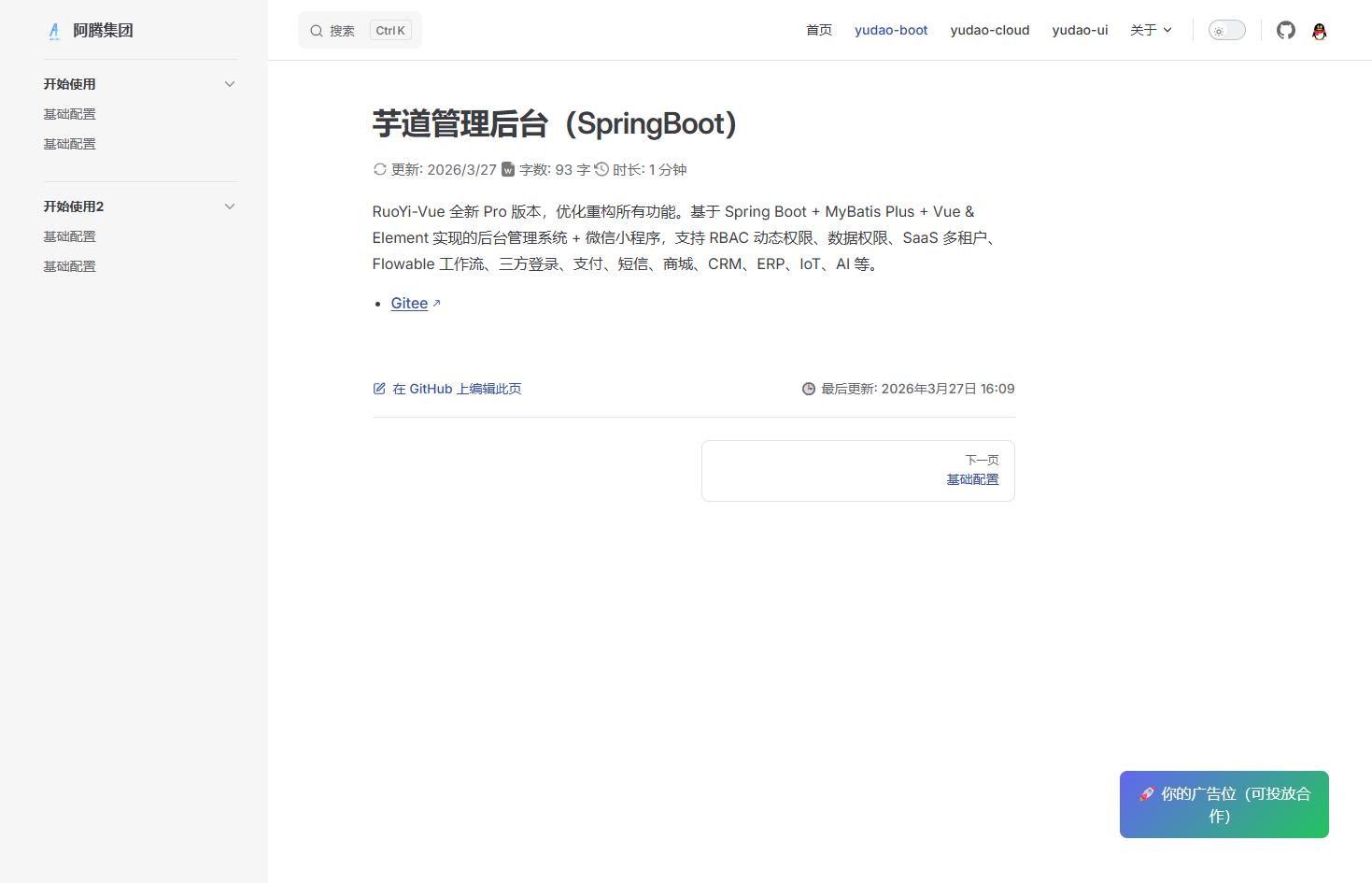
广告位
新建组件
.vitepress/theme/components/AdBanner.vue
<template>
  <div class="ad">
    <a href="https://your-link.com" target="_blank">
      🚀 你的广告位(可投放合作)
    </a>
  </div>
</template>

<style scoped>
.ad {
  margin: 16px 0;
  padding: 12px;
  border-radius: 8px;
  background: linear-gradient(135deg, #6366f1, #22c55e);
  color: white;
  text-align: center;
  font-weight: 500;
}
</style>挂载页面
.vitepress/theme/index.ts
- 文章底部:doc-after
- 侧边栏:aside-bottom
import DefaultTheme from 'vitepress/theme'
import AdBanner from './components/AdBanner.vue'
import { h } from 'vue'

export default {
  ...DefaultTheme,
  Layout: () => {
    return h(DefaultTheme.Layout, null, {
      'doc-after': () => h(AdBanner)
    })
  }
}