
AOP
在 Spring 中,Spring 的 AOP(面向切面编程)是一种编程方式,允许我们在不修改业务代码的前提下,动态地添加一些额外的功能,比如日志记录、性能监控、事务管理等。它通过“切面”来分离这些跨领域的功能,使得核心业务逻辑和这些额外功能解耦,从而提升代码的可维护性和复用性。AOP 在运行时通过代理机制,将增强逻辑(如前置、后置通知等)织入到目标方法的执行中。简单来说,AOP 就是帮助我们在特定的“切入点”上,插入额外的处理逻辑,而不需要修改原本的代码,既提升了代码的整洁性,也使得功能的扩展更加灵活。
概述
注解说明
下面是 AOP 通知类型的表格,列出了各个通知类型、触发时机以及常见用法:
| 通知类型 | 注解 | 触发时机 | 常见用法 |
|---|---|---|---|
| 前置通知 | @Before | 目标方法执行之前 | 1. 检查参数有效性 2. 权限控制 3. 日志记录(例如:记录方法调用时的输入参数) |
| 后置通知 | @After | 目标方法执行之后(无论成功或失败) | 1. 清理工作(例如:释放资源) 2. 日志记录(例如:记录方法执行结束) |
| 返回通知 | @AfterReturning | 目标方法执行成功后 | 1. 记录方法执行结果 2. 业务处理后的后续操作(例如:通知、邮件发送) |
| 异常通知 | @AfterThrowing | 目标方法抛出异常时 | 1. 异常日志记录 2. 异常处理(例如:发送报警通知、记录错误信息) |
| 环绕通知 | @Around | 目标方法执行前后 | 1. 性能监控(例如:计算执行时间) 2. 事务管理(例如:开始和提交事务) 3. 参数处理或修改 |
| 切点定义 | @Pointcut | 定义切点,指定哪些方法会被通知拦截 | 1. 定义切点表达式,决定哪些方法需要被 AOP 通知拦截 2. 通过注解或方法签名指定通知应用的范围 |
pointcut表达式
在Spring Boot中,AOP的pointcut表达式用于定义哪些方法需要被拦截,通常通过@Pointcut注解或者在@Around、@Before、@After等注解中使用。pointcut表达式有多种写法,常见的有以下几种:
| 表达式类型 | 表达式示例 | 说明 | 匹配场景 |
|---|---|---|---|
| 匹配所有方法 | @Pointcut("execution(* com.example.service.*.*(..))") | 匹配指定包下的所有方法,不考虑返回类型和参数类型。 | 匹配 com.example.service 包下的所有方法。 |
| 匹配返回类型 | @Pointcut("execution(String com.example.service.*.*(..))") | 匹配返回类型为指定类型的方法。 | 匹配 com.example.service 包下返回类型为 String 的所有方法。 |
| 匹配方法名 | @Pointcut("execution(* com.example.service.*.do*(..))") | 匹配方法名符合特定模式的方法(例如以 do 开头)。 | 匹配 com.example.service 包下所有方法名以 do 开头的方法。 |
| 匹配参数类型 | @Pointcut("execution(* com.example.service.*.*(String))") | 匹配参数类型为指定类型的方法。 | 匹配 com.example.service 包下参数类型为 String 的所有方法。 |
| 匹配修饰符 | @Pointcut("execution(public * com.example.service.*.*(..))") | 匹配指定访问修饰符(如 public)的方法。 | 匹配 com.example.service 包下所有 public 修饰符的方法。 |
| 匹配子包中的方法 | @Pointcut("execution(* com.example.service..*(..))") | 匹配指定包及其子包下的所有方法。 | 匹配 com.example.service 包及其所有子包下的方法。 |
| 匹配任意参数 | @Pointcut("execution(* com.example.service.*.*(..))") | 匹配方法参数为任意类型和个数的方法。 | 匹配 com.example.service 包下的所有方法,忽略参数类型。 |
| 匹配带注解的方法 | @Pointcut("@annotation(com.example.annotation.MyAnnotation)") | 匹配带有指定注解的方法。 | 匹配所有带有 @MyAnnotation 注解的方法。 |
| 匹配类注解的方法 | @Pointcut("@within(com.example.annotation.MyAnnotation)") | 匹配类上标注了指定注解的所有方法。 | 匹配类上标注了 @MyAnnotation 注解的所有方法。 |
| 匹配参数类型 | @Pointcut("args(java.lang.String)") | 匹配参数为指定类型的方法。 | 匹配参数类型为 String 的所有方法。 |
| 匹配第一个参数类型 | @Pointcut("args(java.lang.String,..)") | 匹配第一个参数为指定类型的方法。 | 匹配第一个参数为 String 类型的所有方法。 |
| 匹配代理类型 | @Pointcut("this(com.example.service.MyService)") | 匹配当前代理对象类型为指定类型的方法。 | 匹配代理对象为 com.example.service.MyService 类型的方法。 |
| 匹配目标类型 | @Pointcut("target(com.example.service.MyService)") | 匹配目标对象类型为指定类型的方法。 | 匹配目标对象为 com.example.service.MyService 类型的方法。 |
| 匹配类范围的方法 | @Pointcut("within(com.example.service.*)") | 匹配指定类或包中的所有方法。 | 匹配 com.example.service 包下的所有方法。 |
| 逻辑否定(排除某些方法) | @Pointcut("execution(* com.example.service.*.*(..)) && !execution(* com.example.service.*.set*(..))") | 匹配所有方法,但排除某些符合条件的方法(如以 set 开头)。 | 匹配 com.example.service 包下所有方法,排除掉 set 开头的方法。 |
| 逻辑与(多条件匹配) | @Pointcut("execution(* com.example.service.*.*(..)) && @annotation(com.example.annotation.Log)") | 匹配满足多个条件的所有方法。例如,匹配 com.example.service 包下且有 @Log 注解的方法。 | 匹配 com.example.service 包下所有带有 @Log 注解的方法。 |
| 逻辑或(任意一个条件满足) | `@Pointcut("execution(* com.example.service..(..)) | execution(* com.example.dao..(..))")` |
1. 匹配指定包下所有方法
@Pointcut("execution(* com.example.service.*.*(..))")
public void allServiceMethods() {}这会匹配 com.example.service 包下的所有方法。
2. 匹配指定方法名和参数类型
@Pointcut("execution(* com.example.service.*.do*(String))")
public void methodsWithDoPrefixAndStringParam() {}这会匹配 com.example.service 包下所有方法名以 do 开头,且参数类型为 String 的方法。
3. 匹配带有特定注解的方法
@Pointcut("@annotation(com.example.annotation.Log)")
public void logAnnotatedMethods() {}这会匹配所有带有 @Log 注解的方法。
也可以这样写:
@Pointcut("@annotation(log)")
public void logAnnotatedMethods(Log log) {}4. 匹配方法的返回类型
@Pointcut("execution(String com.example.service.*.*(..))")
public void stringReturningMethods() {}这会匹配 com.example.service 包下所有返回类型为 String 的方法。
5. 匹配排除某些方法
@Pointcut("execution(* com.example.service.*.*(..)) && !execution(* com.example.service.*.set*(..))")
public void allMethodsExceptSetters() {}这会匹配 com.example.service 包下所有方法,但排除掉方法名以 set 开头的方法。
基础配置
添加依赖
<!-- Spring Boot AOP 依赖 -->
<dependency>
    <groupId>org.springframework.boot</groupId>
    <artifactId>spring-boot-starter-aop</artifactId>
</dependency>启动 AOP
使用 @EnableAspectJAutoProxy 注解启用 AOP 功能:
package local.ateng.java.aop;

import org.springframework.boot.SpringApplication;
import org.springframework.boot.autoconfigure.SpringBootApplication;
import org.springframework.context.annotation.EnableAspectJAutoProxy;

@SpringBootApplication
@EnableAspectJAutoProxy
public class SpringBoot3AOPApplication {

    public static void main(String[] args) {
        SpringApplication.run(SpringBoot3AOPApplication.class, args);
    }

}方法计时
创建注解
自定义注解 @PerformanceMonitor 用于标记需要监控执行时间的方法。我们通过 @Target 和 @Retention 注解来指定它的作用范围和生命周期。
package local.ateng.java.aop.annotation;

import java.lang.annotation.ElementType;
import java.lang.annotation.Retention;
import java.lang.annotation.RetentionPolicy;
import java.lang.annotation.Target;

/**
 * 自定义注解 @PerformanceMonitor 用于标记需要监控执行时间的方法。
 * <p>
 * 1. @Target(ElementType.METHOD) :指定该注解只能应用于方法。
 * 2. @Retention(RetentionPolicy.RUNTIME) :表示注解将在运行时通过反射读取。
 */
@Target(ElementType.METHOD) // 仅限方法使用
@Retention(RetentionPolicy.RUNTIME) // 保留至运行时,可通过反射获取
public @interface PerformanceMonitor {
}@Target(ElementType.METHOD):确保该注解仅能应用在方法上,防止误用在类或字段等其他地方。
@Retention(RetentionPolicy.RUNTIME):确保该注解能够在运行时通过反射读取,以便 AOP 切面能够识别它并执行相应的逻辑。
创建切面
在切面类中,我们使用 @Around 环绕通知来计算标记了 @PerformanceMonitor 注解的方法的执行时间,并输出日志。
package local.ateng.java.aop.aspect;

import cn.hutool.core.date.DateUtil;
import cn.hutool.core.date.TimeInterval;
import local.ateng.java.aop.annotation.PerformanceMonitor;
import lombok.extern.slf4j.Slf4j;
import org.aspectj.lang.ProceedingJoinPoint;
import org.aspectj.lang.annotation.Around;
import org.aspectj.lang.annotation.Aspect;
import org.springframework.stereotype.Component;

/**
 * AOP 切面类,用于监控方法执行时间
 * <p>
 * 使用 @Around 注解定义环绕通知,计算方法执行的时间。
 */
@Aspect
@Component
@Slf4j
public class PerformanceMonitoringAspect {

    /**
     * 环绕通知,拦截标记了 @PerformanceMonitor 注解的方法,计算执行时间
     *
     * @param joinPoint 连接点,表示目标方法的信息
     * @return 目标方法的返回值
     * @throws Throwable 如果目标方法抛出异常,继续抛出异常
     */
    @Around("@annotation(performanceMonitor)") // 拦截所有标记了 @PerformanceMonitor 注解的方法
    public Object monitorExecutionTime(ProceedingJoinPoint joinPoint, PerformanceMonitor performanceMonitor) throws Throwable {
        // 记录方法开始执行的时间
        TimeInterval timer = DateUtil.timer();

        // 执行目标方法
        Object result = joinPoint.proceed();

        // 计算方法执行的时间(单位:毫秒)
        long executionTimeSecond = timer.intervalSecond();
        long executionTime = timer.intervalRestart();

        // 获取目标方法的名称,并记录方法执行的时间
        String methodName = joinPoint.getSignature().toShortString();
        log.info("方法 {} 执行时间:{} 秒({} ms)", methodName, executionTimeSecond, executionTime);

        // 返回目标方法的执行结果
        return result;
    }
}@Around("@annotation(performanceMonitor)"):指定环绕通知拦截所有标记了 @PerformanceMonitor 注解的方法。
joinPoint.proceed():执行目标方法,返回结果。
使用切面
创建服务
package local.ateng.java.aop.service;

import local.ateng.java.aop.annotation.PerformanceMonitor;
import org.springframework.stereotype.Service;

@Service
public class TimerService {

    /**
     * 模拟一个耗时操作的方法,使用 @PerformanceMonitor 注解监控执行时间。
     */
    @PerformanceMonitor  // 使用自定义注解标记需要监控执行时间的方法
    public void one() {
        try {
            Thread.sleep(2000);  // 模拟一个耗时 2 秒的操作
        } catch (InterruptedException e) {
            e.printStackTrace();
        }
    }

    /**
     * 另一个示例方法,模拟不同的执行时间。
     */
    @PerformanceMonitor  // 使用自定义注解标记需要监控执行时间的方法
    public void two() {
        try {
            Thread.sleep(500);  // 模拟一个耗时 0.5 秒的操作
        } catch (InterruptedException e) {
            e.printStackTrace();
        }
    }
}创建接口
package local.ateng.java.aop.controller;

import local.ateng.java.aop.service.TimerService;
import lombok.RequiredArgsConstructor;
import org.springframework.beans.factory.annotation.Autowired;
import org.springframework.web.bind.annotation.GetMapping;
import org.springframework.web.bind.annotation.RequestMapping;
import org.springframework.web.bind.annotation.RestController;

@RestController
@RequestMapping("/timer")
@RequiredArgsConstructor(onConstructor = @__(@Autowired))
public class TimerController {
    private final TimerService timerService;

    @GetMapping("/one")
    public void one() {
        timerService.one();
    }

    @GetMapping("/two")
    public void two() {
        timerService.two();
    }

}调用接口
访问接口,控制台打印方法执行耗时日志
curl localhost:12013/timer/one
curl localhost:12013/timer/two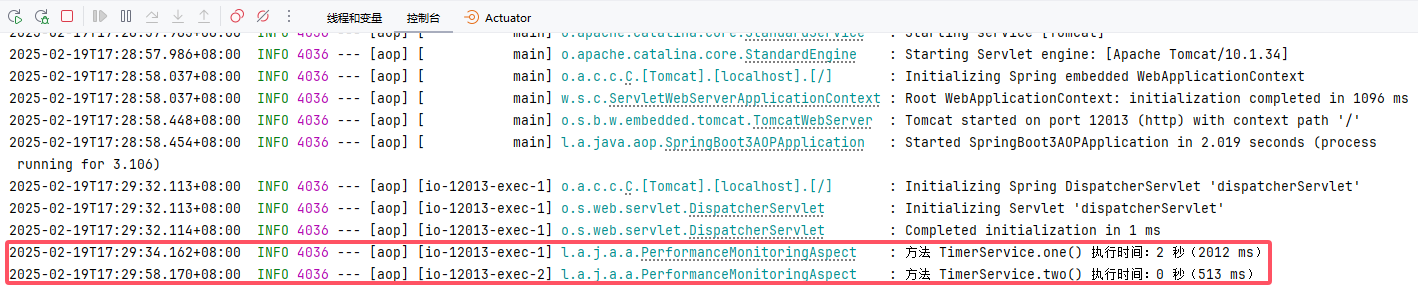
HTTP请求日志记录
基础配置
创建实体类
用于存储和记录 HTTP 请求和响应相关的日志信息。通过这个类,我们能够详细地记录下每个请求的关键信息,方便后续的日志分析、调试和追踪。
package local.ateng.java.aop.entity;

import lombok.AllArgsConstructor;
import lombok.Builder;
import lombok.Data;
import lombok.NoArgsConstructor;

import java.io.Serial;
import java.io.Serializable;

/**
 * 存储 HTTP 请求和响应日志的实体类
 *
 * @author 孔余
 * @email 2385569970@qq.com
 * @since 2025-02-20
 */
@Data
@Builder
@NoArgsConstructor
@AllArgsConstructor
public class RequestLogInfo implements Serializable {

    @Serial
    private static final long serialVersionUID = 1L;

    /**
     * 用户名
     */
    private String username;

    /**
     * 模块名
     */
    private String module;

    /**
     * 操作类型
     */
    private String operationType;

    /**
     * 操作说明
     */
    private String description;

    /**
     * 方法全路径(类名+方法名)
     */
    private String classMethod;

    /**
     * 请求是否成功
     */
    private boolean success;

    /**
     * 请求的 URL
     */
    private String url;

    /**
     * 请求方式(GET、POST、PUT、DELETE 等)
     */
    private String method;

    /**
     * 客户端 IP 地址
     */
    private String ip;

    /**
     * User-Agent 请求头
     */
    private String userAgent;

    /**
     * 请求参数(Query String 或表单参数)
     */
    private String params;

    /**
     * 请求头信息
     */
    private String headers;

    /**
     * 请求体(JSON 或表单)
     */
    private String body;

    /**
     * 响应数据
     */
    private String response;

    /**
     * 执行耗时
     */
    private String executionTime;

    /**
     * 异常信息(如有)
     */
    private String exceptionMessage;
}创建事件类
用于在 Spring 应用程序中发布请求日志事件。它继承自 Spring 提供的 ApplicationEvent 类,通常用于在事件驱动的架构中触发和处理事件。
package local.ateng.java.aop.event;

import local.ateng.java.aop.entity.RequestLogInfo;
import org.springframework.context.ApplicationEvent;

/**
 * 日志事件,用于发布请求日志
 *
 * @author 孔余
 * @email 2385569970@qq.com
 * @since 2025-02-20
 */
public class RequestLogEvent extends ApplicationEvent {
    private final RequestLogInfo requestLogInfo;

    public RequestLogEvent(Object source, RequestLogInfo requestLogInfo) {
        super(source);
        this.requestLogInfo = requestLogInfo;
    }

    public RequestLogInfo getRequestLogInfo() {
        return requestLogInfo;
    }
}创建过滤器
用于解决 HttpServletRequest 只能读取一次请求体 的问题。通过这个过滤器,HttpServletRequest 可以重复读取请求体,这对于需要在多个地方读取请求体的场景(例如:日志记录、请求参数处理等)非常有用。
package local.ateng.java.aop.filter;

import cn.hutool.core.io.IoUtil;
import jakarta.servlet.*;
import jakarta.servlet.http.HttpServletRequest;
import jakarta.servlet.http.HttpServletRequestWrapper;

import java.io.BufferedReader;
import java.io.ByteArrayInputStream;
import java.io.IOException;
import java.io.InputStreamReader;

/**
 * 配置过滤器,可以重复读取请求体
 *
 * @author 孔余
 * @email 2385569970@qq.com
 * @since 2025-02-20
 */
public class RepeatableFilter implements Filter {

    @Override
    public void init(FilterConfig filterConfig) throws ServletException {
        // 过滤器初始化,通常可以做一些初始化操作,比如设置日志记录器等
    }

    @Override
    public void doFilter(ServletRequest request, ServletResponse response, FilterChain chain)
            throws IOException, ServletException {

        // 将缓存请求体存储到 request 属性中,后续可以访问
        ServletRequest requestWrapper = null;
        if (request instanceof HttpServletRequest) {
            requestWrapper = new RepeatedlyRequestWrapper((HttpServletRequest) request, response);
        }

        // 继续执行过滤链
        if (null == requestWrapper) {
            chain.doFilter(request, response);
        } else {
            chain.doFilter(requestWrapper, response);
        }

    }

    @Override
    public void destroy() {
        // 过滤器销毁时执行清理工作,这里没有需要销毁的资源
    }

    /**
     * 自定义 HttpServletRequestWrapper,用于存储缓存的请求体
     */
    public static class RepeatedlyRequestWrapper extends HttpServletRequestWrapper {
        private final byte[] body;

        public RepeatedlyRequestWrapper(HttpServletRequest request, ServletResponse response) throws IOException {
            super(request);
            request.setCharacterEncoding("UTF-8");
            response.setCharacterEncoding("UTF-8");

            body = IoUtil.readBytes(request.getInputStream(), false);
        }

        @Override
        public BufferedReader getReader() throws IOException {
            return new BufferedReader(new InputStreamReader(getInputStream()));
        }

        @Override
        public ServletInputStream getInputStream() throws IOException {
            final ByteArrayInputStream bais = new ByteArrayInputStream(body);
            return new ServletInputStream() {
                @Override
                public int read() throws IOException {
                    return bais.read();
                }

                @Override
                public int available() throws IOException {
                    return body.length;
                }

                @Override
                public boolean isFinished() {
                    return false;
                }

                @Override
                public boolean isReady() {
                    return false;
                }

                @Override
                public void setReadListener(ReadListener readListener) {

                }
            };
        }
    }
}注册过滤器
将自定义的 RepeatableFilter 过滤器添加到 Spring Boot 应用的过滤器链中,使得所有的 HTTP 请求都可以重复读取请求体。通过这种方式,在请求体已被读取后,我们仍然能够多次读取它。
package local.ateng.java.aop.config;

import local.ateng.java.aop.filter.RepeatableFilter;
import org.springframework.boot.web.servlet.FilterRegistrationBean;
import org.springframework.context.annotation.Bean;
import org.springframework.context.annotation.Configuration;

/**
 * 过滤器配置类
 *
 * @author 孔余
 * @email 2385569970@qq.com
 * @since 2025-02-20
 */
@Configuration
public class FilterConfig {

    /**
     * 注册一个自定义的 RepeatableFilter,它可以使请求体可重复读取
     * @return
     */
    @Bean
    public FilterRegistrationBean<RepeatableFilter> repeatableFilter() {
        FilterRegistrationBean<RepeatableFilter> registrationBean = new FilterRegistrationBean<>();
        registrationBean.setFilter(new RepeatableFilter());
        registrationBean.addUrlPatterns("/*");  // 设置需要拦截的URL模式
        registrationBean.setName("repeatableFilter");
        registrationBean.setOrder(FilterRegistrationBean.LOWEST_PRECEDENCE);
        return registrationBean;
    }

}创建注解
用于标记需要记录 HTTP 请求日志的方法。通过这个注解,我们可以在 Spring 的 AOP 切面中捕获被标记的方法的执行信息,进而记录请求的相关日志(如请求参数、请求头、响应数据等)。
package local.ateng.java.aop.annotation;

import java.lang.annotation.ElementType;
import java.lang.annotation.Retention;
import java.lang.annotation.RetentionPolicy;
import java.lang.annotation.Target;

/**
 * 用于标记需要记录 HTTP 请求日志的方法
 *
 * @author 孔余
 * @email 2385569970@qq.com
 * @since 2025-02-20
 */
@Target(ElementType.METHOD)  // 仅限用于方法
@Retention(RetentionPolicy.RUNTIME)  // 运行时有效
public @interface RequestLog {
    String module() default "";  // 模块名

    String operation() default "";  // 操作类型(如:查询、添加、删除等)

    String description() default "";  // 操作说明

    boolean logParams() default true;  // 是否记录请求参数

    boolean logHeaders() default true;  // 是否记录请求头

    boolean logBody() default true;  // 是否记录请求体

    boolean logResponse() default true;  // 是否记录响应数据

    boolean logExecutionTime() default true;  // 是否记录执行时间
}@Target(ElementType.METHOD):表示该注解仅能应用于方法。换句话说,你只能在方法上使用@RequestLog注解。@Retention(RetentionPolicy.RUNTIME):表示该注解在运行时有效,即可以在运行时通过反射读取注解的值。这使得我们能够在 AOP 切面中访问到方法上的@RequestLog注解。
创建切面
在切面类中,我们使用 @Around 环绕通知来计算标记了 @RequestLog 注解的方法的执行时间,并输出日志。
package local.ateng.java.aop.aspect;

import cn.hutool.core.date.DateUtil;
import cn.hutool.core.date.TimeInterval;
import cn.hutool.core.exceptions.ExceptionUtil;
import cn.hutool.core.util.RandomUtil;
import cn.hutool.core.util.StrUtil;
import cn.hutool.extra.servlet.JakartaServletUtil;
import cn.hutool.json.JSONUtil;
import jakarta.servlet.http.HttpServletRequest;
import local.ateng.java.aop.annotation.RequestLog;
import local.ateng.java.aop.entity.RequestLogInfo;
import local.ateng.java.aop.event.RequestLogEvent;
import lombok.RequiredArgsConstructor;
import lombok.extern.slf4j.Slf4j;
import org.aspectj.lang.ProceedingJoinPoint;
import org.aspectj.lang.annotation.Around;
import org.aspectj.lang.annotation.Aspect;
import org.springframework.beans.factory.annotation.Autowired;
import org.springframework.context.ApplicationEventPublisher;
import org.springframework.stereotype.Component;
import org.springframework.web.context.request.RequestContextHolder;
import org.springframework.web.context.request.ServletRequestAttributes;

/**
 * 日志记录切面,记录 HTTP 请求和响应日志
 */
@Aspect
@Component
@Slf4j
@RequiredArgsConstructor(onConstructor = @__(@Autowired))
public class RequestLogAspect {

    private final ApplicationEventPublisher eventPublisher;

    // 环绕通知:方法执行前后都记录日志
    @Around("@annotation(requestLog)")
    public Object logRequestAndResponse(ProceedingJoinPoint joinPoint, RequestLog requestLog) throws Throwable {
        // 获取 HTTP 请求信息
        RequestLogInfo logInfo = new RequestLogInfo();
        HttpServletRequest request = getHttpServletRequest();

        if (request != null) {
            // 获取请求信息
            logInfo.setUsername(getUsername(request));
            logInfo.setUrl(request.getRequestURL().toString());
            logInfo.setMethod(request.getMethod());
            logInfo.setIp(JakartaServletUtil.getClientIP(request));
            logInfo.setUserAgent(request.getHeader("User-Agent"));

            // 获取注解中配置的模块名、操作类型、操作说明
            logInfo.setModule(requestLog.module());
            logInfo.setOperationType(requestLog.operation());
            logInfo.setDescription(requestLog.description());

            // 记录类名和方法名(全路径)
            logInfo.setClassMethod(joinPoint.getSignature().toString());

            // 记录请求参数
            if (requestLog.logParams()) {
                logInfo.setParams(JSONUtil.toJsonStr(JakartaServletUtil.getParams(request)));
            }

            // 记录请求头
            if (requestLog.logHeaders()) {
                logInfo.setHeaders(JSONUtil.toJsonStr(JakartaServletUtil.getHeadersMap(request)));
            }

            // 记录请求体
            if (requestLog.logBody()) {
                String body = JakartaServletUtil.getBody(request);
                logInfo.setBody(StrUtil.cleanBlank(body));
            }
        }

        // 记录方法执行的开始时间
        TimeInterval timer = DateUtil.timer();
        Object result = null;
        String exceptionMessage = null;

        try {
            // 执行目标方法
            result = joinPoint.proceed();
            logInfo.setSuccess(true);  // 标记为成功
        } catch (Throwable throwable) {
            exceptionMessage = ExceptionUtil.stacktraceToString(throwable, 10000);
            logInfo.setSuccess(false);  // 标记为失败
            logInfo.setExceptionMessage(exceptionMessage);
            throw throwable;  // 重新抛出异常
        } finally {
            // 记录方法执行时间
            logInfo.setExecutionTime(timer.intervalPretty());

            // 记录响应数据
            if (requestLog.logResponse()) {
                logInfo.setResponse(StrUtil.subPre(String.valueOf(result), 10000));
            }

            // 如果出现异常,记录异常信息
            if (exceptionMessage != null) {
                logInfo.setExceptionMessage(exceptionMessage);
            }

            // 输出日志信息
            log.info("请求日志:{}", logInfo);

            // 发布日志事件
            eventPublisher.publishEvent(new RequestLogEvent(this, logInfo));
        }

        return result;
    }

    /**
     * 获取当前请求所属用户
     */
    private String getUsername(HttpServletRequest request) {
        String username = null;
        // 根据实际项目逻辑获取用户名
        username = RandomUtil.randomString(5);
        return username;
    }

    /**
     * 获取当前 HTTP 请求
     */
    private HttpServletRequest getHttpServletRequest() {
        HttpServletRequest request = null;
        ServletRequestAttributes attributes = (ServletRequestAttributes) RequestContextHolder.getRequestAttributes();
        if (attributes != null) {
            request = attributes.getRequest();
        }
        return request;
    }

}@Around("@annotation(requestLog)"):指定环绕通知拦截所有标记了 @requestLog 注解的方法。
joinPoint.proceed():执行目标方法,返回结果。
使用切面
创建接口
package local.ateng.java.aop.controller;

import jakarta.servlet.http.HttpServletResponse;
import local.ateng.java.aop.annotation.RequestLog;
import lombok.Data;
import org.springframework.web.bind.annotation.*;

import java.io.IOException;
import java.io.OutputStream;
import java.util.Map;


@RestController
@RequestMapping("/log")
public class LogController {

    // 测试 GET 请求 - 用于记录请求日志
    @RequestLog(
            module = "测试模块",
            operation = "查询",
            description = "查询用户信息",
            logParams = true,  // 记录请求参数
            logHeaders = true,  // 记录请求头
            logBody = false,    // 不记录请求体
            logResponse = true,  // 记录响应
            logExecutionTime = true  // 记录执行时长
    )
    @GetMapping("/user/{id}")
    public String getUser(@PathVariable("id") String id,
                          @RequestParam(value = "name", required = false) String name) {
        return "用户信息: ID = " + id + ", Name = " + name;
    }

    // 测试 GET 请求 - 用于记录请求日志
    @RequestLog(
            module = "测试模块",
            operation = "查询",
            description = "查询用户信息"
    )
    @GetMapping("/userJson/{id}")
    public Map<String, String> getUserJson(@PathVariable("id") String id,
                                           @RequestParam(value = "name", required = false) String name) {

        return Map.of("id", id, "name", name);
    }

    // 测试 POST 请求 - 用于记录请求日志
    @RequestLog(
            module = "测试模块",
            operation = "创建",
            description = "创建新用户",
            logParams = true,  // 记录请求参数
            logHeaders = true,  // 记录请求头
            logBody = true,     // 记录请求体
            logResponse = true,  // 记录响应
            logExecutionTime = true  // 记录执行时长
    )
    @PostMapping("/user")
    public String createUser(@RequestBody User user) {
        return "创建用户: " + user.getName() + ",年龄: " + user.getAge();
    }

    // 测试 PUT 请求 - 用于记录请求日志
    @RequestLog(
            module = "测试模块",
            operation = "更新",
            description = "更新用户信息",
            logParams = true,  // 记录请求参数
            logHeaders = true,  // 记录请求头
            logBody = true,     // 记录请求体
            logResponse = true,  // 记录响应
            logExecutionTime = true  // 记录执行时长
    )
    @PutMapping("/user/{id}")
    public String updateUser(@PathVariable("id") String id, @RequestBody User user) {
        return "更新用户: ID = " + id + ",Name = " + user.getName() + ",Age = " + user.getAge();
    }

    // 测试 DELETE 请求 - 用于记录请求日志
    @RequestLog(
            module = "测试模块",
            operation = "删除",
            description = "删除用户",
            logParams = true,  // 记录请求参数
            logHeaders = true,  // 记录请求头
            logBody = false,    // 不记录请求体
            logResponse = true,  // 记录响应
            logExecutionTime = true  // 记录执行时长
    )
    @DeleteMapping("/user/{id}")
    public String deleteUser(@PathVariable("id") String id) {
        return "删除用户: ID = " + id;
    }

    // 测试异常 - 用于记录异常日志
    @RequestLog(
            module = "测试模块",
            operation = "错误测试",
            description = "测试接口异常记录"
    )
    @PostMapping("/error")
    public String testError(@RequestBody User user) {
        if (user.getAge() < 0) {
            throw new IllegalArgumentException("年龄不能为负");
        }
        return "用户信息: " + user.getName() + ", " + user.getAge();
    }

    // 测试空请求体的 POST 请求 - 用于测试空的请求体日志记录
    @RequestLog(
            module = "测试模块",
            operation = "创建",
            description = "创建用户(空请求体)"
    )
    @PostMapping("/user/empty")
    public String createEmptyUser() {
        return "创建用户成功(空请求体)";
    }

    /**
     * 导出简单文本文件
     */
    @RequestLog(
            module = "数据导出",
            operation = "导出",
            description = "导出简单文本文件"
    )
    @GetMapping("/export")
    public void exportTextFile(HttpServletResponse response) {
        // 简单的文本数据
        String data = "Hello, this is the exported file content.\nLine 2 of the file.\nLine 3 of the file.";

        // 设置响应头
        response.setContentType("text/plain");
        response.setHeader("Content-Disposition", "attachment; filename=sample.txt");

        // 获取输出流
        try (OutputStream out = response.getOutputStream()) {
            out.write(data.getBytes());
            out.flush();  // 确保内容被写入响应
        } catch (IOException e) {
            throw new RuntimeException(e);
        }
    }

    // User 类,用于演示请求体中的数据
    @Data
    static class User {
        private String name;
        private int age;
    }
}调用接口
- GET 请求 - 查询用户信息
接口:/log/user/{id}
curl -Ss -X GET "http://localhost:12013/log/user/123?id=JohnDoe"
- GET 请求 - 查询用户信息(返回 JSON)
接口:/log/userJson/{id}
curl -Ss -X GET "http://localhost:12013/log/userJson/123?name=JohnDoe"
- POST 请求 - 创建用户
接口:/log/user
curl -Ss -X POST "http://localhost:12013/log/user" \
    -H "Content-Type: application/json" \
    -d '{"name":"JohnDoe", "age":30}'
- PUT 请求 - 更新用户信息
接口:/log/user/{id}
curl -Ss -X PUT "http://localhost:12013/log/user/123" \
    -H "Content-Type: application/json" \
    -d '{"name":"JohnDoeUpdated", "age":31}'
- DELETE 请求 - 删除用户
接口:/log/user/{id}
curl -Ss -X DELETE "http://localhost:12013/log/user/123"
- POST 请求 - 错误测试(触发异常)
接口:/log/error
curl -Ss -X POST "http://localhost:12013/log/error" \
    -H "Content-Type: application/json" \
    -d '{"name":"JohnDoe", "age":-1}'
- POST 请求 - 创建空请求体用户
接口:/log/user/empty
curl -Ss -X POST "http://localhost:12013/log/user/empty"
- GET 请求 - 导出简单文本文件
接口:/log/export
curl -Ss -X GET "http://localhost:12013/log/export" -O
后续优化
将注解的属性设置为枚举
模块
package local.ateng.java.aop.constants;

/**
 * 用于定义模块的枚举
 *
 * @author 孔余
 * @email 2385569970@qq.com
 * @since 2025-02-20
 */
public enum Module {
    NULL(null),
    USER("用户模块"),
    ORDER("订单模块"),
    PRODUCT("商品模块");

    private final String description;

    Module(String description) {
        this.description = description;
    }

    public String getDescription() {
        return description;
    }
}操作类型
package local.ateng.java.aop.constants;

/**
 * 用于定义操作类型的枚举
 *
 * @author 孔余
 * @email 2385569970@qq.com
 * @since 2025-02-20
 */
public enum Operation {
    NULL(null),
    CREATE("创建"),
    READ("查询"),
    UPDATE("更新"),
    DELETE("删除"),
    EXPORT("导出"),
    IMPORT("导入");

    private final String description;

    Operation(String description) {
        this.description = description;
    }

    public String getDescription() {
        return description;
    }
}修改注解
修改 @RequestLog 注解的属性
Module module() default Module.NULL;
Operation operation() default Operation.NULL;修改切面
修改切面获取这两个注解的方法
// 获取注解中配置的模块名、操作类型、操作说明
logInfo.setModule(requestLog.module().getDescription());
logInfo.setOperationType(requestLog.operation().getDescription());修改使用注解的属性使用枚举
// 测试 GET 请求 - 用于记录请求日志
@RequestLog(
        module = Module.USER,
        operation = Operation.READ,
        description = "查询用户信息"
)接受事件
在切面的最后发布日志事件,现在来接受这个事件的数据
package local.ateng.java.aop.service;

import local.ateng.java.aop.event.RequestLogEvent;
import lombok.extern.slf4j.Slf4j;
import org.springframework.context.event.EventListener;
import org.springframework.scheduling.annotation.Async;
import org.springframework.stereotype.Service;

/**
 * 接受切面发布日志事件的数据
 *
 * @author 孔余
 * @email 2385569970@qq.com
 * @since 2025-02-20
 */
@Service
@Slf4j
public class RequestLogService {

    @EventListener
    @Async
    public void requestLogEvent(RequestLogEvent requestLogEvent) {
        log.info("接受到日志数据={}", requestLogEvent.getRequestLogInfo());
        // 将 RequestLogEvent 事件实体类转换成业务类
        // ...
    }

}权限控制
创建注解
自定义注解 @PermissionCheck 用于权限检查,确保只有符合特定权限的用户才能访问某些接口。我们通过 @Target 和 @Retention 注解来指定它的作用范围和生命周期。
package local.ateng.java.aop.annotation;

import java.lang.annotation.ElementType;
import java.lang.annotation.Retention;
import java.lang.annotation.RetentionPolicy;
import java.lang.annotation.Target;

/**
 * 权限控制注解,标记需要进行权限检查的方法
 */
@Target(ElementType.METHOD)  // 仅限方法上使用
@Retention(RetentionPolicy.RUNTIME)  // 运行时有效
public @interface PermissionCheck {
    String value();  // 权限标识,比如 "ADMIN", "USER", "MANAGER" 等
}@Target(ElementType.METHOD):确保该注解仅能应用在方法上,防止误用在类或字段等其他地方。
@Retention(RetentionPolicy.RUNTIME):确保该注解能够在运行时通过反射读取,以便 AOP 切面能够识别它并执行相应的逻辑。
创建切面
在切面类中,我们使用 @Around 环绕通知来计算标记了 @PermissionCheck 注解的实现权限检查,确保只有符合特定权限的用户才能访问某些接口。
package local.ateng.java.aop.aspect;

import jakarta.servlet.http.HttpServletRequest;
import local.ateng.java.aop.annotation.PermissionCheck;
import lombok.RequiredArgsConstructor;
import org.aspectj.lang.annotation.Aspect;
import org.aspectj.lang.annotation.Before;
import org.springframework.beans.factory.annotation.Autowired;
import org.springframework.stereotype.Component;

@Aspect
@Component
@RequiredArgsConstructor(onConstructor = @__(@Autowired))
public class PermissionAspect {

    private final HttpServletRequest request;  // 自动注入 HttpServletRequest

    /**
     * 前置通知:拦截带有 @PermissionCheck 注解的方法,检查权限
     */
    @Before("@annotation(permissionCheck)")  // 拦截带有 PermissionCheck 注解的方法
    public void checkPermission(PermissionCheck permissionCheck) throws Exception {
        String requiredPermission = permissionCheck.value();  // 获取所需权限
        String userPermission = getUserPermission();  // 从请求头获取用户权限

        if (userPermission == null || !userPermission.equals(requiredPermission)) {
            // 如果用户权限为空或不匹配所需权限,抛出权限不足异常
            throw new Exception("权限不足,无法访问该接口");
        }
    }

    /**
     * 从请求头中获取 token,然后解析用户权限
     */
    private String getUserPermission() {
        // 从请求头中获取 token(假设 token 的名字是 "Authorization")
        String token = request.getHeader("Authorization");

        if (token != null && token.startsWith("Bearer ")) {
            token = token.substring(7);  // 去掉 "Bearer " 前缀
        }

        // 在实际情况下,可以通过解析 token 来获取用户信息
        // 这里简化为固定返回权限,实际情况中应该解析 token 获取用户权限
        // 例如:JWT 解码,获取用户角色等信息

        // 假设 token 解析结果为以下内容,用户权限是 "USER" 或 "ADMIN"
        if ("1234567890".equals(token)) {
            return "USER";  // 返回 "USER" 权限
        } else if ("2385569970".equals(token)) {
            return "ADMIN";  // 返回 "ADMIN" 权限
        }

        // 如果没有有效的 token 或权限信息,返回 null
        return null;
    }
}@Around("@annotation(PermissionCheck)"):指定环绕通知拦截所有标记了 @PermissionCheck 注解的方法。
joinPoint.proceed():执行目标方法,返回结果。
使用切面
创建接口
package local.ateng.java.aop.controller;

import local.ateng.java.aop.annotation.PermissionCheck;
import org.springframework.web.bind.annotation.GetMapping;
import org.springframework.web.bind.annotation.RequestMapping;
import org.springframework.web.bind.annotation.RestController;

@RestController
@RequestMapping("/permission")
public class PermissionController {

    // 模拟的接口:只有 "ADMIN" 权限的用户可以访问
    @PermissionCheck(value = "ADMIN")  // 需要 ADMIN 权限
    @GetMapping("/admin")
    public String getAdminInfo() {
        return "管理员信息";
    }

    // 模拟的接口:只有 "USER" 权限的用户可以访问
    @PermissionCheck(value = "USER")  // 需要 USER 权限
    @GetMapping("/user")
    public String getUserInfo() {
        return "用户信息";
    }

}调用接口
使用header中的去验证权限,调用接口 /permission/admin 显示正常,调用 /permission/user 权限不足报错。
curl -Ss -H "Authorization: Bearer 2385569970" \
    -X GET http://localhost:12013/permission/admin
接口防抖
配置Redis环境
参考文档:RedisTemplate使用文档
也可以选择其他缓存框架,更多参考 缓存相关文档
创建注解
package local.ateng.java.aop.annotation;

import java.lang.annotation.ElementType;
import java.lang.annotation.Retention;
import java.lang.annotation.RetentionPolicy;
import java.lang.annotation.Target;
import java.util.concurrent.TimeUnit;

/**
 * 自定义防抖注解,防止接口重复提交
 *
 * @author 孔余
 * @email 2385569970@qq.com
 * @since 2025-02-21
 */
@Target(ElementType.METHOD)
@Retention(RetentionPolicy.RUNTIME)
public @interface Debounce {

    // 设置防抖的时间,单位:毫秒,默认值为500ms
    long interval() default 500;

    // 时间单位
    TimeUnit timeUnit() default TimeUnit.MILLISECONDS;

    // 提示消息
    String message() default "操作频繁,请稍候再试";

    // 自定义参数keys做判断,支持 Spring EL 表达式
    String[] keys() default {};
}创建切面
package local.ateng.java.aop.aspect;


import cn.hutool.core.util.RandomUtil;
import cn.hutool.core.util.StrUtil;
import jakarta.servlet.http.HttpServletRequest;
import local.ateng.java.aop.annotation.Debounce;
import lombok.RequiredArgsConstructor;
import org.aspectj.lang.JoinPoint;
import org.aspectj.lang.annotation.AfterReturning;
import org.aspectj.lang.annotation.AfterThrowing;
import org.aspectj.lang.annotation.Aspect;
import org.aspectj.lang.annotation.Before;
import org.aspectj.lang.reflect.MethodSignature;
import org.springframework.beans.factory.annotation.Autowired;
import org.springframework.core.DefaultParameterNameDiscoverer;
import org.springframework.core.ParameterNameDiscoverer;
import org.springframework.data.redis.core.StringRedisTemplate;
import org.springframework.expression.EvaluationContext;
import org.springframework.expression.Expression;
import org.springframework.expression.spel.standard.SpelExpressionParser;
import org.springframework.expression.spel.support.StandardEvaluationContext;
import org.springframework.stereotype.Component;

import java.lang.reflect.Method;
import java.util.ArrayList;
import java.util.Arrays;
import java.util.List;

/**
 * AOP切面,用于处理防抖逻辑。
 */
@Aspect
@Component
@RequiredArgsConstructor(onConstructor = @__(@Autowired))
public class DebounceAspect {
    private static final ThreadLocal<String> KEY = new ThreadLocal<>();
    private final StringRedisTemplate redisTemplate;
    private final HttpServletRequest request;
    private final SpelExpressionParser parser = new SpelExpressionParser();
    private final ParameterNameDiscoverer nameDiscoverer = new DefaultParameterNameDiscoverer();

    /**
     * 方法执行前
     * 首先判断Redis的数据是否存在,存在就抛出错误,不存在则继续
     * 将用户的接口访问信息存储到Redis,并设置TTL
     *
     * @param joinPoint
     * @param debounce
     */
    @Before("@annotation(debounce)")
    public void before(JoinPoint joinPoint, Debounce debounce) {
        // 获取访问的接口
        String uri = request.getRequestURI();
        // 获取用户名
        String username = getUsername(request);
        // 写入Redis并设置TTL
        String key = "ateng:debounce:interface:" + uri + ":" + username;
        // 获取 keys
        List<String> keyList = getKeyList(joinPoint, debounce);
        if (keyList != null && keyList.size() > 0) {
            key = StrUtil.format("{}:{}", key, String.join(":", keyList));
        }
        Boolean isExist = redisTemplate.opsForValue().setIfAbsent(key, "", debounce.interval(), debounce.timeUnit());
        if (!isExist) {
            throw new RuntimeException(debounce.message());
        }
        KEY.set(key);
    }

    /**
     * 方法正常返回后
     *
     * @param joinPoint
     * @param debounce
     */
    @AfterReturning(pointcut = "@annotation(debounce)", returning = "result")
    public void afterReturning(JoinPoint joinPoint, Debounce debounce, Object result) {
        KEY.remove();
    }

    /**
     * 方法异常后
     *
     * @param joinPoint
     * @param debounce
     */
    @AfterThrowing(pointcut = "@annotation(debounce)", throwing = "e")
    public void afterThrowing(JoinPoint joinPoint, Debounce debounce, Exception e) {
        KEY.remove();
    }

    /**
     * 获取当前请求所属用户
     */
    private String getUsername(HttpServletRequest request) {
        String username = null;
        // 根据实际项目逻辑获取用户名
        username = RandomUtil.randomEle(Arrays.asList("ateng", "kongyu"));
        return username;
    }

    /**
     * 获取注解中 keys 的数据列表
     *
     * @param joinPoint JoinPoint
     * @param debounce  Debounce 注解
     * @return keys 数据列表
     */
    private List<String> getKeyList(JoinPoint joinPoint, Debounce debounce) {
        MethodSignature signature = (MethodSignature) joinPoint.getSignature();
        Method method = signature.getMethod();
        Object[] args = joinPoint.getArgs();
        String[] paramNames = nameDiscoverer.getParameterNames(method);

        EvaluationContext context = new StandardEvaluationContext();
        for (int i = 0; i < args.length; i++) {
            context.setVariable(paramNames[i], args[i]);
        }

        List<String> keyList = new ArrayList<>();
        for (String key : debounce.keys()) {
            Expression expression = parser.parseExpression(key);
            Object value = expression.getValue(context);
            keyList.add(value != null ? value.toString() : "null");
        }
        return keyList;
    }

}创建接口
如果接口调用频率超过设定的1秒钟,就会报错。
package local.ateng.java.aop.controller;

import local.ateng.java.aop.annotation.Debounce;
import org.springframework.web.bind.annotation.GetMapping;
import org.springframework.web.bind.annotation.RequestMapping;
import org.springframework.web.bind.annotation.RestController;

import java.util.concurrent.TimeUnit;

@RestController
@RequestMapping("/debounce")
public class DebounceController {

    @GetMapping("/demo")
    @Debounce(interval = 1000, timeUnit = TimeUnit.MILLISECONDS, message = "操作频繁,请稍候再试")
    public String demo() {
        return "ok";
    }

}