Vue Router
一、基础能力(必须掌握)
基础路由配置(createRouter)
功能描述: 创建 Vue3 项目的基础路由,包含首页和关于页,并完成 Router 挂载。
1. 项目结构(简化)
src/
 ├─ router/
 │   └─ index.ts
 ├─ views/
 │   ├─ Home.vue
 │   └─ About.vue
 ├─ App.vue
└─ main.ts2. 路由配置(router/index.ts)
ts
// 引入 Vue Router 核心方法
import { createRouter, createWebHistory, type RouteRecordRaw } from 'vue-router'

// 路由组件(也可以使用懒加载)
import Home from '@/views/Home.vue'
import About from '@/views/About.vue'

// 路由表(TypeScript 推荐使用 RouteRecordRaw 类型)
const routes: Array<RouteRecordRaw> = [
    {
        path: '/', // 路径
        name: 'Home', // 路由名称(建议唯一)
        component: Home, // 对应组件
    },
    {
        path: '/about',
        name: 'About',
        component: About,
    },
]

// 创建路由实例
const router = createRouter({
    history: createWebHistory(), // 使用 H5 history 模式(推荐)
    routes, // 挂载路由表
})

export default router3. 挂载路由(main.ts)
ts
import { createApp } from 'vue'
import App from './App.vue'

// 引入路由
import router from './router'

// ElementPlus
import ElementPlus from 'element-plus'
import 'element-plus/dist/index.css'

const app = createApp(App)

// 使用插件
app.use(router)
app.use(ElementPlus)

// 挂载
app.mount('#app')4. 页面组件(views/Home.vue)
vue
<template>
  <div>
    <h2>首页</h2>

    <!-- 路由跳转 -->
    <el-button type="primary" @click="goAbout">
      去关于页
    </el-button>
  </div>
</template>

<script setup lang="ts">
import { useRouter } from 'vue-router'

// 获取路由实例
const router = useRouter()

// 跳转方法
const goAbout = () => {
  router.push('/about')
}
</script>5. 页面组件(views/About.vue)
vue
<template>
  <div>
    <h2>关于页</h2>

    <el-button @click="goHome">
      返回首页
    </el-button>
  </div>
</template>

<script setup lang="ts">
import { useRouter } from 'vue-router'

const router = useRouter()

const goHome = () => {
  router.push('/')
}
</script>6. 根组件(App.vue)
vue
<template>
  <!-- 路由出口(页面切换位置) -->
  <router-view />
</template>

<script setup lang="ts">
// 根组件一般无需逻辑
</script>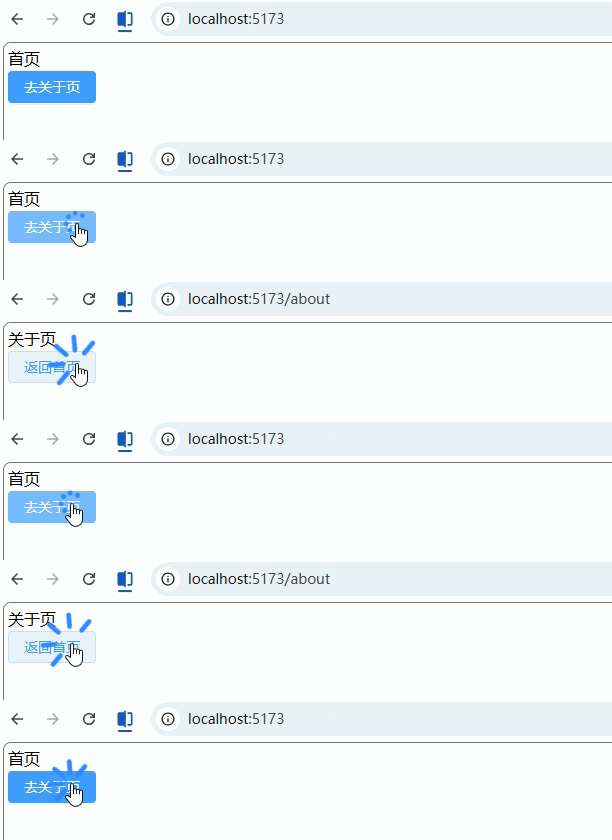
路由跳转(编程式 / 声明式)
功能描述: 实现 Vue Router 中最常用的两种跳转方式:
- 编程式跳转(JS 控制,常用于逻辑处理)
- 声明式跳转(模板中直接使用,适合简单跳转)
1. 声明式跳转(router-link)(Home.vue)
vue
<template>
  <div>
    <h2>声明式跳转</h2>

    <!-- 方式1:字符串路径 -->
    <router-link to="/about">
      <el-button type="primary">去关于页</el-button>
    </router-link>

    <!-- 方式2:对象写法(推荐,方便扩展) -->
    <router-link :to="{ name: 'About' }">
      <el-button type="success">通过 name 跳转</el-button>
    </router-link>

    <!-- 方式3:携带 query 参数 -->
    <router-link
      :to="{ name: 'About', query: { id: 1, name: 'vue' } }"
    >
      <el-button type="warning">带参数跳转</el-button>
    </router-link>
  </div>
</template>

<script setup lang="ts">
// 声明式跳转无需 JS 逻辑
</script>2. 编程式跳转(useRouter)(Home.vue)
vue
<template>
  <div>
    <h2>编程式跳转</h2>

    <el-button type="primary" @click="goAbout">
      普通跳转
    </el-button>

    <el-button type="success" @click="goByName">
      name 跳转
    </el-button>

    <el-button type="warning" @click="goWithQuery">
      携带参数
    </el-button>

    <el-button type="danger" @click="replacePage">
      替换当前页面
    </el-button>

    <el-button @click="goBack">
      返回上一页
    </el-button>
  </div>
</template>

<script setup lang="ts">
import { useRouter } from 'vue-router'

// 获取 router 实例
const router = useRouter()

// 1. 普通路径跳转
const goAbout = () => {
  router.push('/about')
}

// 2. 通过 name 跳转(推荐,避免路径变更影响)
const goByName = () => {
  router.push({ name: 'About' })
}

// 3. 携带 query 参数(URL 会显示 ?id=1)
const goWithQuery = () => {
  router.push({
    name: 'About',
    query: {
      id: '1',
      keyword: 'vue3',
    },
  })
}

// 4. 替换当前页面(不会留下历史记录)
const replacePage = () => {
  router.replace('/about')
}

// 5. 返回上一页(类似浏览器后退)
const goBack = () => {
  router.back()
  // 等价写法:
  // router.go(-1)
}
</script>3. 接收参数(About.vue)
vue
<template>
  <div>
    <h2>关于页</h2>

    <p>id: {{ route.query.id }}</p>
    <p>keyword: {{ route.query.keyword }}</p>
  </div>
</template>

<script setup lang="ts">
import { useRoute } from 'vue-router'

// 获取当前路由信息
const route = useRoute()

// route.query 用于获取 query 参数
</script>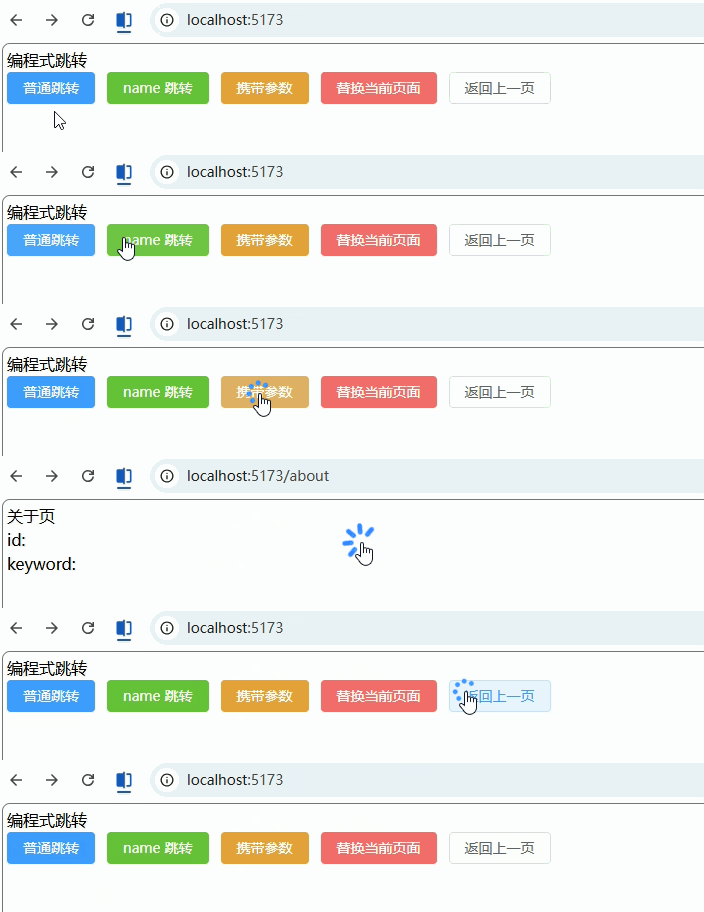
路由参数(params / query)
功能描述: 实现两种常见参数传递方式:
query:URL 显示?id=1(常用于查询条件)params:URL 显示/user/1(常用于资源标识)
1. 路由配置(router/index.ts)
ts
import { createRouter, createWebHistory, type RouteRecordRaw } from 'vue-router'

// 页面组件(建议懒加载,这里先直引方便理解)
import Home from '@/views/Home.vue'
import User from '@/views/User.vue'

const routes: Array<RouteRecordRaw> = [
  {
    path: '/',
    name: 'Home',
    component: Home,
  },
  {
    // params 必须在 path 中声明占位符
    path: '/user/:id',
    name: 'User',
    component: User,
  },
]

const router = createRouter({
  history: createWebHistory(),
  routes,
})

export default router2. 发送参数(Home.vue)
vue
<!-- 文件:src/views/Home.vue -->
<template>
  <div>
    <h2>首页</h2>

    <!-- ===== query 方式 ===== -->
    <el-button type="primary" @click="goWithQuery">
      query 参数跳转
    </el-button>

    <!-- ===== params 方式 ===== -->
    <el-button type="success" @click="goWithParams">
      params 参数跳转
    </el-button>
  </div>
</template>

<script setup lang="ts">
import { useRouter } from 'vue-router'

const router = useRouter()

// 1. query 参数(URL: /user?id=1)
const goWithQuery = () => {
  router.push({
    path: '/user/1', // 注意:这里仍然需要 path
    query: {
      name: 'vue3',
      age: '18',
    },
  })
}

// 2. params 参数(URL: /user/1)
const goWithParams = () => {
  router.push({
    name: 'User', // ⚠️ params 必须使用 name
    params: {
      id: '1',
    },
  })
}
</script>3. 接收参数(User.vue)
vue
<!-- 文件:src/views/User.vue -->
<template>
  <div>
    <h2>用户页</h2>

    <el-card>
      <p><b>params.id:</b>{{ route.params.id }}</p>
      <p><b>query.name:</b>{{ route.query.name }}</p>
      <p><b>query.age:</b>{{ route.query.age }}</p>
    </el-card>
  </div>
</template>

<script setup lang="ts">
import { useRoute } from 'vue-router'

// 获取当前路由
const route = useRoute()

// params:动态路径参数
// query:URL 查询参数
</script>4. 声明式传参(补充)
vue
<!-- 文件:任意组件 -->
<template>
  <div>
    <!-- query 方式 -->
    <router-link
      :to="{ path: '/user/1', query: { name: 'vue3' } }"
    >
      query 跳转
    </router-link>

    <!-- params 方式 -->
    <router-link
      :to="{ name: 'User', params: { id: '2' } }"
    >
      params 跳转
    </router-link>
  </div>
</template>路由重定向(redirect)
功能描述: 将某个路径自动跳转到指定路由,常用于:默认首页、旧地址兼容、简化路径等。
1. 基础重定向(router/index.ts)
ts
// 文件:src/router/index.ts

import { createRouter, createWebHistory, type RouteRecordRaw } from 'vue-router'

// 页面组件
import Home from '@/views/Home.vue'
import About from '@/views/About.vue'

const routes: Array<RouteRecordRaw> = [
  {
    path: '/',
    // 访问根路径时,自动跳转到 /home
    redirect: '/home',
  },
  {
    path: '/home',
    name: 'Home',
    component: Home,
  },
  {
    path: '/about',
    name: 'About',
    component: About,
  },
]

const router = createRouter({
  history: createWebHistory(),
  routes,
})

export default router2. 通过 name 重定向(推荐)
ts
// 文件:src/router/index.ts

{
  path: '/',
  redirect: { name: 'Home' }, // 推荐写法(更安全)
}3. 动态重定向(函数写法)
ts
// 文件:src/router/index.ts

{
  path: '/old-user/:id',
  // 根据参数动态跳转
  redirect: (to) => {
    return {
      name: 'User',
      params: { id: to.params.id },
    }
  },
}4. 嵌套路由默认重定向(后台常用)
ts
// 文件:src/router/index.ts

{
  path: '/system',
  component: () => import('@/layouts/Layout.vue'),
  redirect: '/system/user', // 进入 /system 默认跳到子路由
  children: [
    {
      path: 'user',
      name: 'UserManage',
      component: () => import('@/views/system/User.vue'),
    },
    {
      path: 'role',
      name: 'RoleManage',
      component: () => import('@/views/system/Role.vue'),
    },
  ],
}5. 页面示例(Home.vue)
vue
<!-- 文件:src/views/Home.vue -->
<template>
  <div>
    <h2>首页</h2>

    <el-button @click="goRoot">
      跳转到 /
    </el-button>
  </div>
</template>

<script setup lang="ts">
import { useRouter } from 'vue-router'

const router = useRouter()

// 实际会被重定向到 /home
const goRoot = () => {
  router.push('/')
}
</script>404 页面(兜底路由)
功能描述: 当用户访问不存在的路径时,统一跳转到 404 页面(企业项目必备)。
1. 路由配置(router/index.ts)
ts
// 文件:src/router/index.ts

import { createRouter, createWebHistory, type RouteRecordRaw } from 'vue-router'

import Home from '@/views/Home.vue'
import NotFound from '@/views/404.vue'

const routes: Array<RouteRecordRaw> = [
  {
    path: '/',
    redirect: '/home',
  },
  {
    path: '/home',
    name: 'Home',
    component: Home,
  },

  // ===== 404 页面 =====
  {
    path: '/404',
    name: 'NotFound',
    component: NotFound,
  },

  // ===== 兜底路由(必须放最后)=====
  {
    path: '/:pathMatch(.*)*', // Vue Router4 写法
    redirect: '/404',
  },
]

const router = createRouter({
  history: createWebHistory(),
  routes,
})

export default router2. 404 页面(404.vue)
vue
<!-- 文件:src/views/404.vue -->
<template>
  <div class="not-found">
    <el-result
      icon="error"
      title="404"
      sub-title="页面不存在"
    >
      <template #extra>
        <el-button type="primary" @click="goHome">
          返回首页
        </el-button>
      </template>
    </el-result>
  </div>
</template>

<script setup lang="ts">
import { useRouter } from 'vue-router'

const router = useRouter()

// 返回首页
const goHome = () => {
  router.push('/home')
}
</script>

<style scoped>
.not-found {
  height: 100vh;
  display: flex;
  justify-content: center;
  align-items: center;
}
</style>3. 测试示例(任意页面)
vue
<!-- 文件:src/views/Home.vue -->
<template>
  <div>
    <h2>首页</h2>

    <el-button @click="go404">
      跳转不存在页面
    </el-button>
  </div>
</template>

<script setup lang="ts">
import { useRouter } from 'vue-router'

const router = useRouter()

// 随便跳一个不存在的路径
const go404 = () => {
  router.push('/xxx/yyy')
}
</script>
二、布局与结构(后台系统核心)
嵌套路由(Layout + 子页面)
功能描述: 实现后台管理系统经典布局:
- 外层
Layout(头部 + 侧边栏) - 内层子页面通过
<router-view>切换
1. 路由配置(router/index.ts)
ts
// 文件:src/router/index.ts

import { createRouter, createWebHistory, type RouteRecordRaw } from 'vue-router'

// Layout 组件(外层框架)
import Layout from '@/layouts/Layout.vue'

// 子页面
import Dashboard from '@/views/Dashboard.vue'
import User from '@/views/system/User.vue'
import Role from '@/views/system/Role.vue'

const routes: Array<RouteRecordRaw> = [
  {
    path: '/',
    component: Layout, // 外层布局
    redirect: '/dashboard', // 默认进入首页
    children: [
      {
        path: 'dashboard',
        name: 'Dashboard',
        component: Dashboard,
      },
      {
        path: 'system/user',
        name: 'UserManage',
        component: User,
      },
      {
        path: 'system/role',
        name: 'RoleManage',
        component: Role,
      },
    ],
  },
]

const router = createRouter({
  history: createWebHistory(),
  routes,
})

export default router2. 布局组件(Layout.vue)
vue
<!-- 文件:src/layouts/Layout.vue -->
<template>
  <div class="layout">
    <!-- 头部 -->
    <div class="header">
      <h2>后台管理系统</h2>
    </div>

    <div class="container">
      <!-- 侧边栏 -->
      <div class="sidebar">
        <el-menu
          :default-active="activePath"
          router
        >
          <el-menu-item index="/dashboard">首页</el-menu-item>
          <el-menu-item index="/system/user">用户管理</el-menu-item>
          <el-menu-item index="/system/role">角色管理</el-menu-item>
        </el-menu>
      </div>

      <!-- 内容区域(子路由出口) -->
      <div class="content">
        <router-view />
      </div>
    </div>
  </div>
</template>

<script setup lang="ts">
import { useRoute } from 'vue-router'

// 当前路由(用于菜单高亮)
const route = useRoute()

// 当前路径
const activePath = route.path
</script>

<style scoped>
.layout {
  height: 100vh;
  display: flex;
  flex-direction: column;
}

.header {
  height: 60px;
  background: #409eff;
  color: #fff;
  display: flex;
  align-items: center;
  padding: 0 20px;
}

.container {
  flex: 1;
  display: flex;
}

.sidebar {
  width: 200px;
  border-right: 1px solid #eee;
}

.content {
  flex: 1;
  padding: 20px;
}
</style>3. 子页面(Dashboard.vue)
vue
<!-- 文件:src/views/Dashboard.vue -->
<template>
  <div>
    <h2>首页</h2>
    <el-card>欢迎进入后台管理系统</el-card>
  </div>
</template>

<script setup lang="ts"></script>4. 子页面(User.vue)
vue
<!-- 文件:src/views/system/User.vue -->
<template>
  <div>
    <h2>用户管理</h2>
    <el-card>用户列表</el-card>
  </div>
</template>

<script setup lang="ts"></script>5. 子页面(Role.vue)
vue
<!-- 文件:src/views/system/Role.vue -->
<template>
  <div>
    <h2>角色管理</h2>
    <el-card>角色列表</el-card>
  </div>
</template>

<script setup lang="ts"></script>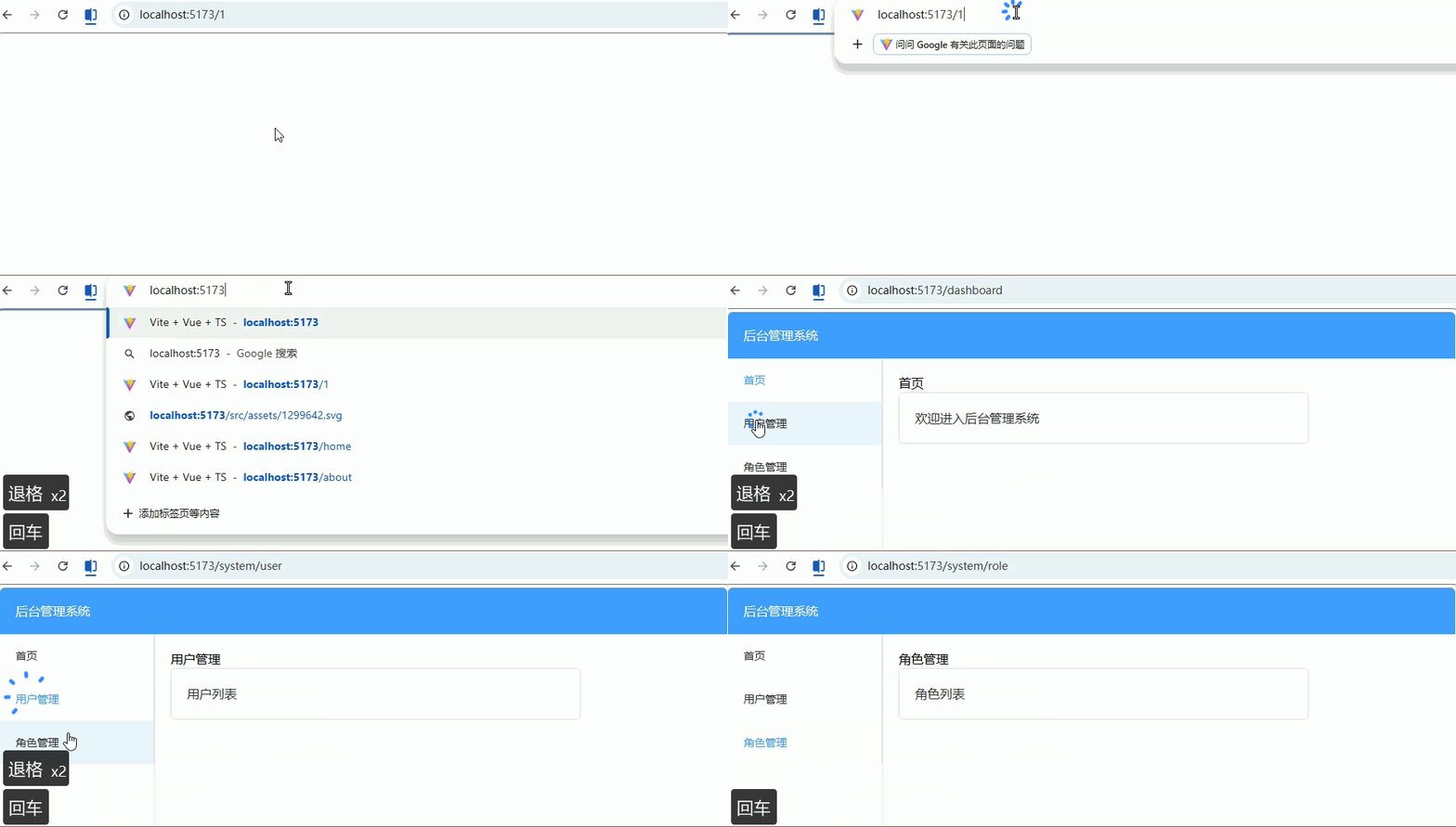
多级菜单路由结构(侧边栏)
功能描述: 根据路由 children 自动生成多级侧边栏菜单(递归渲染),适用于后台管理系统。
1. 路由配置(带 meta)(router/index.ts)
ts
// 文件:src/router/index.ts

import { createRouter, createWebHistory, type RouteRecordRaw } from 'vue-router'
import Layout from '@/layouts/Layout.vue'

const routes: Array<RouteRecordRaw> = [
  {
    path: '/',
    component: Layout,
    redirect: '/dashboard',
    meta: { title: '首页', icon: 'House' },
    children: [
      {
        path: 'dashboard',
        name: 'Dashboard',
        component: () => import('@/views/Dashboard.vue'),
        meta: { title: '仪表盘', icon: 'DataAnalysis' },
      },
      {
        path: 'system',
        name: 'System',
        meta: { title: '系统管理', icon: 'Setting' },
        children: [
          {
            path: 'user',
            name: 'UserManage',
            component: () => import('@/views/system/User.vue'),
            meta: { title: '用户管理', icon: 'User' },
          },
          {
            path: 'role',
            name: 'RoleManage',
            component: () => import('@/views/system/Role.vue'),
            meta: { title: '角色管理', icon: 'Lock' },
          },
        ],
      },
    ],
  },
]

const router = createRouter({
  history: createWebHistory(),
  routes,
})

export default router2. Layout 使用菜单组件(Layout.vue)
vue
<!-- 文件:src/layouts/Layout.vue -->
<template>
  <div class="layout">
    <div class="sidebar">
      <!-- 递归菜单组件 -->
      <SideMenu :routes="menuRoutes" />
    </div>

    <div class="content">
      <router-view />
    </div>
  </div>
</template>

<script setup lang="ts">
import { computed } from 'vue'
import router from '@/router'
import SideMenu from '@/components/SideMenu.vue'

// 获取路由表(只取 Layout 下的 children)
const menuRoutes = computed(() => {
  return router.options.routes[0]?.children || []
})
</script>3. 递归菜单组件(核心)(SideMenu.vue)
vue
<!-- 文件:src/components/SideMenu.vue -->
<template>
  <el-menu
    :default-active="activePath"
    router
    unique-opened
  >
    <!-- 递归渲染 -->
    <template v-for="route in routes" :key="route.path">
      <MenuItem :route="route" :base-path="basePath" />
    </template>
  </el-menu>
</template>

<script setup lang="ts">
import { useRoute } from 'vue-router'
import MenuItem from './MenuItem.vue'

// 接收路由数据
defineProps<{
  routes: any[]
  basePath?: string
}>()

const route = useRoute()
const activePath = route.path
</script>4. 菜单项递归组件(MenuItem.vue)
vue
<!-- 文件:src/components/MenuItem.vue -->
<template>
  <!-- 有子菜单 -->
  <el-sub-menu v-if="hasChildren" :index="fullPath">
    <template #title>
      <span>{{ route.meta?.title }}</span>
    </template>

    <!-- 递归子菜单 -->
    <MenuItem
      v-for="child in route.children"
      :key="child.path"
      :route="child"
      :base-path="fullPath"
    />
  </el-sub-menu>

  <!-- 无子菜单 -->
  <el-menu-item v-else :index="fullPath">
    <span>{{ route.meta?.title }}</span>
  </el-menu-item>
</template>

<script setup lang="ts">
import { computed } from 'vue'

// 接收参数
const props = defineProps<{
  route: any
  basePath?: string
}>()

// 判断是否有子路由
const hasChildren = computed(() => {
  return props.route.children && props.route.children.length > 0
})

// 拼接完整路径(关键)
const fullPath = computed(() => {
  if (!props.basePath) return `/${props.route.path}`
  return `${props.basePath}/${props.route.path}`
})
</script>5. 页面示例(User.vue)
vue
<!-- 文件:src/views/system/User.vue -->
<template>
  <div>
    <h2>用户管理</h2>
    <el-card>用户列表</el-card>
  </div>
</template>

<script setup lang="ts"></script>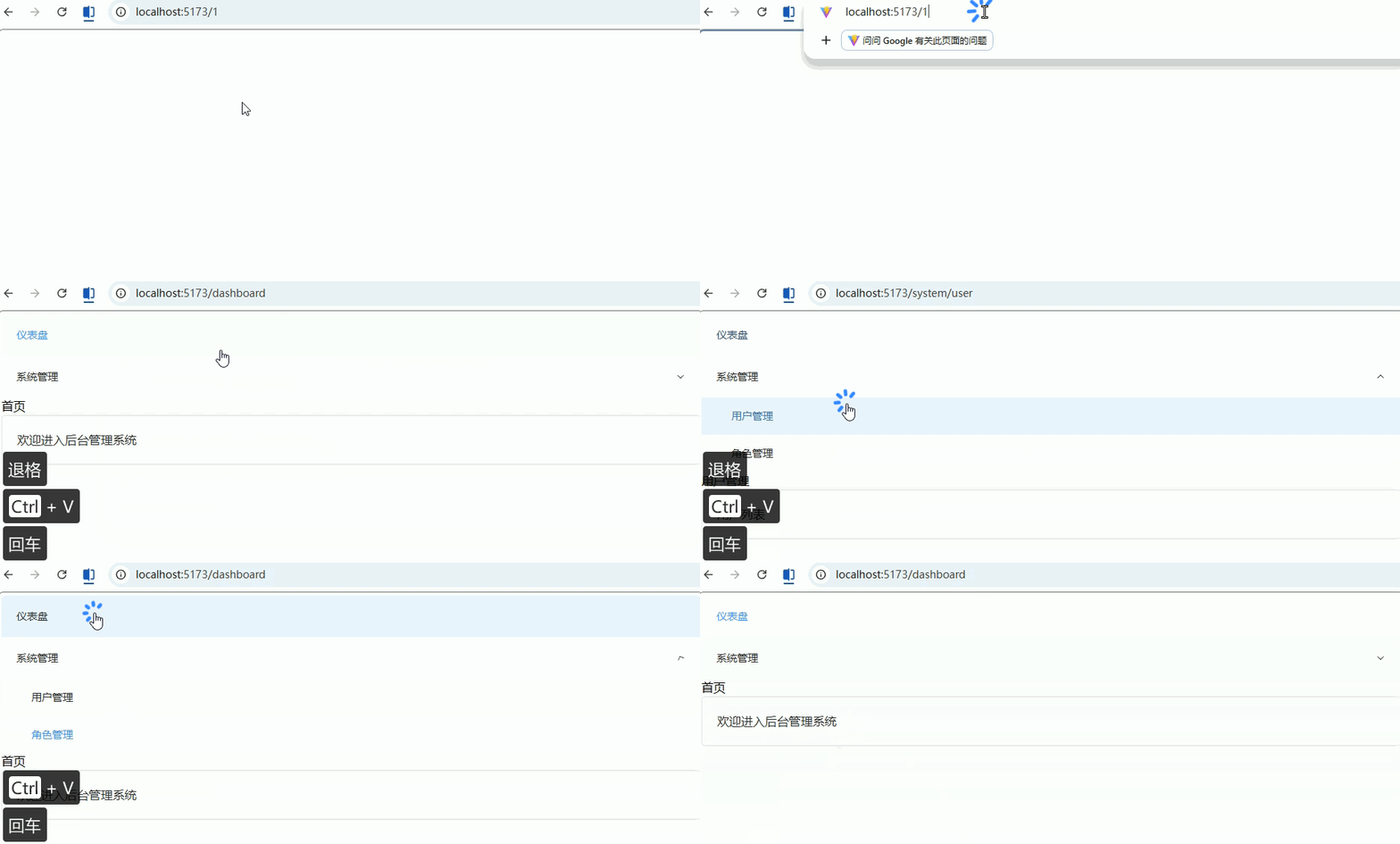
路由懒加载(动态 import)
功能描述: 按需加载页面组件(访问时才加载),减少首屏体积,提高性能(后台系统必备)。
1. 基础懒加载写法(router/index.ts)
ts
// 文件:src/router/index.ts

import { createRouter, createWebHistory, type RouteRecordRaw } from 'vue-router'
import Layout from '@/layouts/Layout.vue'

const routes: Array<RouteRecordRaw> = [
  {
    path: '/',
    component: Layout,
    redirect: '/dashboard',
    children: [
      {
        path: 'dashboard',
        name: 'Dashboard',
        // ✅ 懒加载(核心)
        component: () => import('@/views/Dashboard.vue'),
      },
      {
        path: 'system/user',
        name: 'UserManage',
        component: () => import('@/views/system/User.vue'),
      },
      {
        path: 'system/role',
        name: 'RoleManage',
        component: () => import('@/views/system/Role.vue'),
      },
    ],
  },
]

const router = createRouter({
  history: createWebHistory(),
  routes,
})

export default router2. 对比:普通引入 vs 懒加载
ts
// ❌ 普通引入(会打包到主 bundle)
import User from '@/views/system/User.vue'

// ✅ 懒加载(访问时才加载)
component: () => import('@/views/system/User.vue')3. Layout 一般不做懒加载(说明)
ts
// ❌ 不推荐
component: () => import('@/layouts/Layout.vue')

// ✅ 推荐(主框架直接加载)
import Layout from '@/layouts/Layout.vue'4. 页面示例(User.vue)
vue
<!-- 文件:src/views/system/User.vue -->
<template>
  <div>
    <h2>用户管理</h2>
    <el-card>只有访问该页面时才会加载</el-card>
  </div>
</template>

<script setup lang="ts">
// 懒加载对页面代码无侵入
</script>三、权限与控制(企业必备)
全局路由守卫(登录校验)
功能描述: 通过全局前置守卫 beforeEach 实现登录校验:
- 未登录 → 跳转登录页
- 已登录 → 放行
- 防止重复进入登录页
1. 路由配置(添加 meta)(router/index.ts)
ts
// 文件:src/router/index.ts

import { createRouter, createWebHistory, type RouteRecordRaw } from 'vue-router'
import Layout from '@/layouts/Layout.vue'

const routes: Array<RouteRecordRaw> = [
  {
    path: '/login',
    name: 'Login',
    component: () => import('@/views/Login.vue'),
    meta: { public: true }, // ✅ 白名单页面(无需登录)
  },
  {
    path: '/',
    component: Layout,
    redirect: '/dashboard',
    children: [
      {
        path: 'dashboard',
        name: 'Dashboard',
        component: () => import('@/views/Dashboard.vue'),
        meta: { requiresAuth: true }, // ✅ 需要登录
      },
      {
        path: 'system/user',
        name: 'UserManage',
        component: () => import('@/views/system/User.vue'),
        meta: { requiresAuth: true },
      },
    ],
  },
]

const router = createRouter({
  history: createWebHistory(),
  routes,
})

export default router2. 全局守卫实现(router/index.ts)
ts
// 文件:src/router/index.ts(接上)

// 模拟获取 token(实际项目可用 Pinia / localStorage)
const getToken = (): string | null => {
  return localStorage.getItem('token')
}

// 全局前置守卫
router.beforeEach((to, from, next) => {
  const token = getToken()

  // 1. 白名单(无需登录)
  if (to.meta.public) {
    return next()
  }

  // 2. 已登录 → 放行
  if (token) {
    // 已登录访问 login,跳回首页
    if (to.path === '/login') {
      return next('/dashboard')
    }
    return next()
  }

  // 3. 未登录 → 跳转登录页
  next({
    path: '/login',
    query: { redirect: to.fullPath }, // ✅ 记录原路径
  })
})3. 登录页面(Login.vue)
vue
<!-- 文件:src/views/Login.vue -->
<template>
  <div class="login">
    <el-card class="login-card">
      <h2>登录</h2>

      <el-button type="primary" @click="handleLogin">
        模拟登录
      </el-button>
    </el-card>
  </div>
</template>

<script setup lang="ts">
import { useRouter, useRoute } from 'vue-router'

const router = useRouter()
const route = useRoute()

// 登录逻辑
const handleLogin = () => {
  // 模拟存 token
  localStorage.setItem('token', '123456')

  // 登录后跳回原页面(核心)
  const redirect = (route.query.redirect as string) || '/dashboard'
  router.replace(redirect)
}
</script>

<style scoped>
.login {
  height: 100vh;
  display: flex;
  justify-content: center;
  align-items: center;
}
.login-card {
  width: 300px;
  text-align: center;
}
</style>4. 退出登录示例(任意页面)
vue
<!-- 文件:src/views/Dashboard.vue -->
<template>
  <div>
    <h2>首页</h2>

    <el-button type="danger" @click="logout">
      退出登录
    </el-button>
  </div>
</template>

<script setup lang="ts">
import { useRouter } from 'vue-router'

const router = useRouter()

// 退出登录
const logout = () => {
  localStorage.removeItem('token')
  router.push('/login')
}
</script>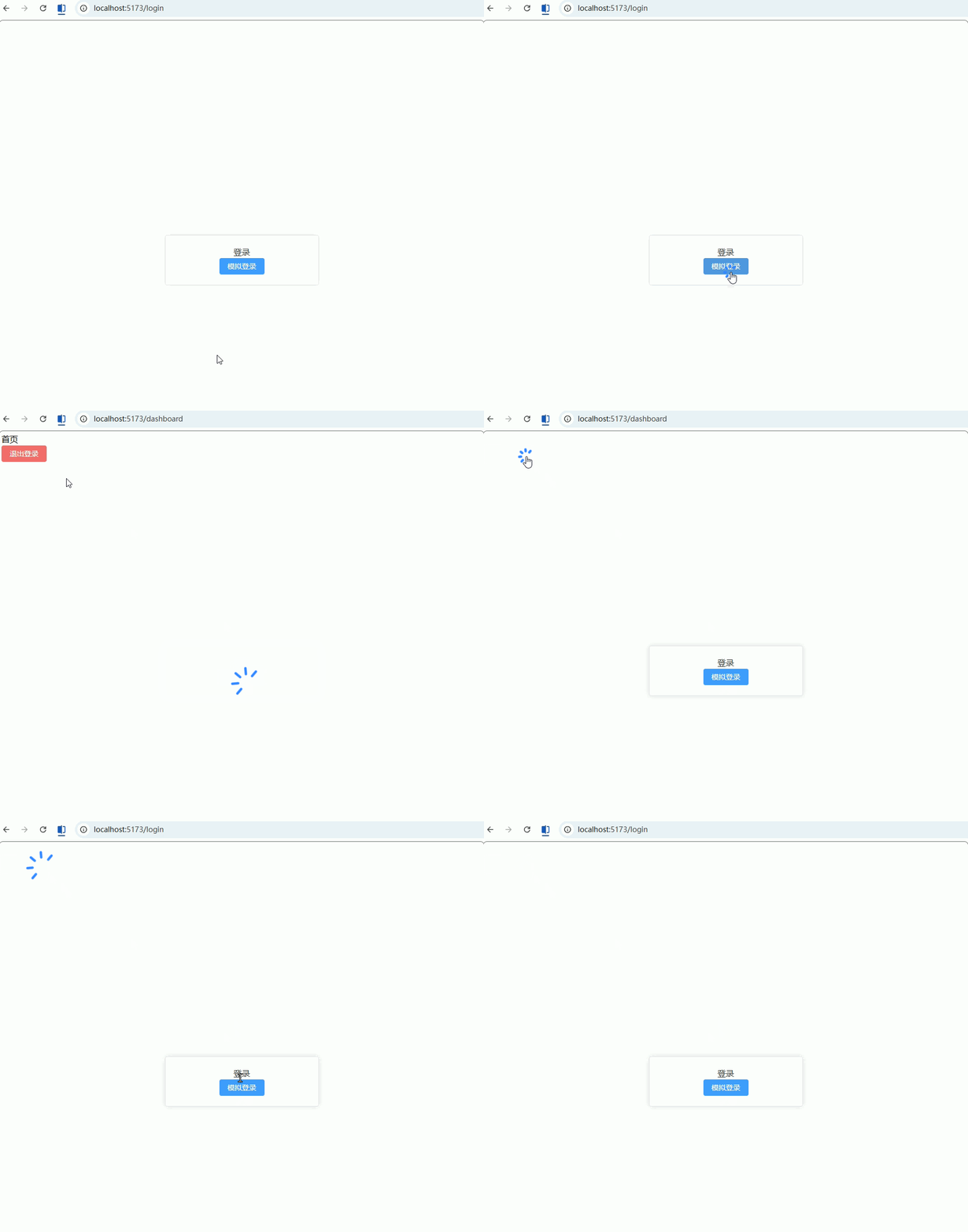
基于角色的动态路由(RBAC)!!!有问题
功能描述: 根据用户角色(admin / user)动态加载可访问路由,实现权限控制:
- 登录后 → 获取角色
- 根据角色 → 动态添加路由
- 菜单同步过滤
1. 路由拆分(静态 + 动态)
ts
// 文件:src/router/modules/staticRoutes.ts(固定路由)

import { type RouteRecordRaw } from 'vue-router'
import Layout from '@/layouts/Layout.vue'

export const staticRoutes: RouteRecordRaw[] = [
  {
    path: '/login',
    name: 'Login',
    component: () => import('@/views/Login.vue'),
    meta: { public: true },
  },
  {
    path: '/',
    component: Layout,
    redirect: '/dashboard',
    children: [
      {
        path: 'dashboard',
        name: 'Dashboard',
        component: () => import('@/views/Dashboard.vue'),
        meta: { title: '首页', roles: ['admin', 'user'] },
      },
    ],
  },
]ts
// 文件:src/router/modules/asyncRoutes.ts(权限路由)

import { type RouteRecordRaw } from 'vue-router'

export const asyncRoutes: RouteRecordRaw[] = [
  {
    path: '/system',
    name: 'System',
    meta: { title: '系统管理', roles: ['admin'] }, // 只有 admin 可访问
    children: [
      {
        path: 'user',
        name: 'UserManage',
        component: () => import('@/views/system/User.vue'),
        meta: { title: '用户管理', roles: ['admin'] },
      },
      {
        path: 'role',
        name: 'RoleManage',
        component: () => import('@/views/system/Role.vue'),
        meta: { title: '角色管理', roles: ['admin'] },
      },
    ],
  },
]2. 权限过滤工具(核心)
ts
// 文件:src/utils/permission.ts

import { type RouteRecordRaw } from 'vue-router'

// 判断是否有权限
const hasPermission = (roles: string[], route: RouteRecordRaw) => {
  if (route.meta?.roles) {
    return roles.some(role => route.meta!.roles!.includes(role))
  }
  return true
}

// 递归过滤路由
export const filterRoutes = (
  routes: RouteRecordRaw[],
  roles: string[]
): RouteRecordRaw[] => {
  const res: RouteRecordRaw[] = []

  routes.forEach(route => {
    const tmp = { ...route }

    if (hasPermission(roles, tmp)) {
      if (tmp.children) {
        tmp.children = filterRoutes(tmp.children, roles)
      }
      res.push(tmp)
    }
  })

  return res
}3. 动态添加路由(router/index.ts)
ts
// 文件:src/router/index.ts

import { createRouter, createWebHistory } from 'vue-router'
import { staticRoutes } from './modules/staticRoutes'

const router = createRouter({
  history: createWebHistory(),
  routes: staticRoutes,
})

export default router4. 在守卫中加载权限路由(核心)
ts
// 文件:src/router/index.ts(补充)

import { asyncRoutes } from './modules/asyncRoutes'
import { filterRoutes } from '@/utils/permission'

// 模拟获取用户角色
const getUserRoles = (): string[] => {
  // 实际项目从接口获取
  return JSON.parse(localStorage.getItem('roles') || '[]')
}

let isRouteAdded = false

router.beforeEach((to, from, next) => {
  const token = localStorage.getItem('token')

  // 未登录
  if (!token && !to.meta.public) {
    return next('/login')
  }

  // 已登录但未加载动态路由
  if (token && !isRouteAdded) {
    const roles = getUserRoles()

    // 过滤路由
    const accessRoutes = filterRoutes(asyncRoutes, roles)

    // 动态添加
    accessRoutes.forEach(route => {
      router.addRoute(route)
    })

    isRouteAdded = true

    // 关键:重新进入当前路由
    return next({ ...to, replace: true })
  }

  next()
})5. 登录时设置角色(Login.vue)
vue
<!-- 文件:src/views/Login.vue -->
<script setup lang="ts">
import { useRouter } from 'vue-router'

const router = useRouter()

const handleLogin = (role: string) => {
  // 存 token
  localStorage.setItem('token', '123')

  // 存角色(模拟)
  localStorage.setItem('roles', JSON.stringify([role]))

  router.replace('/dashboard')
}
</script>

<template>
  <div>
    <el-button @click="handleLogin('admin')">管理员登录</el-button>
    <el-button @click="handleLogin('user')">普通用户登录</el-button>
  </div>
</template>6. 菜单同步过滤(Layout.vue)
ts
// 只展示有权限的路由(核心思路)

const menuRoutes = computed(() => {
  return router.getRoutes().filter(route => route.meta?.title)
})按钮级权限控制(配合路由 meta)
功能描述: 根据用户权限控制按钮是否显示/可操作(常见:新增 / 删除 / 编辑),通过 自定义指令 + 路由 meta/权限数据 实现。
1. 路由中定义按钮权限(router/index.ts)
ts
// 文件:src/router/index.ts

import { createRouter, createWebHistory, type RouteRecordRaw } from 'vue-router'
import Layout from '@/layouts/Layout.vue'

const routes: Array<RouteRecordRaw> = [
  {
    path: '/login',
    name: 'Login',
    component: () => import('@/views/Login.vue'),
    meta: { public: true },
  },
  {
    path: '/',
    component: Layout,
    redirect: '/system/user',
    children: [
      {
        path: 'system/user',
        name: 'UserManage',
        component: () => import('@/views/system/User.vue'),
        meta: {
          title: '用户管理',
          permissions: ['user:add', 'user:edit'], // ✅ 按钮权限标识
        },
      },
    ],
  },
]

const router = createRouter({
  history: createWebHistory(),
  routes,
})

export default routervue
<!-- 文件:src/layouts/Layout.vue -->
<template>
  <div class="layout">
    <div class="sidebar">
      <!-- 递归菜单组件 -->
      <SideMenu :routes="menuRoutes" />
    </div>

    <div class="content">
      <router-view />
    </div>
  </div>
</template>

<script setup lang="ts">
import { computed } from 'vue'
import router from '@/router'
import SideMenu from '@/components/SideMenu.vue'

// 获取路由表(只取 Layout 下的 children)
const menuRoutes = computed(() => {
  return router.options.routes[0]?.children || []
})
</script>2. 权限工具(permission.ts)
ts
// 文件:src/utils/permission.ts

// 获取当前用户权限(实际项目从接口获取)
export const getUserPermissions = (): string[] => {
  return JSON.parse(localStorage.getItem('permissions') || '[]')
}

// 判断是否有权限
export const hasPermission = (value: string | string[]): boolean => {
  const permissions = getUserPermissions()

  if (!value) return true

  if (Array.isArray(value)) {
    // 满足任意一个即可
    return value.some(v => permissions.includes(v))
  }

  return permissions.includes(value)
}3. 自定义指令(核心)(v-permission.ts)
ts
// 文件:src/directives/v-permission.ts

import { type Directive } from 'vue'
import { hasPermission } from '@/utils/permission'

// 自定义指令:v-permission
export const permissionDirective: Directive = {
  mounted(el, binding) {
    const value = binding.value

    if (!hasPermission(value)) {
      // ❌ 没权限 → 移除元素
      el.parentNode && el.parentNode.removeChild(el)
    }
  },
}4. 注册全局指令(main.ts)
ts
// 文件:src/main.ts

import { createApp } from 'vue'
import App from './App.vue'
import router from './router'

import ElementPlus from 'element-plus'
import 'element-plus/dist/index.css'

// 引入权限指令
import { permissionDirective } from '@/directives/v-permission'

const app = createApp(App)

app.use(router)
app.use(ElementPlus)

// 注册全局指令
app.directive('permission', permissionDirective)

app.mount('#app')5. 页面使用(User.vue)
vue
<!-- 文件:src/views/system/User.vue -->
<template>
  <div>
    <h2>用户管理</h2>

    <el-card>
      <!-- 有权限才显示 -->
      <el-button
        type="primary"
        v-permission="'user:add'"
      >
        新增用户
      </el-button>

      <!-- 多权限(满足一个即可) -->
      <el-button
        type="success"
        v-permission="['user:add', 'user:edit']"
      >
        编辑用户
      </el-button>

      <!-- 无权限(不会显示) -->
      <el-button
        type="danger"
        v-permission="'user:delete'"
      >
        删除用户
      </el-button>
    </el-card>
  </div>
</template>

<script setup lang="ts"></script>6. 登录时设置权限(Login.vue)
vue
<!-- 文件:src/views/Login.vue -->
<template>
  <div>
    <h2>登录</h2>

    <el-button @click="loginAdmin">
      管理员登录
    </el-button>

    <el-button @click="loginUser">
      普通用户登录
    </el-button>
  </div>
</template>

<script setup lang="ts">
import { useRouter } from 'vue-router'

const router = useRouter()

// 管理员:全部权限
const loginAdmin = () => {
  localStorage.setItem('token', '123')
  localStorage.setItem(
    'permissions',
    JSON.stringify(['user:add', 'user:edit', 'user:delete'])
  )
  router.replace('/system/user')
}

// 普通用户:部分权限
const loginUser = () => {
  localStorage.setItem('token', '123')
  localStorage.setItem(
    'permissions',
    JSON.stringify(['user:add'])
  )
  router.replace('/system/user')
}
</script>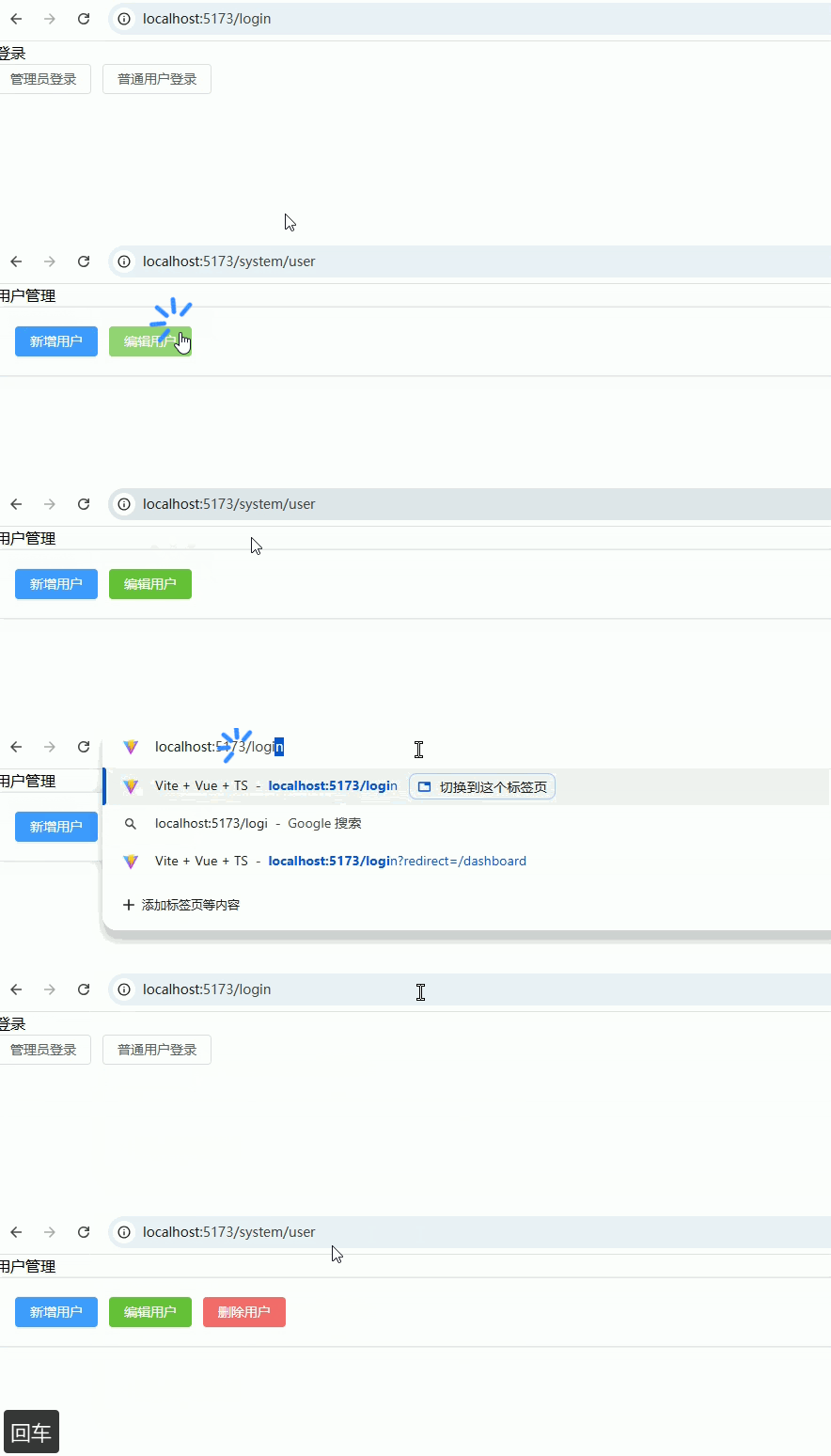
四、增强体验(高频实战)
路由缓存(keep-alive)
功能描述: 缓存页面状态(如表单/滚动位置),避免来回切换时重新加载(后台系统高频需求)。
1. 路由配置(添加缓存标识)(router/index.ts)
ts
// 文件:src/router/index.ts

import { createRouter, createWebHistory, type RouteRecordRaw } from 'vue-router'
import Layout from '@/layouts/Layout.vue'

const routes: Array<RouteRecordRaw> = [
    {
        path: '/',
        component: Layout,
        redirect: '/dashboard',
        children: [
            {
                path: 'dashboard',
                name: 'Dashboard',
                component: () => import('@/views/Dashboard.vue'),
                meta: { keepAlive: true },
            },
            {
                path: 'system/user',
                name: 'UserManage',
                component: () => import('@/views/system/User.vue'),
                meta: { keepAlive: true },
            },
            {
                path: 'system/role',
                name: 'RoleManage',
                component: () => import('@/views/system/Role.vue'),
                meta: { keepAlive: false },
            },
        ],
    },
]

const router = createRouter({
    history: createWebHistory(),
    routes,
})

export default router2. Layout 中使用 keep-alive(核心)
vue
<!-- 文件:src/layouts/Layout.vue -->
<template>
  <div class="layout">
    <div class="sidebar">
      <!-- 模拟菜单 -->
      <el-menu router>
        <el-menu-item index="/dashboard">首页</el-menu-item>
        <el-menu-item index="/system/user">用户管理</el-menu-item>
        <el-menu-item index="/system/role">角色管理</el-menu-item>
      </el-menu>
    </div>

    <div class="content">
      <router-view v-slot="{ Component, route }">
        <!-- ✅ 关键:统一入口 -->
        <keep-alive>
          <component
              v-if="route.meta.keepAlive"
              :is="Component"
              :key="route.fullPath"
          />
        </keep-alive>

        <!-- ❗ 不缓存页面 -->
        <component
            v-if="!route.meta.keepAlive"
            :is="Component"
            :key="route.fullPath"
        />
      </router-view>
    </div>
  </div>
</template>

<script setup lang="ts">
</script>

<style scoped>
.layout {
  display: flex;
}

.sidebar {
  width: 200px;
}

.content {
  flex: 1;
  padding: 16px;
}
</style>3. Dashboard 页面(Dashboard.vue)
<!-- 文件:src/views/Dashboard.vue -->
<template>
  <div>
    <h2>首页(缓存)</h2>

    <el-card>
      <p>输入内容后切换页面,再回来不会丢失 👇</p>

      <el-input v-model="text" placeholder="输入点内容试试" />
    </el-card>
  </div>
</template>

<script setup lang="ts">
import { ref, onActivated, onDeactivated } from 'vue'

const text = ref('')

onActivated(() => {
  console.log('Dashboard 激活(缓存恢复)')
})

onDeactivated(() => {
  console.log('Dashboard 被缓存(未销毁)')
})
</script>4. 页面必须设置 name(非常关键)
vue
<!-- 文件:src/views/system/User.vue -->
<template>
  <div>
    <h2>用户管理(缓存)</h2>

    <el-input v-model="keyword" placeholder="输入不会丢失" />
  </div>
</template>

<script setup lang="ts">
import { ref, onActivated, onDeactivated } from 'vue'

const keyword = ref('')

onActivated(() => {
  console.log('User 激活')
})

onDeactivated(() => {
  console.log('User 缓存')
})
</script>5. 测试页面(Role.vue,不缓存)
vue
<!-- 文件:src/views/system/Role.vue -->
<template>
  <div>
    <h2>角色管理(不缓存)</h2>

    <el-input v-model="keyword" placeholder="切换会清空" />
  </div>
</template>

<script setup lang="ts">
import { ref, onUnmounted } from 'vue'

const keyword = ref('')

onUnmounted(() => {
  console.log('Role 已销毁')
})
</script>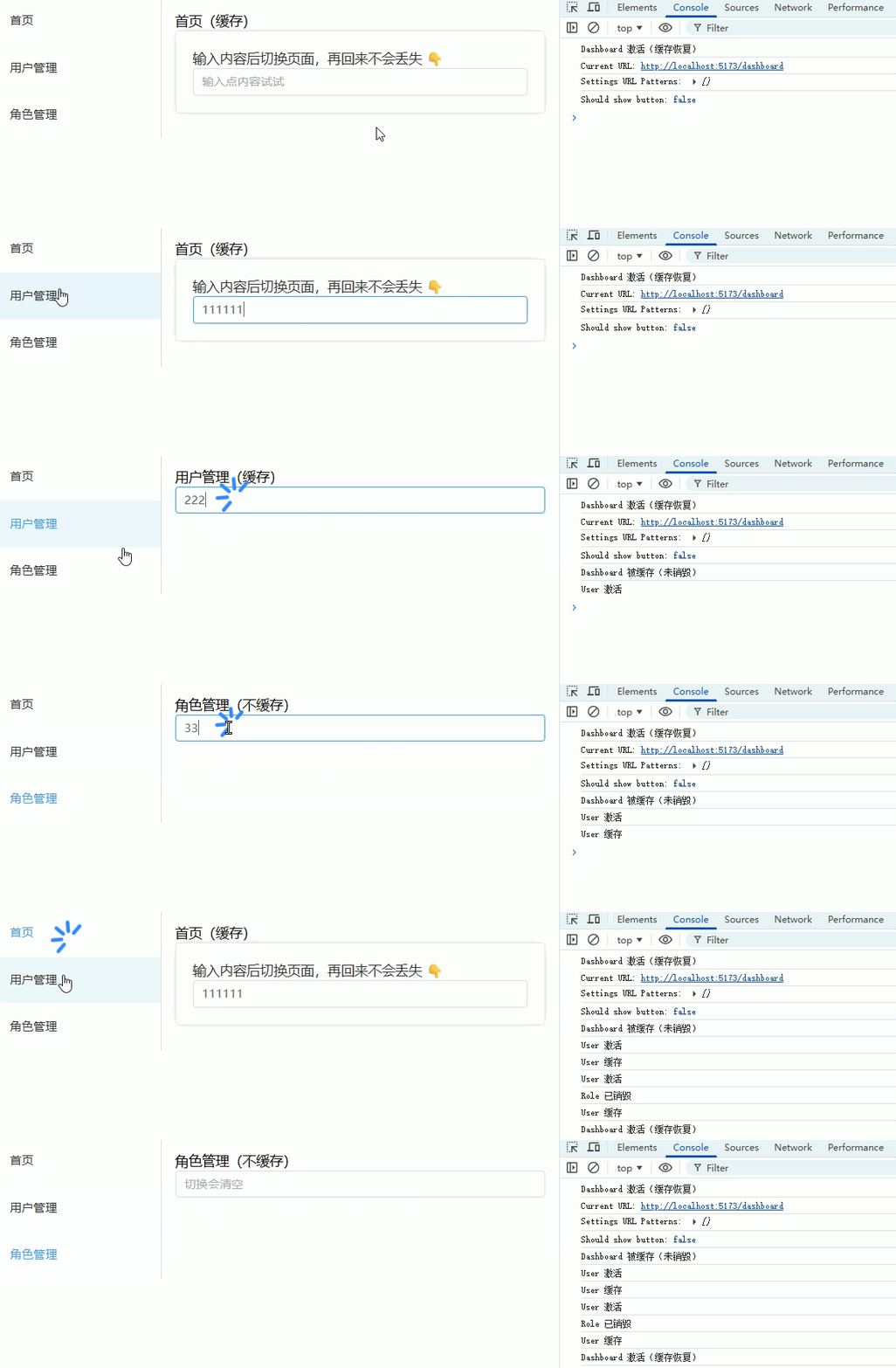
页面标题动态设置(meta.title)
功能描述: 根据路由 meta.title 动态修改浏览器标题(后台系统必备)。
1. 路由配置(添加 title)(router/index.ts)
ts
// 文件:src/router/index.ts

import { createRouter, createWebHistory, type RouteRecordRaw } from 'vue-router'
import Layout from '@/layouts/Layout.vue'

const routes: Array<RouteRecordRaw> = [
  {
    path: '/',
    component: Layout,
    redirect: '/dashboard',
    children: [
      {
        path: 'dashboard',
        name: 'Dashboard',
        component: () => import('@/views/Dashboard.vue'),
        meta: { title: '首页' },
      },
      {
        path: 'system/user',
        name: 'UserManage',
        component: () => import('@/views/system/User.vue'),
        meta: { title: '用户管理' },
      },
      {
        path: 'system/role',
        name: 'RoleManage',
        component: () => import('@/views/system/Role.vue'),
        meta: { title: '角色管理' },
      },
    ],
  },
  {
    path: '/login',
    name: 'Login',
    component: () => import('@/views/Login.vue'),
    meta: { title: '登录' },
  },
]

const router = createRouter({
  history: createWebHistory(),
  routes,
})

/**
 * ✅ 全局后置守卫:设置页面标题
 */
router.afterEach((to) => {
  const title = to.meta.title as string
  const baseTitle = '后台管理系统'

  document.title = title
    ? `${title} - ${baseTitle}`
    : baseTitle
})

export default router2. Layout.vue(完整)
vue
<!-- 文件:src/layouts/Layout.vue -->
<template>
  <div class="layout">
    <div class="sidebar">
      <el-menu router :default-active="route.path">
        <el-menu-item index="/dashboard">首页</el-menu-item>
        <el-menu-item index="/system/user">用户管理</el-menu-item>
        <el-menu-item index="/system/role">角色管理</el-menu-item>
      </el-menu>
    </div>

    <div class="content">
      <router-view />
    </div>
  </div>
</template>

<script setup lang="ts">
import { useRoute } from 'vue-router'

const route = useRoute()
</script>

<style scoped>
.layout {
  display: flex;
  height: 100vh;
}

.sidebar {
  width: 200px;
  border-right: 1px solid #eee;
}

.content {
  flex: 1;
  padding: 20px;
}
</style>3. Dashboard.vue(带跳转测试)
vue
<!-- 文件:src/views/Dashboard.vue -->
<template>
  <div>
    <h2>首页</h2>

    <el-space>
      <el-button type="primary" @click="goUser">
        去用户管理
      </el-button>

      <el-button type="success" @click="goRole">
        去角色管理
      </el-button>
    </el-space>
  </div>
</template>

<script setup lang="ts">
import { useRouter } from 'vue-router'

const router = useRouter()

const goUser = () => {
  router.push('/system/user')
}

const goRole = () => {
  router.push('/system/role')
}
</script>4. User.vue
vue
<!-- 文件:src/views/system/User.vue -->
<template>
  <div>
    <h2>用户管理</h2>

    <el-button @click="goDashboard">
      返回首页
    </el-button>
  </div>
</template>

<script setup lang="ts">
import { useRouter } from 'vue-router'

const router = useRouter()

const goDashboard = () => {
  router.push('/dashboard')
}
</script>5. Role.vue
vue
<!-- 文件:src/views/system/Role.vue -->
<template>
  <div>
    <h2>角色管理</h2>

    <el-button @click="goDashboard">
      返回首页
    </el-button>
  </div>
</template>

<script setup lang="ts">
import { useRouter } from 'vue-router'

const router = useRouter()

const goDashboard = () => {
  router.push('/dashboard')
}
</script>6. Login.vue
vue
<!-- 文件:src/views/Login.vue -->
<template>
  <div>
    <h2>登录页</h2>

    <el-button type="primary" @click="goHome">
      登录进入首页
    </el-button>
  </div>
</template>

<script setup lang="ts">
import { useRouter } from 'vue-router'

const router = useRouter()

const goHome = () => {
  router.push('/dashboard')
}
</script>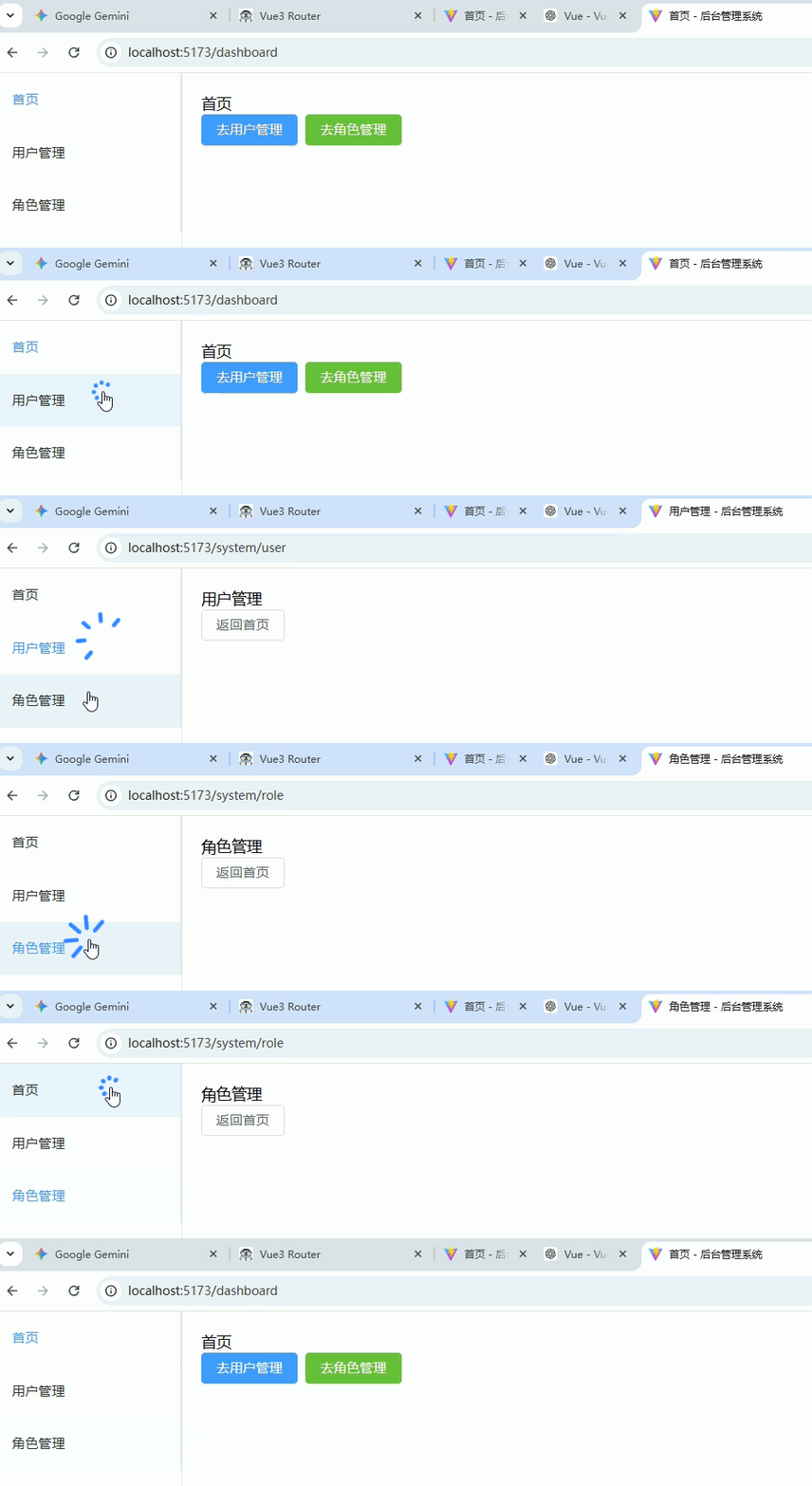
面包屑导航(根据路由生成)
功能描述: 根据当前路由路径和 meta.title 自动生成面包屑,支持多级路由。
1. 路由配置(添加多级 title)(router/index.ts)
ts
// 文件:src/router/index.ts

import { createRouter, createWebHistory, type RouteRecordRaw } from 'vue-router'
import Layout from '@/layouts/Layout.vue'

const routes: Array<RouteRecordRaw> = [
  {
    path: '/',
    component: Layout,
    redirect: '/dashboard',
    children: [
      {
        path: 'dashboard',
        name: 'Dashboard',
        component: () => import('@/views/Dashboard.vue'),
        meta: { title: '首页' },
      },
      {
        path: 'system',
        name: 'System',
        meta: { title: '系统管理' },
        component: () => import('@/views/system/System.vue'),
        children: [
          {
            path: 'user',
            name: 'UserManage',
            component: () => import('@/views/system/User.vue'),
            meta: { title: '用户管理' },
          },
          {
            path: 'role',
            name: 'RoleManage',
            component: () => import('@/views/system/Role.vue'),
            meta: { title: '角色管理' },
          },
        ],
      },
    ],
  },
  {
    path: '/login',
    name: 'Login',
    component: () => import('@/views/Login.vue'),
    meta: { title: '登录' },
  },
]

const router = createRouter({
  history: createWebHistory(),
  routes,
})

export default router2. Layout.vue(带面包屑组件)
vue
<!-- 文件:src/layouts/Layout.vue -->
<template>
  <div class="layout">
    <div class="sidebar">
      <el-menu router :default-active="route.path">
        <el-menu-item index="/dashboard">首页</el-menu-item>
        <el-sub-menu index="/system" v-if="true">
          <template #title>系统管理</template>
          <el-menu-item index="/system/user">用户管理</el-menu-item>
          <el-menu-item index="/system/role">角色管理</el-menu-item>
        </el-sub-menu>
      </el-menu>
    </div>

    <div class="content">
      <!-- 面包屑 -->
      <el-breadcrumb separator="/">
        <el-breadcrumb-item v-for="item in breadcrumbs" :key="item.path">
          <router-link :to="item.path">{{ item.meta.title }}</router-link>
        </el-breadcrumb-item>
      </el-breadcrumb>

      <router-view />
    </div>
  </div>
</template>

<script setup lang="ts">
import { computed } from 'vue'
import { useRoute, useRouter } from 'vue-router'

const route = useRoute()
const router = useRouter()

/**
 * 根据路由 path 生成面包屑
 */
const breadcrumbs = computed(() => {
  const paths = route.matched // 当前路由匹配的所有父级
  return paths.filter(r => r.meta?.title) // 只显示有 title 的路由
})
</script>

<style scoped>
.layout {
  display: flex;
  height: 100vh;
}

.sidebar {
  width: 200px;
  border-right: 1px solid #eee;
}

.content {
  flex: 1;
  padding: 20px;
}
</style>3. System.vue(中间父级页面)
vue
<!-- 文件:src/views/system/System.vue -->
<template>
  <router-view />
</template>

<script setup lang="ts">
defineOptions({ name: 'System' })
</script>4. User.vue & Role.vue(子页面示例)
vue
<!-- 文件:src/views/system/User.vue -->
<template>
  <div>
    <h2>用户管理</h2>
    <el-input v-model="keyword" placeholder="输入不会丢失" />
  </div>
</template>

<script setup lang="ts">
defineOptions({ name: 'UserManage' })
import { ref } from 'vue'
const keyword = ref('')
</script>
<!-- 文件:src/views/system/Role.vue -->
<template>
  <div>
    <h2>角色管理</h2>
    <el-input v-model="keyword" placeholder="输入会清空" />
  </div>
</template>

<script setup lang="ts">
defineOptions({ name: 'RoleManage' })
import { ref } from 'vue'
const keyword = ref('')
</script>5. Dashboard.vue(首页示例)
vue
<!-- 文件:src/views/Dashboard.vue -->
<template>
  <div>
    <h2>首页</h2>
    <el-button type="primary" @click="goUser">去用户管理</el-button>
    <el-button type="success" @click="goRole">去角色管理</el-button>
  </div>
</template>

<script setup lang="ts">
defineOptions({ name: 'Dashboard' })
import { useRouter } from 'vue-router'

const router = useRouter()
const goUser = () => router.push('/system/user')
const goRole = () => router.push('/system/role')
</script>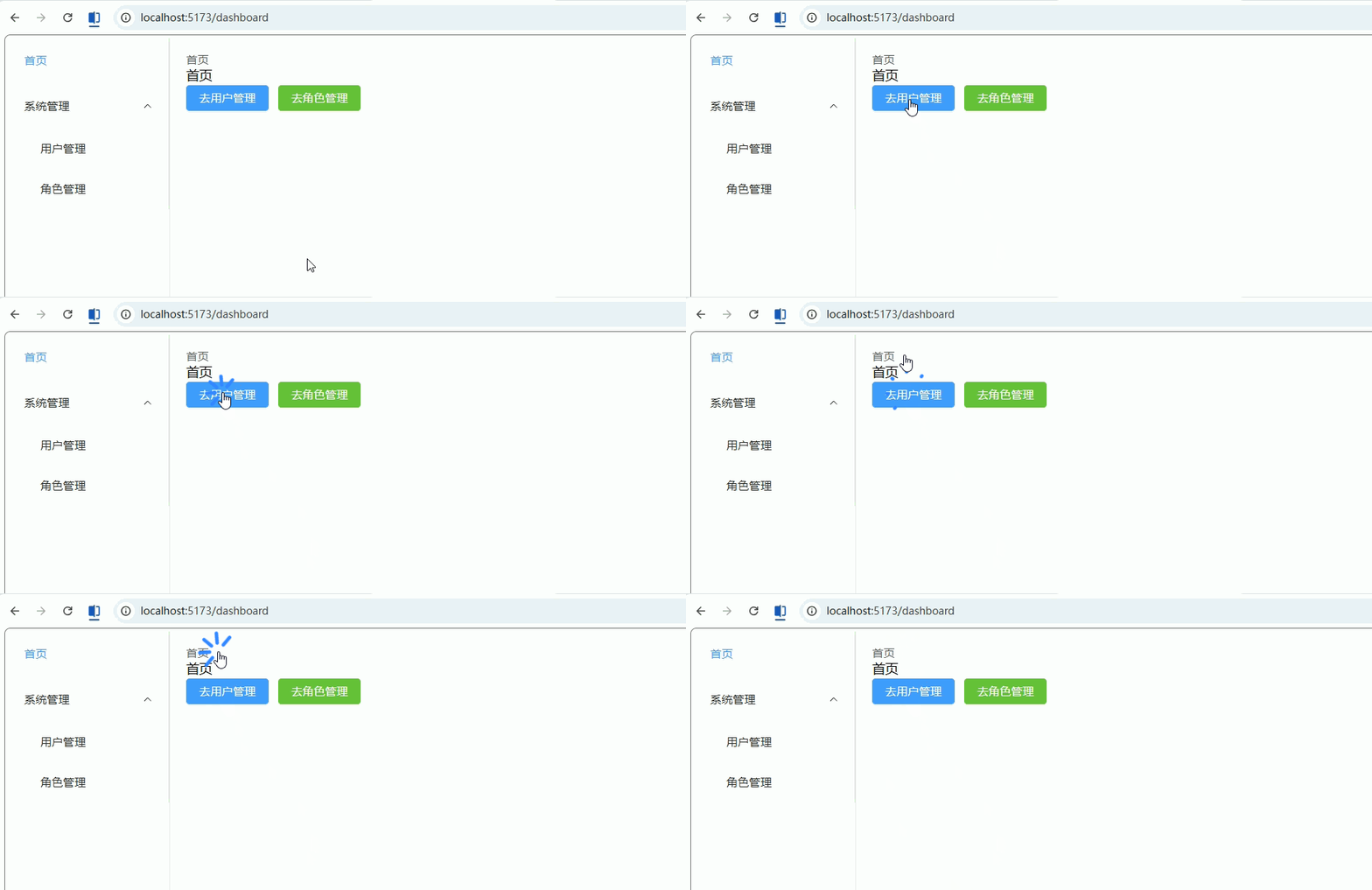
标签页(多页签 Tab 管理)
功能描述: 实现后台系统常见的“多页签”:
- 路由切换自动新增 Tab
- 点击 Tab 切换页面
- 关闭 Tab
1. 路由配置(必须有 title)(router/index.ts)
ts
// 文件:src/router/index.ts

import { createRouter, createWebHistory, type RouteRecordRaw } from 'vue-router'
import Layout from '@/layouts/Layout.vue'

const routes: Array<RouteRecordRaw> = [
  {
    path: '/',
    component: Layout,
    redirect: '/dashboard',
    children: [
      {
        path: 'dashboard',
        name: 'Dashboard',
        component: () => import('@/views/Dashboard.vue'),
        meta: { title: '首页' },
      },
      {
        path: 'system/user',
        name: 'UserManage',
        component: () => import('@/views/system/User.vue'),
        meta: { title: '用户管理' },
      },
      {
        path: 'system/role',
        name: 'RoleManage',
        component: () => import('@/views/system/Role.vue'),
        meta: { title: '角色管理' },
      },
    ],
  },
]

const router = createRouter({
  history: createWebHistory(),
  routes,
})

export default router2. Tabs 管理(Layout.vue 完整实现)
vue
<!-- 文件:src/layouts/Layout.vue -->
<template>
  <div class="layout">
    <!-- 侧边栏 -->
    <div class="sidebar">
      <el-menu router :default-active="route.path">
        <el-menu-item index="/dashboard">首页</el-menu-item>
        <el-menu-item index="/system/user">用户管理</el-menu-item>
        <el-menu-item index="/system/role">角色管理</el-menu-item>
      </el-menu>
    </div>

    <div class="content">
      <!-- Tabs -->
      <el-tabs
        v-model="activeTab"
        type="card"
        closable
        @tab-click="handleClick"
        @tab-remove="handleRemove"
      >
        <el-tab-pane
          v-for="tab in tabs"
          :key="tab.path"
          :label="tab.title"
          :name="tab.path"
        />
      </el-tabs>

      <!-- 页面 -->
      <router-view />
    </div>
  </div>
</template>

<script setup lang="ts">
import { ref, watch } from 'vue'
import { useRoute, useRouter } from 'vue-router'

interface TabItem {
  title: string
  path: string
}

const route = useRoute()
const router = useRouter()

// 当前激活 tab
const activeTab = ref(route.path)

// tab 列表
const tabs = ref<TabItem[]>([
  { title: '首页', path: '/dashboard' }, // 默认首页
])

/**
 * 监听路由变化 → 添加 tab
 */
watch(
  () => route.path,
  () => {
    activeTab.value = route.path

    const exists = tabs.value.find(t => t.path === route.path)

    if (!exists) {
      tabs.value.push({
        title: route.meta.title as string,
        path: route.path,
      })
    }
  },
  { immediate: true }
)

/**
 * 点击 tab
 */
const handleClick = (tab: any) => {
  router.push(tab.props.name)
}

/**
 * 关闭 tab
 */
const handleRemove = (targetPath: string) => {
  // 首页不允许关闭
  if (targetPath === '/dashboard') return

  const index = tabs.value.findIndex(t => t.path === targetPath)

  tabs.value.splice(index, 1)

  // 如果关闭的是当前页 → 跳到最后一个
  if (activeTab.value === targetPath) {
    const lastTab = tabs.value[tabs.value.length - 1]
    router.push(lastTab.path)
  }
}
</script>

<style scoped>
.layout {
  display: flex;
  height: 100vh;
}

.sidebar {
  width: 200px;
  border-right: 1px solid #eee;
}

.content {
  flex: 1;
  padding: 10px;
}
</style>3. Dashboard.vue(测试入口)
vue
<!-- 文件:src/views/Dashboard.vue -->
<template>
  <div>
    <h2>首页</h2>

    <el-space>
      <el-button type="primary" @click="goUser">
        打开用户管理
      </el-button>

      <el-button type="success" @click="goRole">
        打开角色管理
      </el-button>
    </el-space>
  </div>
</template>

<script setup lang="ts">
defineOptions({ name: 'Dashboard' })

import { useRouter } from 'vue-router'

const router = useRouter()

const goUser = () => router.push('/system/user')
const goRole = () => router.push('/system/role')
</script>4. User.vue
vue
<!-- 文件:src/views/system/User.vue -->
<template>
  <div>
    <h2>用户管理</h2>
  </div>
</template>

<script setup lang="ts">
defineOptions({ name: 'UserManage' })
</script>5. Role.vue
vue
<!-- 文件:src/views/system/Role.vue -->
<template>
  <div>
    <h2>角色管理</h2>
  </div>
</template>

<script setup lang="ts">
defineOptions({ name: 'RoleManage' })
</script>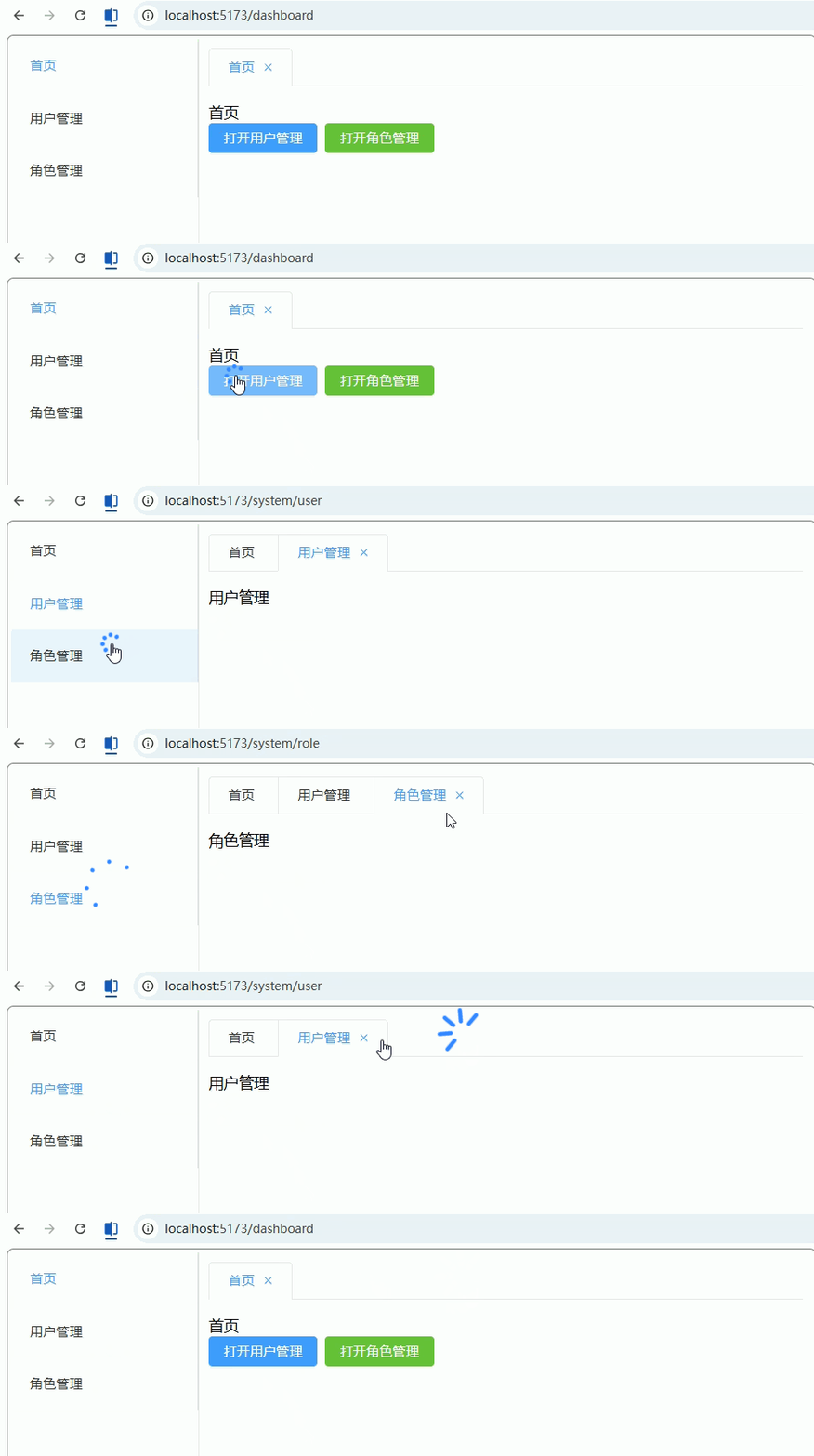
五、进阶能力(中大型项目)
动态添加路由(addRoute)
功能描述: 在运行时动态注册路由(常用于权限系统 / 后端返回菜单)。
1. 基础路由(router/index.ts)
ts
// 文件:src/router/index.ts

import { createRouter, createWebHistory, type RouteRecordRaw } from 'vue-router'
import Layout from '@/layouts/Layout.vue'

// 静态路由(固定存在)
const staticRoutes: Array<RouteRecordRaw> = [
  {
    path: '/login',
    name: 'Login',
    component: () => import('@/views/Login.vue'),
  },
  {
    path: '/',
    component: Layout,
    redirect: '/dashboard',
    children: [
      {
        path: 'dashboard',
        name: 'Dashboard',
        component: () => import('@/views/Dashboard.vue'),
        meta: { title: '首页' },
      },
    ],
  },
]

const router = createRouter({
  history: createWebHistory(),
  routes: staticRoutes,
})

export default router2. 动态路由数据(模拟后端返回)
ts
// 文件:src/router/dynamicRoutes.ts

import { type RouteRecordRaw } from 'vue-router'

// 模拟后端返回
export const dynamicRoutes: RouteRecordRaw[] = [
  {
    path: 'system/user',
    name: 'UserManage',
    component: () => import('@/views/system/User.vue'),
    meta: { title: '用户管理' },
  },
  {
    path: 'system/role',
    name: 'RoleManage',
    component: () => import('@/views/system/Role.vue'),
    meta: { title: '角色管理' },
  },
]3. 动态添加路由(核心逻辑)
ts
// 文件:src/router/permission.ts

import router from './index'
import { dynamicRoutes } from './dynamicRoutes'

// 是否已添加
let isAdded = false

export const setupDynamicRoutes = () => {
    if (isAdded) return

    dynamicRoutes.forEach(route => {
        // 添加到 Layout 下
        router.addRoute('Layout', route)
    })

    isAdded = true
    return true
}

export const hasAddedRoutes = () => isAdded4. 在守卫中调用(router/index.ts)
ts
// 文件:src/router/index.ts(补充)

import { setupDynamicRoutes, hasAddedRoutes } from './permission'

router.beforeEach((to, from, next) => {
    const token = localStorage.getItem('token')

    // 未登录
    if (!token && to.path !== '/login') {
        return next('/login')
    }

    // 已登录 → 动态添加路由
    if (token) {
        // ❗ 只在第一次加路由时,才重定向
        if (!hasAddedRoutes()) {
            const added = setupDynamicRoutes()

            if (added) {
                // 关键:重新匹配路由
                return next({ ...to, replace: true })
            }
        }

    }

    next()
})5. Layout.vue(菜单自动显示)
vue
<!-- 文件:src/layouts/Layout.vue -->
<template>
  <div class="layout">
    <div class="sidebar">
      <el-menu router :default-active="route.path">
        <el-menu-item index="/dashboard">首页</el-menu-item>

        <!-- 动态菜单 -->
        <el-menu-item
            v-for="r in dynamicMenus"
            :key="r.path"
            :index="r.path"
        >
          {{ r.meta.title }}
        </el-menu-item>
      </el-menu>
    </div>

    <div class="content">
      <router-view />
    </div>
  </div>
</template>

<script setup lang="ts">
import router from '@/router'
import { useRoute } from 'vue-router'
import { computed } from 'vue'

const route = useRoute()

// 获取动态路由(简单过滤)
const dynamicMenus = computed(() => {
  return router
      .getRoutes()
      .filter(r => r.meta?.title && r.path.includes('system'))
})
</script>

<style scoped>
.layout {
  display: flex;
  height: 100vh;
}
.sidebar {
  width: 200px;
}
.content {
  flex: 1;
  padding: 20px;
}
</style>6. Dashboard.vue(触发测试)
vue
<!-- 文件:src/views/Dashboard.vue -->
<template>
  <div>
    <h2>首页</h2>

    <el-button type="primary" @click="goUser">
      去用户管理(动态路由)
    </el-button>
  </div>
</template>

<script setup lang="ts">
defineOptions({ name: 'Dashboard' })

import { useRouter } from 'vue-router'

const router = useRouter()

const goUser = () => {
  router.push('/system/user')
}
</script>7. Login.vue(登录触发)
vue
<!-- 文件:src/views/Login.vue -->
<template>
  <div>
    <h2>登录</h2>

    <el-button type="primary" @click="login">
      登录
    </el-button>
  </div>
</template>

<script setup lang="ts">
import { useRouter } from 'vue-router'

const router = useRouter()

const login = () => {
  localStorage.setItem('token', '123')
  router.replace('/dashboard')
}
</script>8. User.vue / Role.vue
vue
<!-- 文件:src/views/system/User.vue -->
<template>
  <div><h2>用户管理</h2></div>
</template>

<script setup lang="ts">
defineOptions({ name: 'UserManage' })
</script>
<!-- 文件:src/views/system/Role.vue -->
<template>
  <div><h2>角色管理</h2></div>
</template>

<script setup lang="ts">
defineOptions({ name: 'RoleManage' })
</script>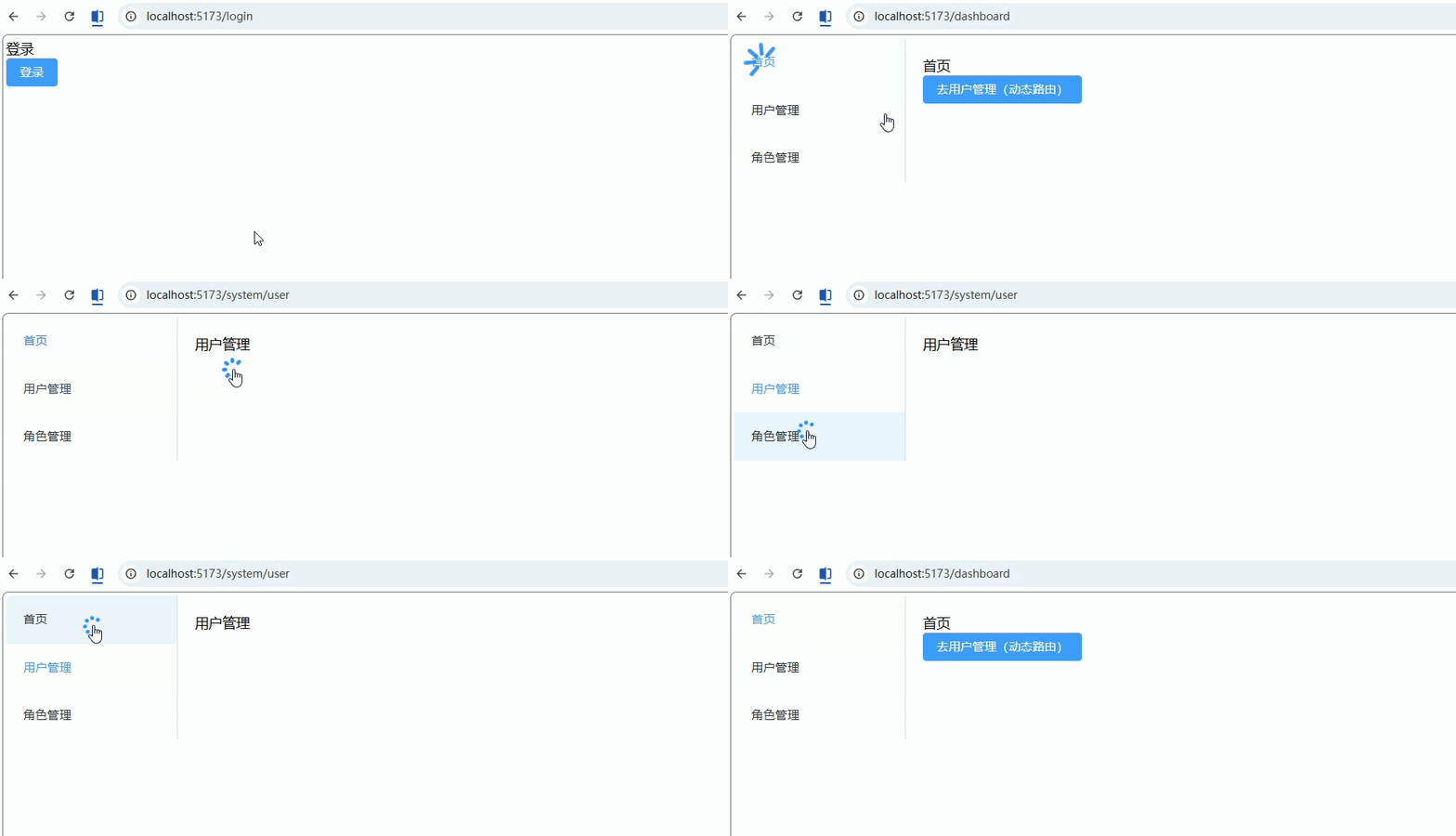
路由滚动行为(scrollBehavior)
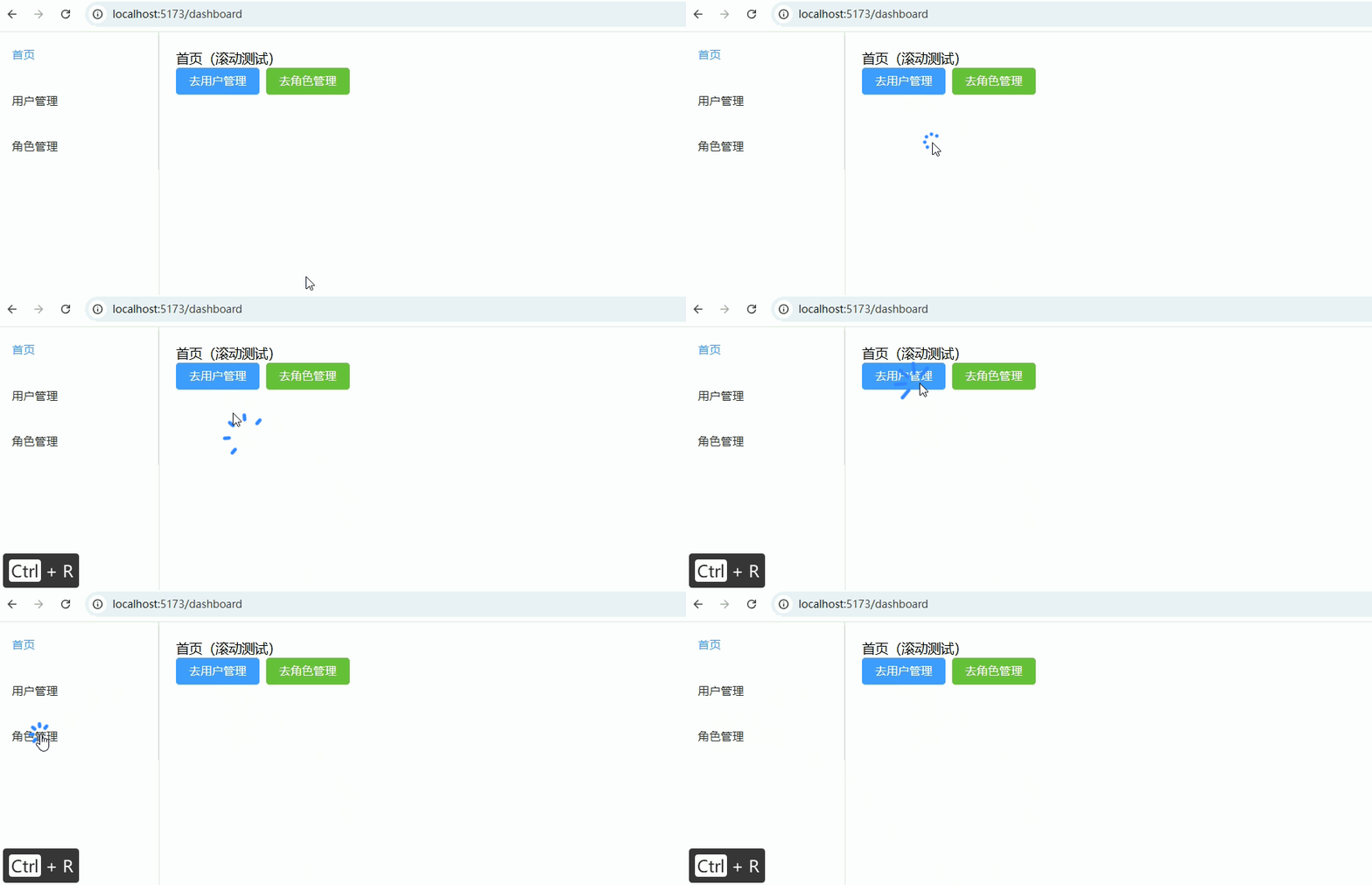
功能描述: 自定义路由切换时页面滚动行为,比如:
- 新页面滚动到顶部
- 返回历史记录恢复滚动位置
- 某些页面固定滚动位置
1. router/index.ts(配置 scrollBehavior)
ts
import { createRouter, createWebHistory, type RouteRecordRaw } from 'vue-router'
import Layout from '@/layouts/Layout.vue'

const routes: Array<RouteRecordRaw> = [
  {
    path: '/',
    component: Layout,
    redirect: '/dashboard',
    children: [
      {
        path: 'dashboard',
        name: 'Dashboard',
        component: () => import('@/views/Dashboard.vue'),
        meta: { title: '首页' },
      },
      {
        path: 'system/user',
        name: 'UserManage',
        component: () => import('@/views/system/User.vue'),
        meta: { title: '用户管理' },
      },
      {
        path: 'system/role',
        name: 'RoleManage',
        component: () => import('@/views/system/Role.vue'),
        meta: { title: '角色管理' },
      },
    ],
  },
  {
    path: '/login',
    name: 'Login',
    component: () => import('@/views/Login.vue'),
    meta: { title: '登录' },
  },
]

const router = createRouter({
  history: createWebHistory(),
  routes,
  scrollBehavior(to, from, savedPosition) {
    // 1️⃣ 浏览器前进/后退,恢复滚动
    if (savedPosition) {
      return savedPosition
    }

    // 2️⃣ 新路由,滚动到顶部
    if (to.hash) {
      // 如果有锚点,滚动到对应位置
      return {
        el: to.hash,
        behavior: 'smooth',
      }
    }

    // 默认滚动到顶部
    return { top: 0 }
  },
})

export default router2. Dashboard.vue(带长内容测试滚动)
vue
<!-- 文件:src/views/Dashboard.vue -->
<template>
  <div style="height:2000px">
    <h2>首页(滚动测试)</h2>

    <el-space>
      <el-button type="primary" @click="goUser">
        去用户管理
      </el-button>
      <el-button type="success" @click="goRole">
        去角色管理
      </el-button>
    </el-space>

    <p style="margin-top:1500px">页面底部,用于测试滚动恢复</p>
  </div>
</template>

<script setup lang="ts">
defineOptions({ name: 'Dashboard' })
import { useRouter } from 'vue-router'
const router = useRouter()
const goUser = () => router.push('/system/user')
const goRole = () => router.push('/system/role')
</script>3. User.vue(长内容示例)
vue
<!-- 文件:src/views/system/User.vue -->
<template>
  <div style="height:1500px">
    <h2>用户管理(滚动测试)</h2>
    <p style="margin-top:1400px">页面底部,用于测试滚动恢复</p>
  </div>
</template>

<script setup lang="ts">
defineOptions({ name: 'UserManage' })
</script>4. Role.vue(长内容示例)
vue
<!-- 文件:src/views/system/Role.vue -->
<template>
  <div style="height:1500px">
    <h2>角色管理(滚动测试)</h2>
    <p style="margin-top:1400px">页面底部,用于测试滚动恢复</p>
  </div>
</template>

<script setup lang="ts">
defineOptions({ name: 'RoleManage' })
</script>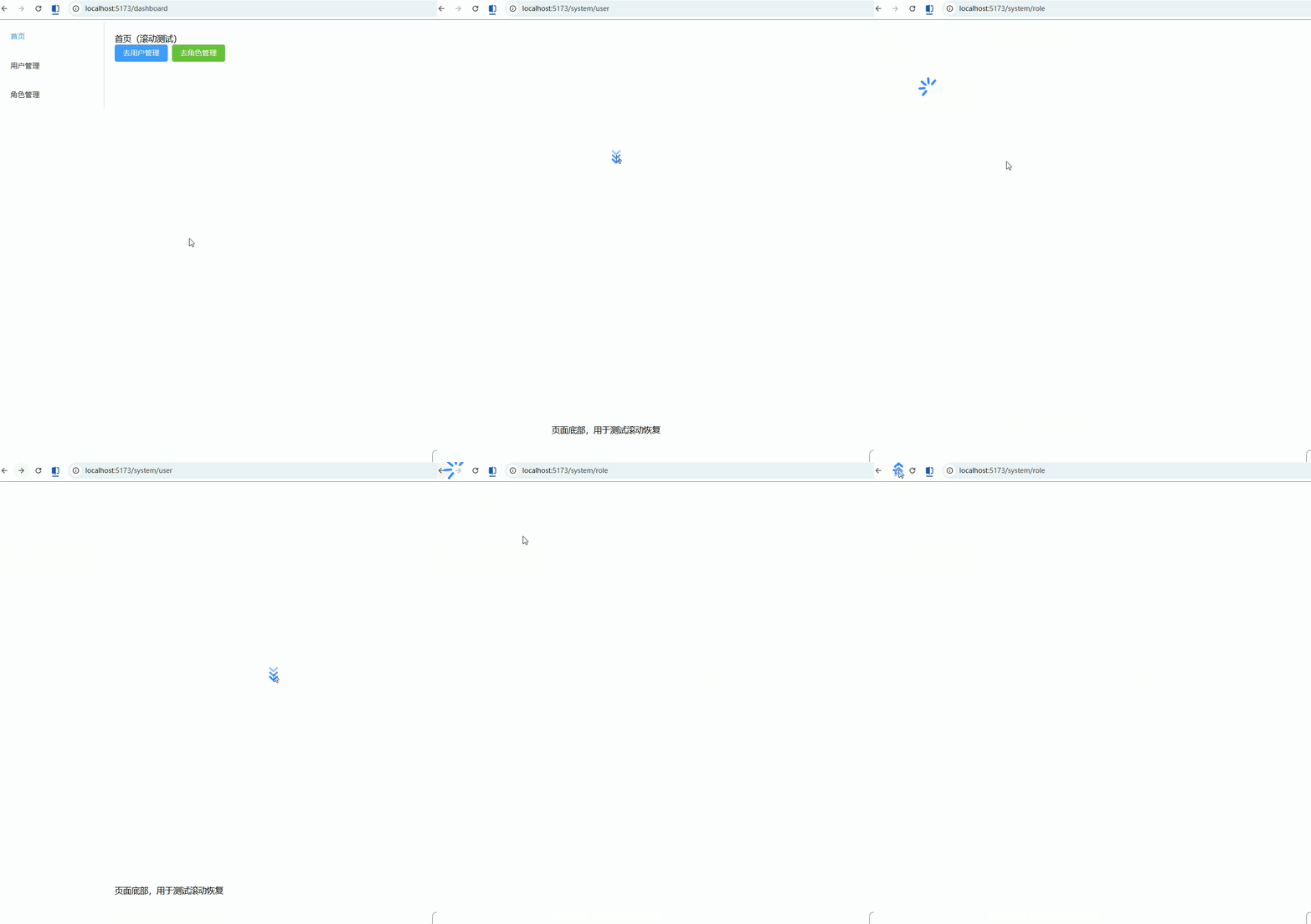
路由过渡动画(transition)
功能描述: 为页面切换添加过渡动画,使后台系统页面切换更加流畅和可视化。
1. App.vue(包裹 <router-view> 并添加 <transition>)
vue
<!-- 文件:src/App.vue -->
<template>
  <router-view v-slot="{ Component }">
    <transition name="fade-slide" mode="out-in">
      <component :is="Component" :key="route.path" />
    </transition>
  </router-view>
</template>

<script setup lang="ts">
import { useRoute } from 'vue-router'
const route = useRoute()
</script>

<style scoped>
/* 淡入淡出 + 滑动效果 */
.fade-slide-enter-active,
.fade-slide-leave-active {
  transition: all 0.3s ease;
}

.fade-slide-enter-from {
  opacity: 0;
  transform: translateX(50px);
}

.fade-slide-enter-to {
  opacity: 1;
  transform: translateX(0);
}

.fade-slide-leave-from {
  opacity: 1;
  transform: translateX(0);
}

.fade-slide-leave-to {
  opacity: 0;
  transform: translateX(-50px);
}
</style>2. Layout.vue(保持不变,只渲染 <router-view>)
vue
<!-- 文件:src/layouts/Layout.vue -->
<template>
  <div class="layout">
    <div class="sidebar">
      <el-menu router :default-active="route.path">
        <el-menu-item index="/dashboard">首页</el-menu-item>
        <el-menu-item index="/system/user">用户管理</el-menu-item>
        <el-menu-item index="/system/role">角色管理</el-menu-item>
      </el-menu>
    </div>

    <div class="content">
      <router-view />
    </div>
  </div>
</template>

<script setup lang="ts">
import { useRoute } from 'vue-router'
const route = useRoute()
</script>

<style scoped>
.layout {
  display: flex;
  height: 100vh;
}

.sidebar {
  width: 200px;
  border-right: 1px solid #eee;
}

.content {
  flex: 1;
  padding: 20px;
}
</style>3. Dashboard.vue / User.vue / Role.vue(内容示例,保持不变)
vue
<!-- 文件:src/views/Dashboard.vue -->
<template>
  <div>
    <h2>首页</h2>
    <el-space>
      <el-button type="primary" @click="goUser">去用户管理</el-button>
      <el-button type="success" @click="goRole">去角色管理</el-button>
    </el-space>
  </div>
</template>

<script setup lang="ts">
import { useRouter } from 'vue-router'
const router = useRouter()
const goUser = () => router.push('/system/user')
const goRole = () => router.push('/system/role')
</script>
<!-- 文件:src/views/system/User.vue -->
<template>
  <div>
    <h2>用户管理</h2>
  </div>
</template>

<script setup lang="ts">
defineOptions({ name: 'UserManage' })
</script>
<!-- 文件:src/views/system/Role.vue -->
<template>
  <div>
    <h2>角色管理</h2>
  </div>
</template>

<script setup lang="ts">
defineOptions({ name: 'RoleManage' })
</script>