uni-app
uni-app 是一个基于 Vue 3 的跨平台应用开发框架, 支持 H5 / 微信小程序 / 支付宝小程序 / App(Android & iOS)/ 桌面端(结合 Electron) 等多端统一开发。
多端运行架构模型
uni-app 的核心思想是:一套代码,多端运行。
从代码到不同平台的执行路径如下:
- 视图层(Vue 组件) 使用 Vue3 + Composition API 编写页面和组件。
- 运行时适配层(uni 运行时) 由 uni-app 提供,负责将 Vue 代码适配到不同平台:
- H5 → 浏览器
- 小程序 → 各平台小程序运行时
- App → 原生 WebView
- 桌面端 → Electron(可选)
- 平台能力层 不同平台提供的原生能力:
- 网络请求
- 文件系统
- 存储
- 系统 API
官方链接
- 官方网站:https://uniapp.dcloud.net.cn/
- GitHub(模板仓库):https://github.com/dcloudio/uni-preset-vue
- Vite 模式说明:https://uniapp.dcloud.net.cn/tutorial/vite.html
快速创建项目
创建项目
使用 官方 Vite + TypeScript 模板:
npx degit dcloudio/uni-preset-vue#vite-ts uniapp-demo说明:
vite-ts- Vue 3
- Vite
- TypeScript
- 无 CLI 交互
- 无多余依赖
- 适合工程化项目与 CI 场景
安装依赖
bash
cd uniapp-demo
pnpm install启动开发环境
启动 H5
bash
pnpm run dev:h5启动微信小程序
bash
pnpm run dev:mp-weixin集成 uView-plus
uView-plus 是一个基于 uni-app + Vue3 的高质量 UI 组件库, 适用于 H5 / 小程序 / App 多端统一开发。
特点说明
- 基于 Vue 3 + Composition API
- 组件丰富,覆盖业务高频场景
- 样式统一,适配多端
- 社区活跃,文档完善
安装依赖
在项目根目录执行:
bash
pnpm add uview-plus@3.7.13
pnpm add -D sass@1.62.1全局引入
1️⃣ 修改 main.ts
ts
import { createSSRApp } from 'vue'
import App from './App.vue'
import uviewPlus from 'uview-plus'

export function createApp() {
  const app = createSSRApp(App)
  app.use(uviewPlus)
  return {
    app,
  }
}手动声明模块 types/uview-plus.d.ts
ts
declare module 'uview-plus';2️⃣ 引入全局样式
在 App.vue 中引入:
vue
<style lang="scss">
@import "@/uni.scss";
</style>⚠️ 必须使用
scss,否则样式不生效
pages.json 添加配置
json
{
  "easycom": {
    "autoscan": true,
    "custom": {
      "^u-(.*)": "uview-plus/components/u-$1/u-$1.vue",
      "^up-(.*)": "uview-plus/components/u-$1/u-$1.vue"
    }
  }
}uni.scss
scss
@import "uview-plus/theme.scss";
@import "uview-plus/index.scss";使用组件示例
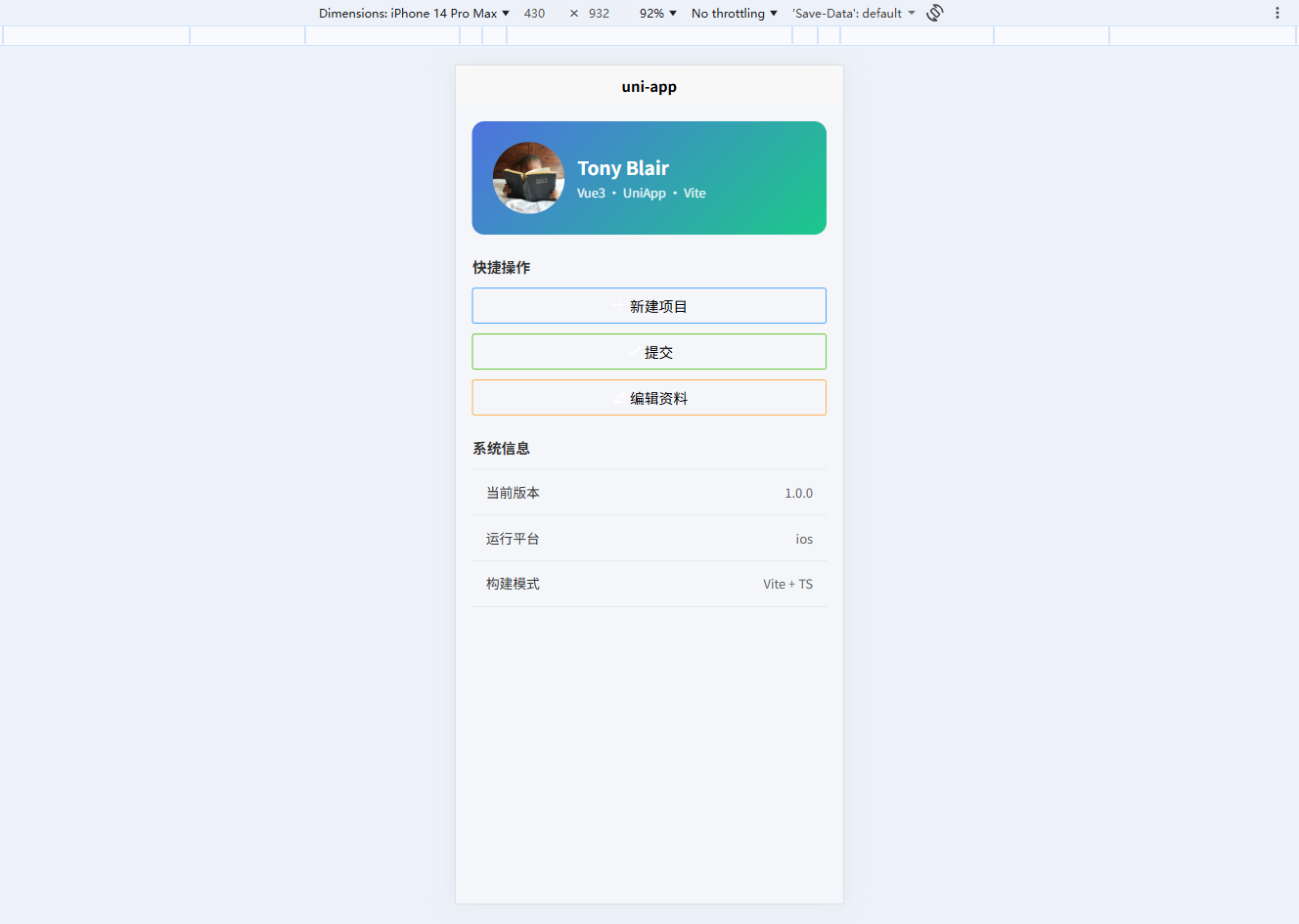
页面示例:src/pages/index/index.vue
vue
<template>
  <view class="page">
    <!-- 顶部用户卡片 -->
    <view class="user-card">
      <up-avatar
          size="80"
          src="https://picsum.photos/200"
      />
      <view class="user-info">
        <text class="name">Tony Blair</text>
        <text class="desc">Vue3 · UniApp · Vite</text>
      </view>
    </view>

    <!-- 功能区 -->
    <view class="section">
      <view class="section-title">快捷操作</view>

      <view class="btn-group">
        <u-button type="primary" icon="plus" @click="onAdd">
          新建项目
        </u-button>

        <u-button type="success" icon="checkmark" @click="onSuccess">
          提交
        </u-button>

        <u-button type="warning" icon="edit-pen" @click="onEdit">
          编辑资料
        </u-button>
      </view>
    </view>

    <!-- 信息卡片 -->
    <view class="section">
      <view class="section-title">系统信息</view>

      <up-cell-group>
        <up-cell title="当前版本" value="1.0.0" />
        <up-cell title="运行平台" :value="platform" />
        <up-cell title="构建模式" value="Vite + TS" />
      </up-cell-group>
    </view>
  </view>
</template>

<script setup lang="ts">
import { ref } from 'vue'

const platform = ref(uni.getSystemInfoSync().platform)

const onAdd = () => {
  uni.showToast({
    title: '创建成功',
    icon: 'success'
  })
}

const onSuccess = () => {
  uni.showToast({
    title: '提交成功',
    icon: 'success'
  })
}

const onEdit = () => {
  uni.showToast({
    title: '跳转编辑页',
    icon: 'none'
  })
}
</script>

<style scoped lang="scss">
.page {
  padding: 32rpx;
  background: #f5f6fa;
  min-height: 100vh;
}

.user-card {
  background: linear-gradient(135deg, #4e73df, #1cc88a);
  border-radius: 24rpx;
  padding: 40rpx;
  display: flex;
  align-items: center;
  color: #fff;
  margin-bottom: 40rpx;

  .user-info {
    margin-left: 24rpx;

    .name {
      font-size: 36rpx;
      font-weight: bold;
      display: block;
    }

    .desc {
      font-size: 24rpx;
      opacity: 0.9;
    }
  }
}

.section {
  margin-bottom: 40rpx;
}

.section-title {
  font-size: 28rpx;
  font-weight: 600;
  margin-bottom: 20rpx;
  color: #333;
}

.btn-group {
  display: flex;
  flex-direction: column;
  gap: 20rpx;
}
</style>