VueUse Motion
VueUse Motion 是一个基于 Vue 3 的动画库,用来快速实现声明式动画和过渡效果。它构建在 VueUse 生态之上,底层基于 Popmotion(同样是 Framer Motion 的动画引擎),专为 Vue.js 3 设计。
基础配置
安装依赖
pnpm add @vueuse/motion@3.0.3 @vueuse/core@14.1.0使用示例
vue
<template>
  <div class="page">
    <section ref="heroRef" class="hero">
      <h1 class="title">Enterprise Dashboard</h1>
      <p class="subtitle">Advanced Motion Experience</p>
    </section>

    <section class="card-list">
      <div
          v-for="index in 4"
          :key="index"
          :ref="setCardRef"
          class="card"
      >
        <h3>Module {{ index }}</h3>
        <p>Elegant animated component</p>
      </div>
    </section>
  </div>
</template>

<script lang="ts" setup>
import { ref, onMounted, nextTick } from 'vue'
import { useMotion } from '@vueuse/motion'

/**
 * DOM Refs
 */
const heroRef = ref<HTMLElement | null>(null)
const cardRefs = ref<HTMLElement[]>([])

/**
 * 安全收集 DOM
 * 这里使用 unknown 再做类型守卫
 */
const setCardRef = (el: unknown) => {
  if (el instanceof HTMLElement) {
    cardRefs.value.push(el)
  }
}

onMounted(async () => {
  await nextTick()

  /**
   * 标题动画
   */
  if (heroRef.value) {
    useMotion(heroRef.value, {
      initial: { opacity: 0, y: 40 },
      enter: {
        opacity: 1,
        y: 0,
        transition: {
          type: 'spring',
          stiffness: 120,
          damping: 14,
        },
      },
    })
  }

  /**
   * 卡片交错动画
   */
  cardRefs.value.forEach((el, index) => {
    useMotion(el, {
      initial: { opacity: 0, y: 60, scale: 0.95 },
      enter: {
        opacity: 1,
        y: 0,
        scale: 1,
        transition: {
          delay: index * 120,
          type: 'spring',
          stiffness: 140,
          damping: 16,
        },
      },
    })
  })
})
</script>

<style scoped>
.page {
  min-height: 100vh;
  background: linear-gradient(135deg, #0f172a, #1e293b);
  color: white;
  padding: 80px 60px;
}

.hero {
  margin-bottom: 60px;
}

.title {
  font-size: 48px;
  font-weight: 700;
}

.subtitle {
  margin-top: 12px;
  font-size: 18px;
  color: #94a3b8;
}

.card-list {
  display: flex;
  gap: 24px;
}

.card {
  flex: 1;
  padding: 30px;
  border-radius: 20px;
  background: rgba(255, 255, 255, 0.05);
  backdrop-filter: blur(12px);
  box-shadow:
      0 10px 30px rgba(0, 0, 0, 0.4),
      inset 0 0 0 1px rgba(255, 255, 255, 0.08);
}
</style>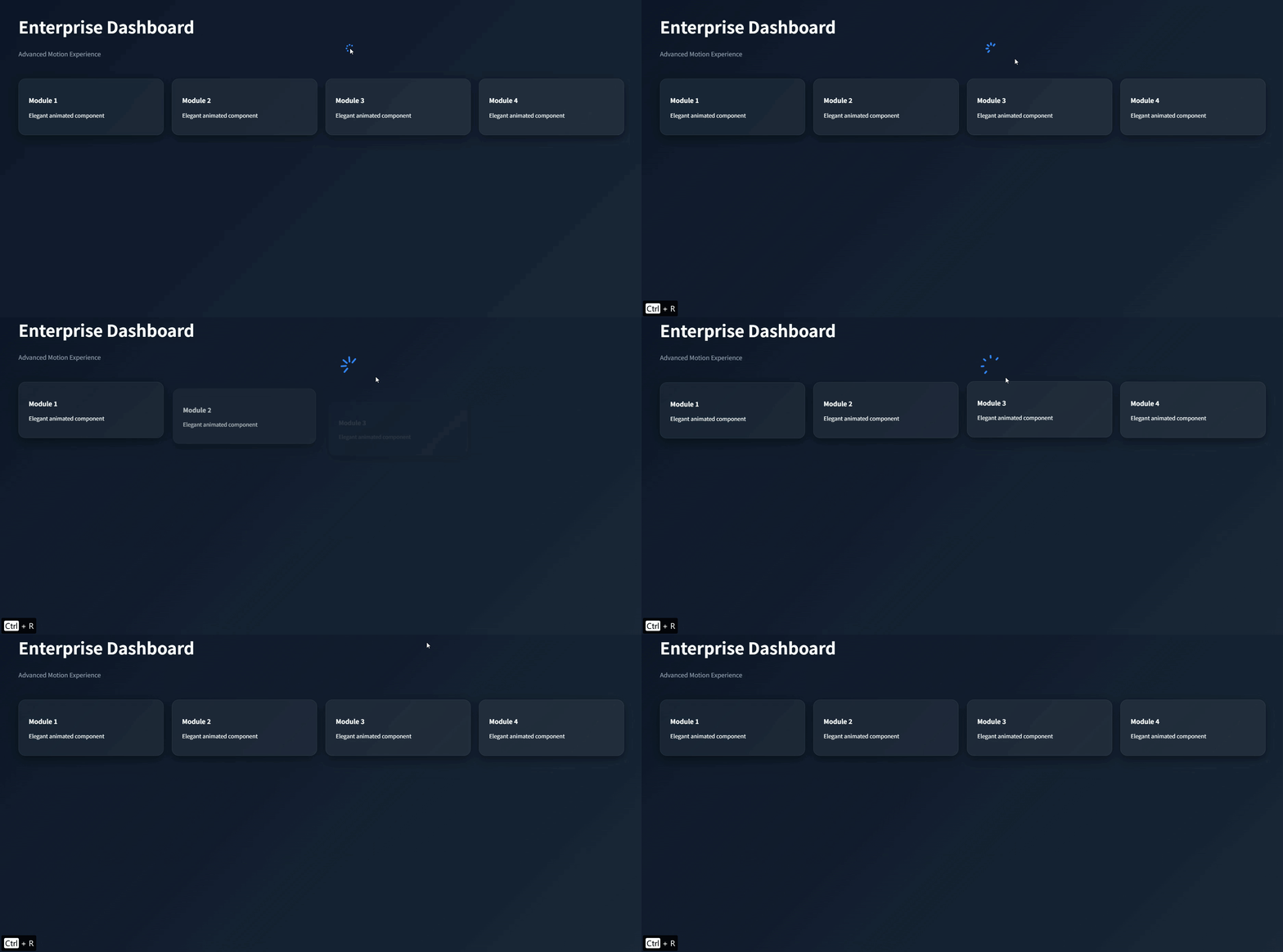
状态驱动的验证卡片
vue
<script setup lang="ts">
import { ref, computed, watch } from 'vue'
import { useMotion, type MotionVariants } from '@vueuse/motion'

/**
 * 1. 业务逻辑状态定义
 */
type AuthStatus = 'idle' | 'processing' | 'success' | 'error'
const status = ref<AuthStatus>('idle')

/**
 * 2. 动画变体配置
 */
const cardRef = ref<HTMLElement | null>(null)
const variants: MotionVariants<AuthStatus> = {
  idle: { opacity: 1, x: 0, scale: 1 },
  processing: {
    scale: 0.97,
    transition: { repeat: Infinity, duration: 800, type: 'keyframes' }
  },
  success: {
    scale: 1.02,
    y: -5,
    transition: { type: 'spring', stiffness: 300, damping: 15 }
  },
  error: {
    x: [-6, 6, -6, 6, 0],
    transition: { duration: 400 }
  }
}

const { variant } = useMotion(cardRef, variants)

/**
 * 3. 优化:使用 Computed 处理与状态相关的 UI 表现
 */
const statusConfig = computed(() => {
  const configs = {
    idle: { label: '开始验证', color: '#0f172a' },
    processing: { label: '处理中...', color: '#64748b' },
    success: { label: '验证通过', color: '#10b981' },
    error: { label: '重试一次', color: '#ef4444' }
  }
  return configs[status.value]
})

/**
 * 4. 监听业务状态变化,驱动动画层
 */
watch(status, (newStatus) => {
  variant.value = newStatus
})

const runVerification = async () => {
  if (status.value === 'processing') return

  status.value = 'processing'

  // 模拟 API 调用
  await new Promise(resolve => setTimeout(resolve, 1500))

  status.value = Math.random() > 0.5 ? 'success' : 'error'

  // 3秒后自动恢复到闲置状态
  setTimeout(() => { status.value = 'idle' }, 3000)
}
</script>

<template>
  <div class="canvas">
    <div ref="cardRef" class="auth-card">
      <div class="icon-badge" :style="{ backgroundColor: statusConfig.color }">
        <span v-if="status === 'success'">✓</span>
        <span v-else-if="status === 'error'">!</span>
        <span v-else>?</span>
      </div>

      <div class="info">
        <h3>Security Shield</h3>
        <p>Status: <span class="status-text">{{ status.toUpperCase() }}</span></p>
      </div>

      <button
          class="action-btn"
          :disabled="status === 'processing'"
          :style="{ backgroundColor: statusConfig.color }"
          @click="runVerification"
      >
        {{ statusConfig.label }}
      </button>
    </div>
  </div>
</template>

<style scoped>
.canvas {
  display: flex;
  justify-content: center;
  align-items: center;
  min-height: 350px;
  background-image: radial-gradient(#e2e8f0 1px, transparent 1px);
  background-size: 20px 20px;
}

.auth-card {
  width: 280px;
  padding: 2rem;
  background: #ffffff;
  border-radius: 24px;
  box-shadow: 0 20px 25px -5px rgba(0,0,0,0.1), 0 10px 10px -5px rgba(0,0,0,0.04);
  text-align: center;
}

.icon-badge {
  width: 56px;
  height: 56px;
  margin: 0 auto 1.5rem;
  border-radius: 18px;
  display: flex;
  align-items: center;
  justify-content: center;
  color: white;
  font-weight: bold;
  font-size: 1.5rem;
  transition: background-color 0.4s ease;
}

.info h3 {
  margin: 0;
  font-size: 1.25rem;
  color: #1e293b;
}

.status-text {
  font-weight: 700;
  font-family: monospace;
}

.action-btn {
  margin-top: 1.5rem;
  width: 100%;
  padding: 0.8rem;
  border: none;
  border-radius: 12px;
  color: white;
  font-weight: 600;
  cursor: pointer;
  transition: all 0.3s cubic-bezier(0.4, 0, 0.2, 1);
}

.action-btn:disabled {
  opacity: 0.6;
  cursor: not-allowed;
}
</style>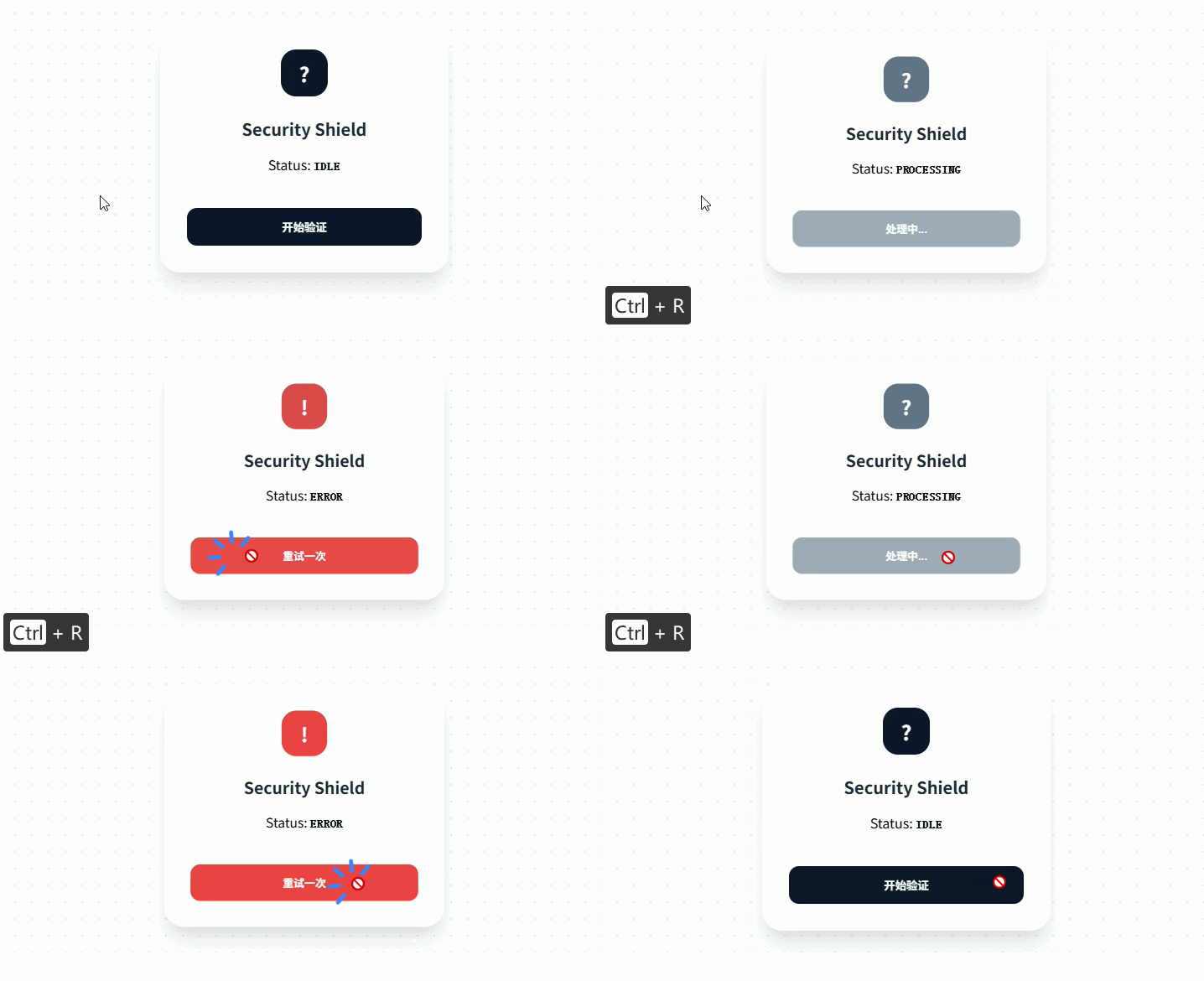
Stagger 列表入场
vue
<script setup lang="ts">
import { ref, onMounted } from 'vue'
import { useMotion } from '@vueuse/motion'

/**
 * 1. 数据定义
 */
interface Project {
  id: number
  title: string
  tag: string
}

const projects = ref<Project[]>([
  { id: 1, title: 'AI Engine Refactor', tag: 'High' },
  { id: 2, title: 'Redesign System v2', tag: 'Medium' },
  { id: 3, title: 'Edge Computing Lab', tag: 'Critical' },
  { id: 4, title: 'Legacy Migration', tag: 'Low' }
])

/**
 * 2. 动态引用管理
 * 在 Vue3 中,v-for 绑定的 ref 需要特殊处理
 */
const itemRefs = ref<HTMLElement[]>([])
const setItemRef = (el: any) => {
  if (el) itemRefs.value.push(el)
}

/**
 * 3. 动画逻辑封装
 */
const initStaggerAnimation = () => {
  itemRefs.value.forEach((el, index) => {
    // 为每个列表项初始化独立的 Motion 实例
    useMotion(el, {
      initial: { opacity: 0, x: -30, filter: 'blur(10px)' },
      enter: {
        opacity: 1,
        x: 0,
        filter: 'blur(0px)',
        transition: {
          type: 'spring',
          stiffness: 150,
          damping: 20,
          delay: index * 120, // 核心:根据索引创建交错感
        }
      }
    })
  })
}

onMounted(() => {
  initStaggerAnimation()
})
</script>

<template>
  <div class="list-wrapper">
    <header class="list-header">
      <h2>Project Backlog</h2>
      <span class="badge">{{ projects.length }} Tasks</span>
    </header>

    <ul class="stagger-list">
      <li
          v-for="item in projects"
          :key="item.id"
          :ref="setItemRef"
          class="list-item"
      >
        <div class="item-content">
          <span class="item-title">{{ item.title }}</span>
          <span :class="['item-tag', item.tag.toLowerCase()]">{{ item.tag }}</span>
        </div>
        <div class="item-arrow">→</div>
      </li>
    </ul>
  </div>
</template>

<style scoped>
.list-wrapper {
  max-width: 400px;
  margin: 40px auto;
  padding: 24px;
  background: #ffffff;
  border-radius: 20px;
  box-shadow: 0 10px 30px rgba(0, 0, 0, 0.05);
}

.list-header {
  display: flex;
  justify-content: space-between;
  align-items: center;
  margin-bottom: 24px;
}

.list-header h2 {
  font-size: 1.2rem;
  color: #0f172a;
  margin: 0;
}

.badge {
  background: #f1f5f9;
  color: #64748b;
  padding: 4px 10px;
  border-radius: 20px;
  font-size: 0.75rem;
  font-weight: 600;
}

.stagger-list {
  list-style: none;
  padding: 0;
  margin: 0;
}

.list-item {
  display: flex;
  justify-content: space-between;
  align-items: center;
  padding: 16px;
  margin-bottom: 12px;
  background: #f8fafc;
  border: 1px solid #f1f5f9;
  border-radius: 12px;
  cursor: pointer;
  transition: all 0.2s ease;
}

.list-item:hover {
  background: #ffffff;
  border-color: #cbd5e1;
  transform: translateY(-2px);
  box-shadow: 0 4px 12px rgba(0, 0, 0, 0.05);
}

.item-content {
  display: flex;
  flex-direction: column;
  gap: 4px;
}

.item-title {
  font-weight: 600;
  color: #334155;
}

.item-tag {
  font-size: 0.7rem;
  text-transform: uppercase;
  letter-spacing: 0.05em;
  font-weight: 700;
}

.item-tag.critical { color: #ef4444; }
.item-tag.high { color: #f59e0b; }
.item-tag.medium { color: #3b82f6; }
.item-tag.low { color: #94a3b8; }

.item-arrow {
  color: #cbd5e1;
  font-size: 1.2rem;
}
</style>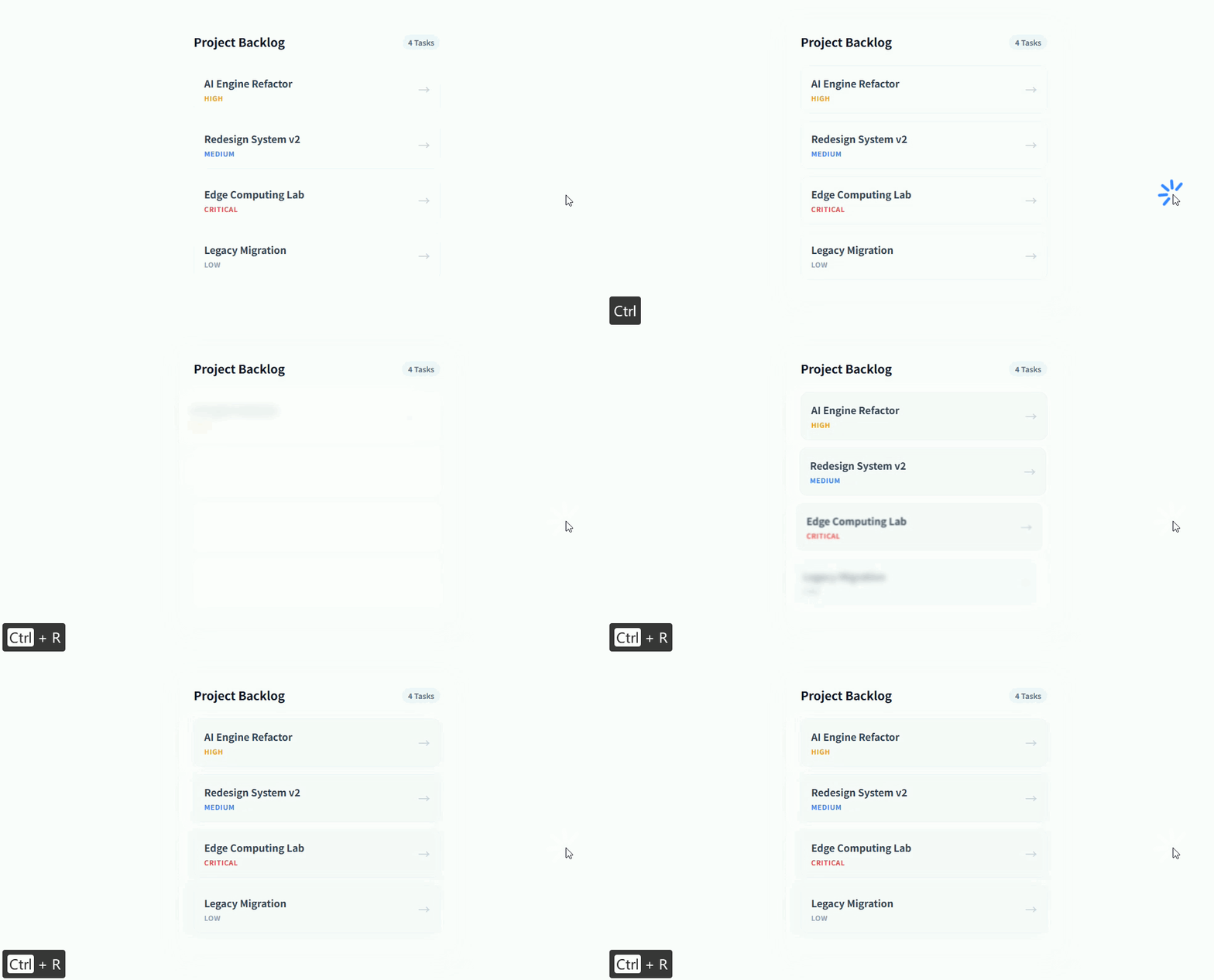
响应鼠标坐标的 3D 视差卡片
vue
<script setup lang="ts">
import { ref } from 'vue'
import { useMotion } from '@vueuse/motion'

const containerRef = ref<HTMLElement | null>(null)
const cardRef = ref<HTMLElement | null>(null)

/**
 * 1. 初始化 Motion
 * 设置较强的 damping (阻尼),让旋转跟随更丝滑,不会产生过度晃动
 */
const { set } = useMotion(cardRef, {
  initial: { rotateX: 0, rotateY: 0, scale: 1 },
  transition: {
    type: 'spring',
    stiffness: 150,
    damping: 25,
    restDelta: 0.001
  }
})

/**
 * 2. 坐标映射逻辑
 */
const handleMouseMove = (e: MouseEvent) => {
  if (!containerRef.value) return

  const { left, top, width, height } = containerRef.value.getBoundingClientRect()

  // 计算鼠标在容器内的相对位置 (-0.5 到 0.5)
  const relativeX = (e.clientX - left) / width - 0.5
  const relativeY = (e.clientY - top) / height - 0.5

  // 映射为旋转角度(最大偏转 20 度)
  set({
    rotateY: relativeX * 40,
    rotateX: -relativeY * 40,
    scale: 1.05
  })
}

const handleMouseLeave = () => {
  // 鼠标离开时重置
  set({ rotateX: 0, rotateY: 0, scale: 1 })
}
</script>

<template>
  <div class="scene">
    <div
        ref="containerRef"
        class="container"
        @mousemove="handleMouseMove"
        @mouseleave="handleMouseLeave"
    >
      <div ref="cardRef" class="glass-card">
        <div class="chip"></div>
        <div class="balance">
          <label>Current Balance</label>
          <h2>$12,450.00</h2>
        </div>
        <div class="footer">
          <span>**** 8888</span>
          <span class="vendor">VISA</span>
        </div>

        <div class="shine"></div>
      </div>
    </div>
  </div>
</template>

<style scoped>
.scene {
  perspective: 1000px; /* 必须设置透视距离 */
  display: flex;
  justify-content: center;
  align-items: center;
  min-height: 400px;
  background: #0f172a;
}

.container {
  padding: 50px;
  cursor: pointer;
}

.glass-card {
  position: relative;
  width: 340px;
  height: 200px;
  padding: 30px;
  background: linear-gradient(135deg, rgba(255,255,255,0.1), rgba(255,255,255,0.05));
  backdrop-filter: blur(10px);
  border: 1px solid rgba(255,255,255,0.2);
  border-radius: 24px;
  box-shadow: 0 25px 50px -12px rgba(0,0,0,0.5);
  color: white;
  display: flex;
  flex-direction: column;
  justify-content: space-between;
  transform-style: preserve-3d; /* 开启 3D 子元素空间 */
}

/* 增强视差感:让文字浮动在卡片表面 */
.balance h2 {
  margin: 5px 0 0 0;
  font-size: 1.8rem;
  transform: translateZ(50px); /* 关键:Z轴位移 */
}

.chip {
  width: 45px;
  height: 35px;
  background: linear-gradient(135deg, #f59e0b, #d97706);
  border-radius: 8px;
  transform: translateZ(30px);
}

.footer {
  display: flex;
  justify-content: space-between;
  align-items: center;
  font-family: monospace;
  transform: translateZ(40px);
}

.vendor {
  font-weight: 800;
  font-style: italic;
  font-size: 1.2rem;
}

.shine {
  position: absolute;
  inset: 0;
  background: radial-gradient(circle at 50% 50%, rgba(255,255,255,0.15) 0%, transparent 60%);
  pointer-events: none;
  border-radius: 24px;
}
</style>