
Spring Cache
Spring Cache 是 Spring 提供的一个抽象缓存框架,旨在简化缓存管理,支持多种缓存存储(如 Redis、Ehcache、Caffeine 等)。它通过注解(如 @Cacheable)和配置管理缓存操作,帮助开发者方便地实现缓存机制,提高应用性能。
基础配置
添加依赖
使用Redis作为缓存提供者,若要使用本地缓存参考文档
<!-- Spring Boot Redis 数据库集成,支持多种 Redis 数据结构和操作 -->
<dependency>
    <groupId>org.springframework.boot</groupId>
    <artifactId>spring-boot-starter-data-redis</artifactId>
</dependency>

<!-- Lettuce 客户端连接池实现,基于 Apache Commons Pool2 -->
<dependency>
    <groupId>org.apache.commons</groupId>
    <artifactId>commons-pool2</artifactId>
</dependency>编辑配置文件
---
# 缓存配置
spring:
  cache:
    type: redis  # 使用Redis作为缓存存储
---
# Redis的相关配置
spring:
  data:
    redis:
      host: 192.168.1.10 # Redis服务器地址
      database: 102 # Redis数据库索引(默认为0)
      port: 42784 # Redis服务器连接端口
      password: Admin@123 # Redis服务器连接密码(默认为空)
      client-type: lettuce  # 默认使用Lettuce作为Redis客户端
      lettuce:
        pool:
          max-active: 100 # 连接池最大连接数(使用负值表示没有限制)
          max-wait: -1s # 连接池最大阻塞等待时间(使用负值表示没有限制)
          max-idle: 100 # 连接池中的最大空闲连接
          min-idle: 0 # 连接池最小空闲连接数
          time-between-eviction-runs: 1s # 空闲对象逐出器线程的运行间隔时间.空闲连接线程释放周期时间
timeout: 5000ms # 连接超时时间(毫秒)配置缓存管理器
添加以下代码,配置 Redis 缓存管理器
package local.ateng.java.cache.config;

import org.springframework.cache.CacheManager;
import org.springframework.cache.annotation.EnableCaching;
import org.springframework.context.annotation.Bean;
import org.springframework.context.annotation.Configuration;
import org.springframework.data.redis.cache.RedisCacheConfiguration;
import org.springframework.data.redis.cache.RedisCacheManager;
import org.springframework.data.redis.cache.RedisCacheWriter;
import org.springframework.data.redis.connection.RedisConnectionFactory;

import java.time.Duration;

@Configuration
@EnableCaching  // 启用缓存
public class CacheConfig {

    /**
     * 配置 Redis 缓存管理器
     * @return CacheManager
     */
    @Bean
    public CacheManager cacheManager(RedisConnectionFactory connectionFactory) {
        RedisCacheConfiguration config = RedisCacheConfiguration.defaultCacheConfig()
                .entryTtl(Duration.ofMinutes(10)) // 设置默认TTL为10分钟
                .prefixCacheNameWith("ateng:spring:"); // 设置键前缀

        return RedisCacheManager.builder(RedisCacheWriter.nonLockingRedisCacheWriter(connectionFactory))
                .cacheDefaults(config)
                .enableStatistics() // 开启统计
                .build();
    }

}使用缓存
使用方法注解缓存
创建服务
package local.ateng.java.cache.service;

import lombok.extern.slf4j.Slf4j;
import org.springframework.cache.annotation.CacheEvict;
import org.springframework.cache.annotation.CachePut;
import org.springframework.cache.annotation.Cacheable;
import org.springframework.stereotype.Service;

@Service
@Slf4j
public class RemoteService {

    @Cacheable(value = "my:cache", key = "#root.targetClass.simpleName + ':' + #root.methodName + ':' + T(java.util.Arrays).toString(#root.args)")
    public String getData() {
        // 模拟从数据库或其他数据源获取数据
        String data = "Data";
        log.info(data);
        return data;
    }

    @Cacheable(value = "my:cache", key = "#id")
    public String getDataById(int id) {
        // 模拟从数据库或其他数据源获取数据
        String data = "Data for id " + id;
        log.info(data);
        return data;
    }

    @CachePut(value = "my:cache", key = "#id")
    public String updateData(int id, String newData) {
        // 模拟更新数据源
        String data = "newData " + newData + " for id " + id;
        log.info(data);
        return data;
    }

    @CacheEvict(value = "my:cache", key = "#id")
    public void deleteData(int id) {
        // 模拟删除数据源
        String data = "Data for id " + id;
        log.info(data);
    }

}创建接口
package local.ateng.java.cache.controller;

import local.ateng.java.cache.service.RemoteService;
import lombok.RequiredArgsConstructor;
import org.springframework.beans.factory.annotation.Autowired;
import org.springframework.web.bind.annotation.GetMapping;
import org.springframework.web.bind.annotation.PathVariable;
import org.springframework.web.bind.annotation.RequestMapping;
import org.springframework.web.bind.annotation.RestController;

@RestController
@RequestMapping("/remote")
@RequiredArgsConstructor(onConstructor = @__(@Autowired))
public class RemoteController {

    private final RemoteService remoteService;

    @GetMapping("/data")
    public String getData() {
        return remoteService.getData();
    }

    @GetMapping("/data/{id}")
    public String getData(@PathVariable int id) {
        return remoteService.getDataById(id);
    }

    @GetMapping("/update/{id}/{newData}")
    public String updateData(@PathVariable int id, @PathVariable String newData) {
        return remoteService.updateData(id, newData);
    }

    @GetMapping("/delete/{id}")
    public void deleteData(@PathVariable int id) {
        remoteService.deleteData(id);
    }

}使用缓存
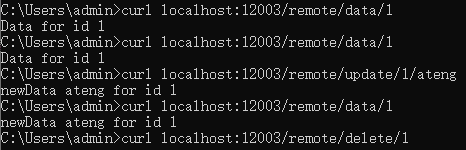
- 先调用 get 获取数据并写入缓存:
- 调用 update 更新缓存数据和重置过期时间
- 调用 delete 删除缓存
@CacheConfig注解
@CacheConfig可以在类上进行注解,表示整个类中的所有缓存操作都使用默认的缓存配置。常用的用途是设置公共的缓存名称和缓存管理器。
import org.springframework.cache.annotation.CacheConfig;
import org.springframework.cache.annotation.Cacheable;
import org.springframework.stereotype.Service;

@Service
@CacheConfig(cacheNames = "users")  // 默认所有方法使用 "users" 缓存
public class UserService {

    @Cacheable(key = "#userId")
    public User getUserById(String userId) {
        return new User(userId, "John Doe");
    }
}SpEL
在 @Cacheable 注解中的 key 属性,可以使用 SpEL (Spring Expression Language) 表达式来定义缓存的键。key 表达式允许你根据方法的输入参数、方法返回值或其他上下文动态生成缓存的键。下面是一些常见的写法,涵盖了如何利用 SpEL 在 key 属性中动态计算缓存键。
1. 使用方法参数作为缓存键
最常见的写法是直接使用方法参数作为缓存的键。可以通过 #paramName 来引用方法参数:
@Cacheable(value = "my:cache", key = "#id")
public String getDataById(String id) {
    return "Some data for " + id;
}#id表示缓存的键是方法参数id的值。
如果方法参数是一个对象,你也可以通过 #param.field 来引用对象的字段:
@Cacheable(value = "my:cache", key = "#user.id")
public User getUser(User user) {
    return user;
}#user.id表示缓存的键是user对象的id字段。
2. 使用多个参数组合缓存键
你可以使用多个方法参数作为缓存键的组成部分,通过 #param1, #param2 等组合起来。例如:
@Cacheable(value = "my:cache", key = "#firstName + '-' + #lastName")
public String getFullName(String firstName, String lastName) {
    return firstName + " " + lastName;
}#firstName + '-' + #lastName组合了firstName和lastName两个方法参数的值,用-连接作为缓存的键。
3. 使用方法参数的集合或数组
如果你有一个集合或数组作为方法参数,并希望将其内容作为缓存键,可以使用 SpEL 表达式对集合进行操作:
@Cacheable(value = "my:cache", key = "#ids.toString()")
public List<User> getUsersByIds(List<String> ids) {
    return userService.getUsersByIds(ids);
}#ids.toString()将ids列表的内容转换为字符串并作为缓存的键。
4. 引用方法的返回值
你可以引用方法的返回值作为缓存的键,但这种做法不常见,且需要注意缓存时的性能开销,因为计算方法的返回值可能比较复杂。
@Cacheable(value = "my:cache", key = "#result.id")
public User getUser(String id) {
    return userService.getUserById(id);
}#result.id引用了方法返回值User对象的id字段。
5. 使用常量作为缓存键的一部分
你可以使用常量来作为缓存键的一部分,甚至与方法参数结合。
@Cacheable(value = "my:cache", key = "'user:' + #id")
public User getUserById(String id) {
    return userService.getUserById(id);
}'user:' + #id将字符串"user:"和方法参数id结合起来作为缓存键。
6. 使用拼接多个参数与常量
通过拼接多个方法参数和常量,你可以生成一个复杂的缓存键:
@Cacheable(value = "my:cache", key = "#type + ':' + #category + ':' + #id")
public Product getProduct(String type, String category, String id) {
    return productService.getProduct(type, category, id);
}#type + ':' + #category + ':' + #id将多个参数拼接为一个缓存键。
7. 使用 Map 或其他对象的属性
如果方法参数是一个 Map 或其他对象,你可以通过 #paramName.key 来引用其特定的属性或值:
@Cacheable(value = "my:cache", key = "#map['id']")
public User getUserByMap(Map<String, String> map) {
    return userService.getUserById(map.get("id"));
}#map['id']获取map对象中id键的值作为缓存的键。
8. 使用数组索引
如果方法参数是一个数组,你可以通过索引来指定某个元素作为缓存键:
@Cacheable(value = "my:cache", key = "#array[0]")
public String getFirstElement(String[] array) {
    return array[0];
}#array[0]表示取数组array中的第一个元素作为缓存键。
9. 组合复杂的对象属性
你可以组合多个复杂对象的多个字段来生成缓存键。例如,假设方法参数是一个复合对象,包含多个字段,你可以使用 #object.field1 + #object.field2 等来构造缓存键。
@Cacheable(value = "my:cache", key = "#user.name + '-' + #user.age")
public String getUserInfo(User user) {
    return user.getName() + " " + user.getAge();
}#user.name + '-' + #user.age将user对象的name和age字段作为缓存的键。
10. 使用运算符和条件
你可以在 key 中使用基本的运算符或者条件逻辑:
@Cacheable(value = "my:cache", key = "#id % 2 == 0 ? 'even:' + #id : 'odd:' + #id")
public String getUserById(String id) {
    return "User " + id;
}#id % 2 == 0 ? 'even:' + #id : 'odd:' + #id根据id的偶数或奇数来决定缓存键。
11. 使用 T 引用类
你还可以通过 T 关键字引用类,并访问类的静态方法或常量:
@Cacheable(value = "my:cache", key = "T(com.example.MyClass).getStaticKey()")
public String getData() {
    return "Some data";
}T(com.example.MyClass).getStaticKey()调用MyClass类的静态方法getStaticKey()获取缓存键。
小结
在 @Cacheable 注解中的 key 属性可以通过 SpEL 来灵活地定义缓存的键,以下是一些常见的使用场景:
- 使用方法参数作为缓存键:
#id,#user.name - 组合多个参数:
#firstName + '-' + #lastName - 处理集合或数组:
#ids.toString(),#array[0] - 使用常量和拼接:
'user:' + #id - 引用对象属性:
#map['id'],#user.age - 进行条件判断和运算:
#id % 2 == 0 ? 'even:' + #id : 'odd:' + #id - 引用静态方法:
T(com.example.MyClass).getStaticKey()
这些方式让你可以根据实际业务需求灵活地生成缓存的键,从而提高缓存的命中率和管理的灵活性。