Sentinel
Sentinel 是阿里巴巴开源的 流量控制 和 熔断降级 框架,专注于保障 分布式系统稳定性。它提供 限流(QPS/并发控制)、熔断降级(失败率、响应时间触发)、热点参数限流、系统自适应保护 等功能,并支持 Sentinel Dashboard 进行可视化监控和动态规则管理。Sentinel 可与 Spring Cloud、Dubbo、Nacos 等无缝集成,广泛应用于 高并发场景,如电商、支付系统等,有效防止流量突增导致的系统崩溃。
基础配置
添加依赖
添加 Sentinel 依赖
<!-- Sentinel 流量治理 -->
<dependency>
    <groupId>com.alibaba.cloud</groupId>
    <artifactId>spring-cloud-starter-alibaba-sentinel</artifactId>
</dependency>完整 pom.xml 文件如下
<?xml version="1.0" encoding="UTF-8"?>
<project xmlns:xsi="http://www.w3.org/2001/XMLSchema-instance" xmlns="http://maven.apache.org/POM/4.0.0"
         xsi:schemaLocation="http://maven.apache.org/POM/4.0.0 https://maven.apache.org/xsd/maven-4.0.0.xsd">
    <!-- 项目模型版本 -->
    <modelVersion>4.0.0</modelVersion>

    <!-- 项目坐标 -->
    <groupId>local.ateng.java</groupId>
    <artifactId>spring-cloud-sentinel</artifactId>
    <version>v1.0</version>
    <name>spring-cloud-sentinel</name>
    <description>
        Sentinel 面向分布式、多语言异构化服务架构的流量治理组件
    </description>
    <url>https://sentinelguard.io/zh-cn/index.html</url>

    <!-- 项目属性 -->
    <properties>
        <java.version>21</java.version>
        <project.build.sourceEncoding>UTF-8</project.build.sourceEncoding>
        <project.reporting.outputEncoding>UTF-8</project.reporting.outputEncoding>
        <spring-boot.version>3.3.9</spring-boot.version>
        <spring-cloud.version>2023.0.5</spring-cloud.version>
        <spring-cloud-alibaba.version>2023.0.3.2</spring-cloud-alibaba.version>
        <maven-compiler.version>3.12.1</maven-compiler.version>
        <lombok.version>1.18.36</lombok.version>
    </properties>

    <!-- 项目环境配置 -->
    <profiles>
        <!-- 开发环境配置 -->
        <profile>
            <id>dev</id>
            <activation>
                <activeByDefault>true</activeByDefault>
            </activation>
            <properties>
                <profiles.active>dev</profiles.active>
                <profiles.desc>开发环境</profiles.desc>
                <logging.level>info</logging.level>
            </properties>
        </profile>

        <!-- 测试环境配置 -->
        <profile>
            <id>test</id>
            <properties>
                <profiles.active>test</profiles.active>
                <profiles.desc>测试环境</profiles.desc>
                <logging.level>info</logging.level>
            </properties>
        </profile>

        <!-- 生产环境配置 -->
        <profile>
            <id>prod</id>
            <properties>
                <profiles.active>prod</profiles.active>
                <profiles.desc>生产环境</profiles.desc>
                <logging.level>warn</logging.level>
            </properties>
        </profile>
    </profiles>

    <!-- 项目依赖 -->
    <dependencies>
        <!-- Spring Boot Web Starter: 包含用于构建Web应用程序的Spring Boot依赖项 -->
        <dependency>
            <groupId>org.springframework.boot</groupId>
            <artifactId>spring-boot-starter-web</artifactId>
        </dependency>

        <!-- Spring Boot Starter Test: 包含用于测试Spring Boot应用程序的依赖项 -->
        <dependency>
            <groupId>org.springframework.boot</groupId>
            <artifactId>spring-boot-starter-test</artifactId>
            <scope>test</scope>
        </dependency>

        <!-- Lombok: 简化Java代码编写的依赖项 -->
        <!-- https://mvnrepository.com/artifact/org.projectlombok/lombok -->
        <dependency>
            <groupId>org.projectlombok</groupId>
            <artifactId>lombok</artifactId>
            <version>${lombok.version}</version>
            <scope>provided</scope>
        </dependency>

        <!-- Nacos 服务发现的依赖 -->
        <dependency>
            <groupId>com.alibaba.cloud</groupId>
            <artifactId>spring-cloud-starter-alibaba-nacos-discovery</artifactId>
        </dependency>

        <!-- Nacos 配置管理的依赖 -->
        <dependency>
            <groupId>com.alibaba.cloud</groupId>
            <artifactId>spring-cloud-starter-alibaba-nacos-config</artifactId>
        </dependency>

        <!-- Sentinel 流量治理 -->
        <dependency>
            <groupId>com.alibaba.cloud</groupId>
            <artifactId>spring-cloud-starter-alibaba-sentinel</artifactId>
        </dependency>

        <!-- 配置 Sentinel 配置 Nacos 的数据持久化 -->
        <dependency>
            <groupId>com.alibaba.csp</groupId>
            <artifactId>sentinel-datasource-nacos</artifactId>
        </dependency>

    </dependencies>

    <!-- 依赖管理 -->
    <dependencyManagement>
        <dependencies>
            <dependency>
                <groupId>org.springframework.boot</groupId>
                <artifactId>spring-boot-dependencies</artifactId>
                <version>${spring-boot.version}</version>
                <type>pom</type>
                <scope>import</scope>
            </dependency>
            <dependency>
                <groupId>org.springframework.cloud</groupId>
                <artifactId>spring-cloud-dependencies</artifactId>
                <version>${spring-cloud.version}</version>
                <type>pom</type>
                <scope>import</scope>
            </dependency>
            <dependency>
                <groupId>com.alibaba.cloud</groupId>
                <artifactId>spring-cloud-alibaba-dependencies</artifactId>
                <version>${spring-cloud-alibaba.version}</version>
                <type>pom</type>
                <scope>import</scope>
            </dependency>
        </dependencies>
    </dependencyManagement>

    <!-- 插件仓库配置 -->
    <repositories>
        <!-- Central Repository -->
        <repository>
            <id>central</id>
            <name>阿里云中央仓库</name>
            <url>https://maven.aliyun.com/repository/central</url>
            <!--<name>Maven官方中央仓库</name>
            <url>https://repo.maven.apache.org/maven2/</url>-->
        </repository>
    </repositories>

    <!-- 构建配置 -->
    <build>
        <finalName>${project.name}-${project.version}</finalName>
        <plugins>
            <!-- Maven 编译插件 -->
            <plugin>
                <groupId>org.apache.maven.plugins</groupId>
                <artifactId>maven-compiler-plugin</artifactId>
                <version>${maven-compiler.version}</version>
                <configuration>
                    <source>${java.version}</source>
                    <target>${java.version}</target>
                    <encoding>${project.build.sourceEncoding}</encoding>
                    <!-- 编译参数 -->
                    <compilerArgs>
                        <!-- 启用Java 8参数名称保留功能 -->
                        <arg>-parameters</arg>
                    </compilerArgs>
                </configuration>
            </plugin>

            <!-- Spring Boot Maven 插件 -->
            <plugin>
                <groupId>org.springframework.boot</groupId>
                <artifactId>spring-boot-maven-plugin</artifactId>
                <version>${spring-boot.version}</version>
                <executions>
                    <execution>
                        <id>repackage</id>
                        <goals>
                            <goal>repackage</goal>
                        </goals>
                    </execution>
                </executions>
            </plugin>
        </plugins>
        <resources>
            <!-- 第一个资源配置块 -->
            <resource>
                <directory>src/main/resources</directory>
                <filtering>false</filtering>
            </resource>
            <!-- 第二个资源配置块 -->
            <resource>
                <directory>src/main/resources</directory>
                <includes>
                    <include>application*</include>
                    <include>bootstrap*.yml</include>
                    <include>common*</include>
                    <include>banner*</include>
                </includes>
                <filtering>true</filtering>
            </resource>
        </resources>
    </build>

</project>添加配置
在 Nacos 中添加 Sentinel 的地址信息
# Sentinel 配置
spring:
  cloud:
    sentinel:
      transport:
        dashboard: 192.168.1.10:38858  # Sentinel 控制台地址
        port: 38719  # 发送心跳的端口(默认 8719)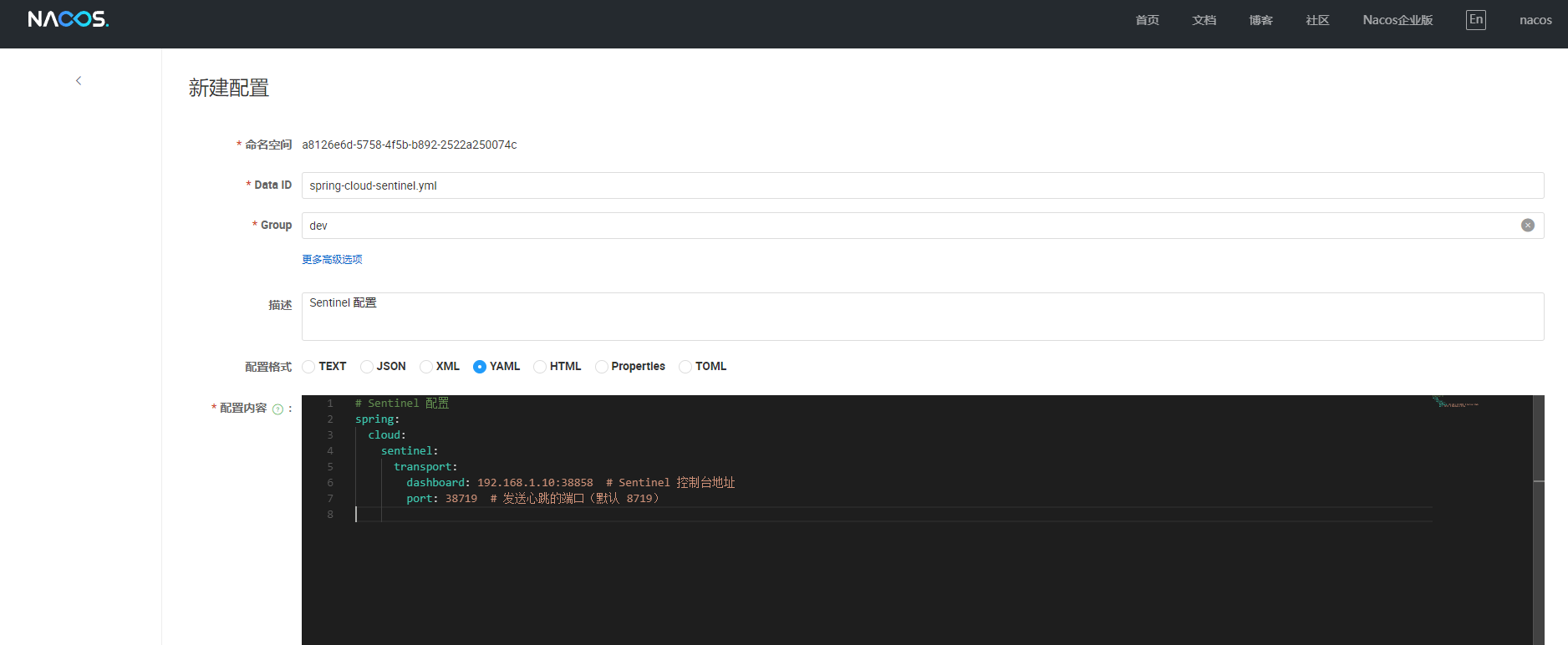
创建接口
package local.ateng.java.cloud.controller;

import com.alibaba.csp.sentinel.annotation.SentinelResource;
import com.alibaba.csp.sentinel.slots.block.BlockException;
import jakarta.servlet.http.HttpServletResponse;
import org.springframework.web.bind.annotation.GetMapping;
import org.springframework.web.bind.annotation.RequestMapping;
import org.springframework.web.bind.annotation.RequestParam;
import org.springframework.web.bind.annotation.RestController;
import org.springframework.web.context.request.RequestContextHolder;
import org.springframework.web.context.request.ServletRequestAttributes;

import java.util.Random;
import java.util.concurrent.TimeUnit;

@RestController
@RequestMapping("/sentinel")
public class SentinelController {

    /**
     * **1. 基本限流**
     * 演示 Sentinel 对接口的 QPS 限流
     */
    @GetMapping("/hello")
    @SentinelResource(value = "hello", blockHandler = "handleBlock")
    public String hello() {
        return "Hello Sentinel!";
    }

    /**
     * **2. 熔断降级**
     * 模拟耗时请求,当响应时间过长时触发降级
     */
    @GetMapping("/slowRequest")
    @SentinelResource(value = "slowRequest", blockHandler = "handleBlock", fallback = "handleFallback")
    public String slowRequest() throws InterruptedException {
        int delay = new Random().nextInt(3); // 随机 0~2 秒延迟
        TimeUnit.SECONDS.sleep(delay);

        // **主动抛出异常,触发 fallback**
        if (delay > 1) {
            throw new RuntimeException("请求超时,触发 fallback");
        }

        return "慢请求处理完成";

    }

    /**
     * **3. 热点参数限流**
     * 对特定参数进行限流
     */
    @GetMapping("/hotParam")
    @SentinelResource(value = "hotParam", blockHandler = "handleHotParam")
    public String hotParam(@RequestParam(value = "item", required = false) String item) {
        return "热点参数请求:" + item;
    }

    /**
     * **4. 访问控制**
     * 限制特定 IP 或应用访问
     */
    @GetMapping("/auth")
    @SentinelResource(value = "auth", blockHandler = "handleBlock")
    public String auth() {
        return "访问通过";
    }

    // ==================== 限流 / 熔断 / 访问控制 处理方法 ====================

    /**
     * **限流处理方法**
     * `blockHandler`:被限流时的处理逻辑
     */
    public String handleBlock(BlockException e) {
        // 通过 ThreadLocal 方式获取 response 并设置状态码
        HttpServletResponse response = ((ServletRequestAttributes) RequestContextHolder.getRequestAttributes()).getResponse();
        if (response != null) {
            response.setStatus(HttpServletResponse.SC_INTERNAL_SERVER_ERROR);  // 设置 HTTP 500 错误码
        }
        return "请求被限流:" + e.getMessage();
    }

    /**
     * **熔断降级处理方法**
     * `fallback`:接口发生异常时的处理逻辑
     */
    public String handleFallback(Throwable t) {
        // 通过 ThreadLocal 方式获取 response 并设置状态码
        HttpServletResponse response = ((ServletRequestAttributes) RequestContextHolder.getRequestAttributes()).getResponse();
        if (response != null) {
            response.setStatus(HttpServletResponse.SC_INTERNAL_SERVER_ERROR);  // 设置 HTTP 500 错误码
        }
        return "请求被熔断:" + t.getMessage();
    }

    /**
     * **热点参数限流处理**
     */
    public String handleHotParam(String item, BlockException e) {
        // 通过 ThreadLocal 方式获取 response 并设置状态码
        HttpServletResponse response = ((ServletRequestAttributes) RequestContextHolder.getRequestAttributes()).getResponse();
        if (response != null) {
            response.setStatus(HttpServletResponse.SC_INTERNAL_SERVER_ERROR);  // 设置 HTTP 500 错误码
        }
        return "热点参数限流:" + item;
    }
}使用Sentinel
流控规则(Flow Rule)
通过设置每秒请求数(QPS)或并发数等方式限制接口流量,防止瞬时流量过载。支持排队等待、拒绝请求等处理方式,保障系统稳定性。还可根据调用关系设置不同的限流策略。
Nacos配置
在 Nacos 中添加配置,添加这个后需要重启相关的应用
---
# 流控规则
spring:
  cloud:
    sentinel:
      datasource:
        flow:
          nacos:
            serverAddr: ${spring.cloud.nacos.server-addr}
            namespace: ${spring.cloud.nacos.config.namespace}
            username: ${spring.cloud.nacos.username}
            password: ${spring.cloud.nacos.password}
            groupId: ${spring.cloud.nacos.config.group}
            dataId: sentinel-flow.json
            dataType: json
            rule-type: flow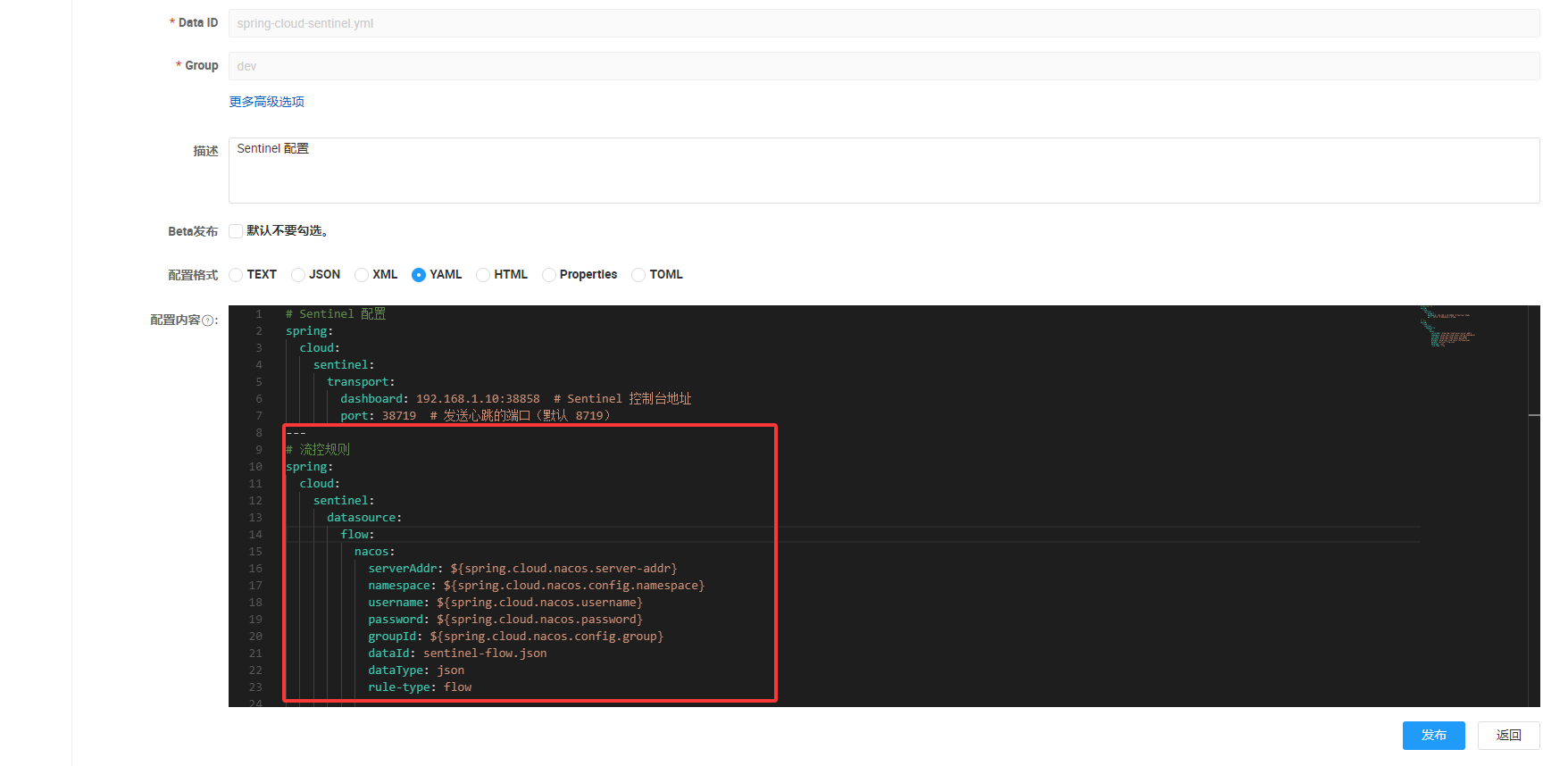
添加规则
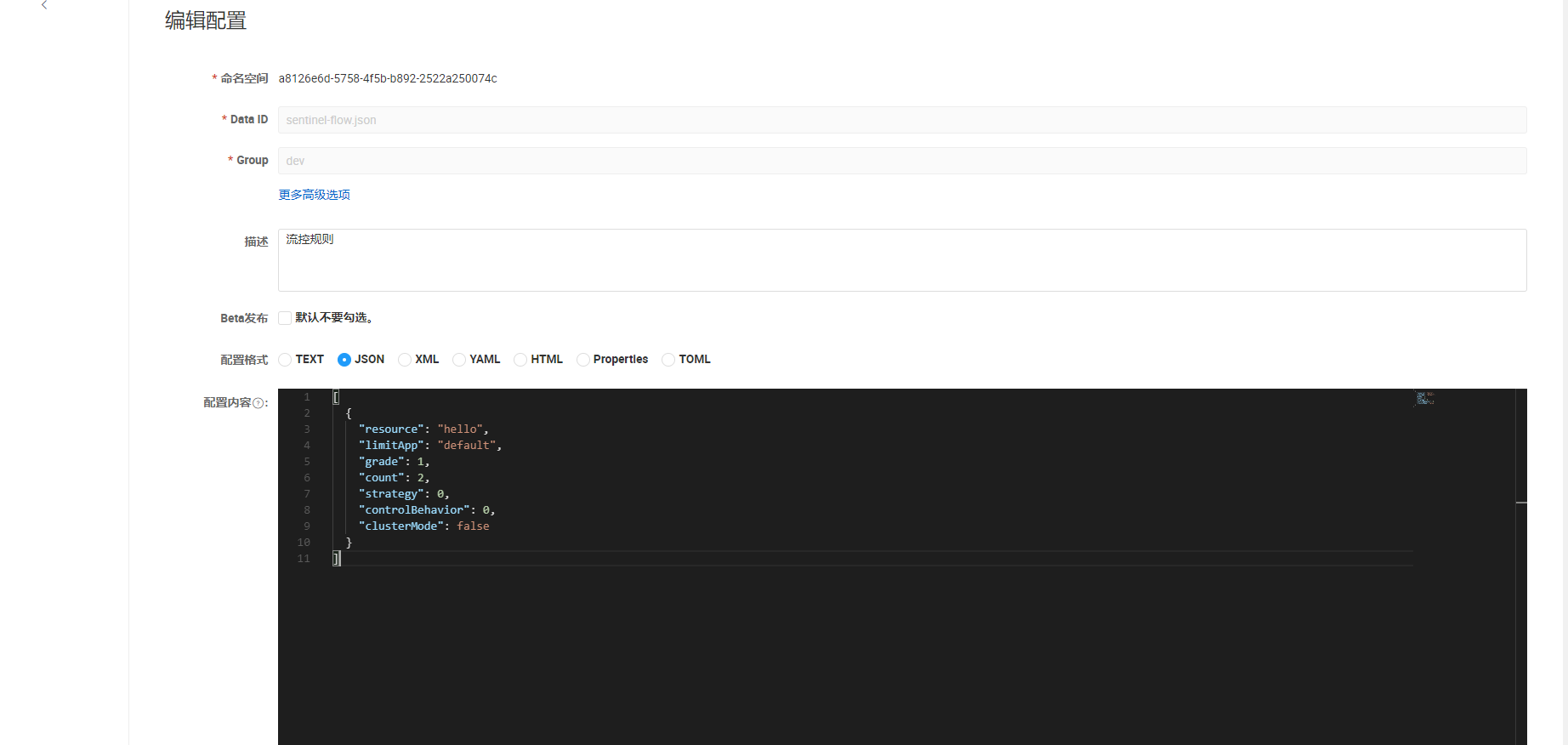
在以上配置的 dataId 创建规则配置,添加后立即生效
如果
hello接口 QPS 超过 2,则 超出的请求会被直接拒绝 并触发blockHandler方法进行限流处理。
[
    {
        "resource": "hello",
        "limitApp": "default",
        "grade": 1,
        "count": 2,
        "strategy": 0,
        "controlBehavior": 0,
        "clusterMode": false
    }
]
对应控制台参数,对于其他参数设置可以在dashboard中新增,浏览器使用调试(快捷键F12)查看接口调用的相关参数
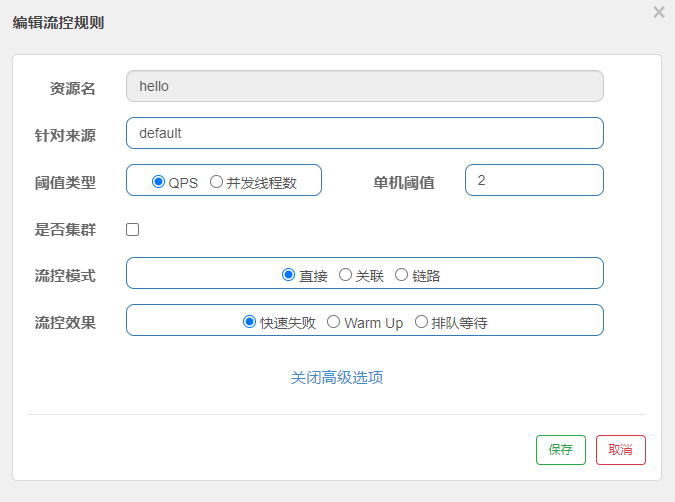
参数详解
| 参数 | 类型 | 含义 | 可选值 |
|---|---|---|---|
resource | String | 受保护的资源(接口/方法名) | 例如 "hello" |
limitApp | String | 限制的来源应用("default" 表示所有来源) | "default" 或指定应用名 |
grade | int | 限流模式 | 0(并发线程数 限流) 1(QPS(每秒查询数) 限流) |
count | double | 阈值(限流阈值,单位随 grade 变化) | 并发线程数或 QPS |
strategy | int | 限流策略(针对资源访问) | 0(直接限流) 1(关联流控) 2(链路流控) |
controlBehavior | int | 流控效果(如何处理超限流量) | 0(快速失败) 1(匀速排队) 2(WarmUp 预热) |
clusterMode | boolean | 是否启用集群模式 | false(单机模式) true(集群模式) |
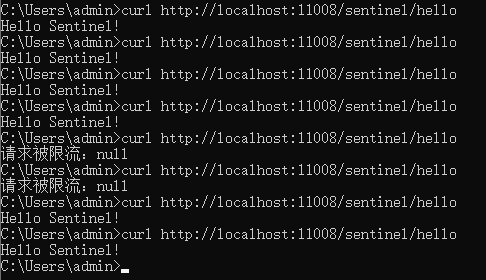
访问接口
curl http://localhost:11008/sentinel/hello频繁访问该接口就会限流
熔断降级规则(Degrade Rule)
当接口的异常比例、慢调用比例或异常数达到阈值时,触发熔断。短期内拒绝请求,待恢复后自动关闭熔断,防止因服务故障导致的连锁崩溃,保护整体系统稳定。
Nacos配置
在 Nacos 中添加配置,添加这个后需要重启相关的应用
---
# 熔断降级规则
spring:
  cloud:
    sentinel:
      datasource:
        degrade:
          nacos:
            serverAddr: ${spring.cloud.nacos.server-addr}
            namespace: ${spring.cloud.nacos.config.namespace}
            username: ${spring.cloud.nacos.username}
            password: ${spring.cloud.nacos.password}
            groupId: ${spring.cloud.nacos.config.group}
            dataId: sentinel-degrade.json
            dataType: json
            rule-type: degrade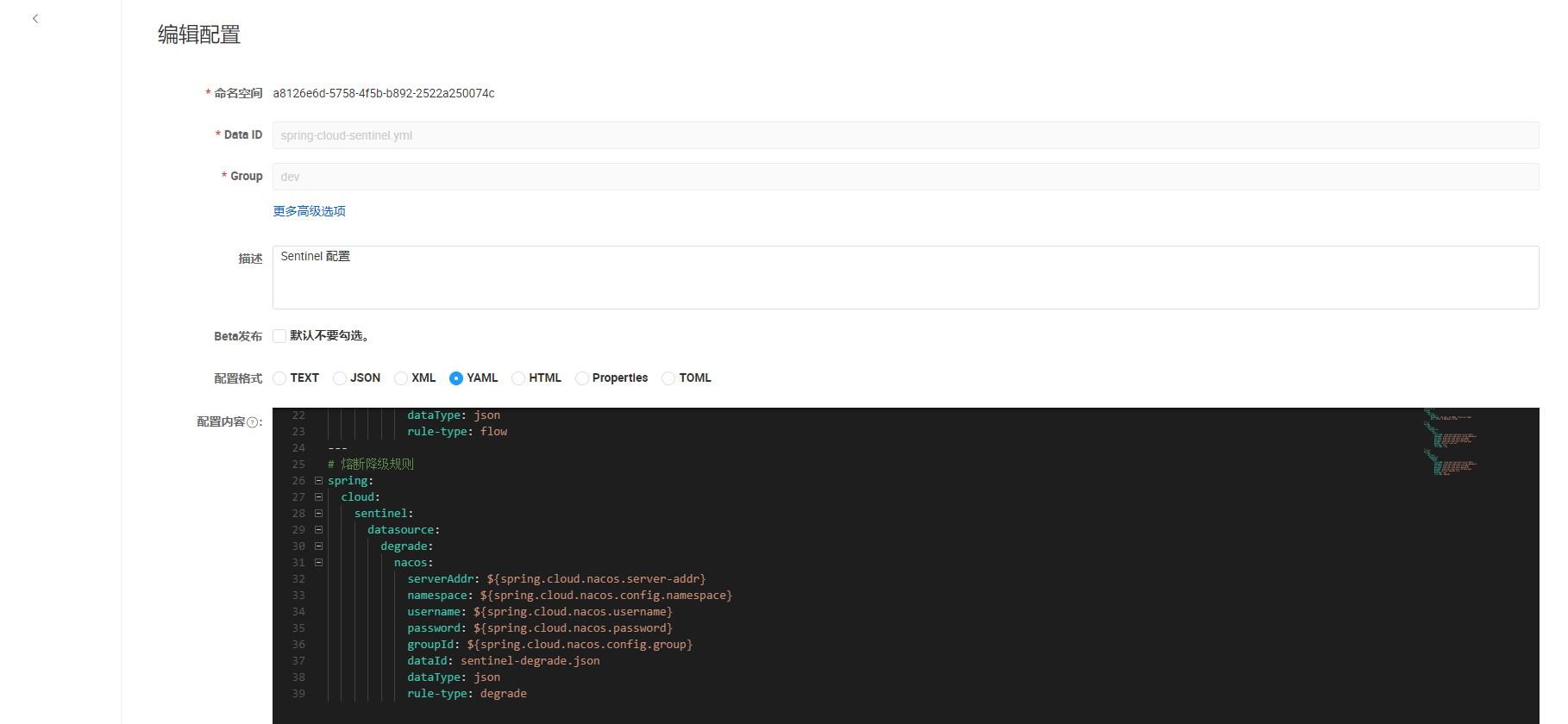
添加规则
在以上配置的 dataId 创建规则配置,添加后立即生效
如果 1 秒内
slowRequest请求中,80% 以上耗时超过 500ms,则触发熔断,熔断 3 秒后自动恢复
[
    {
        "resource": "slowRequest",
        "limitApp": "default",
        "grade": 0,
        "count": 500,
        "timeWindow": 3,
        "minRequestAmount": 1,
        "slowRatioThreshold": 0.8,
        "statIntervalMs": 1000
    }
]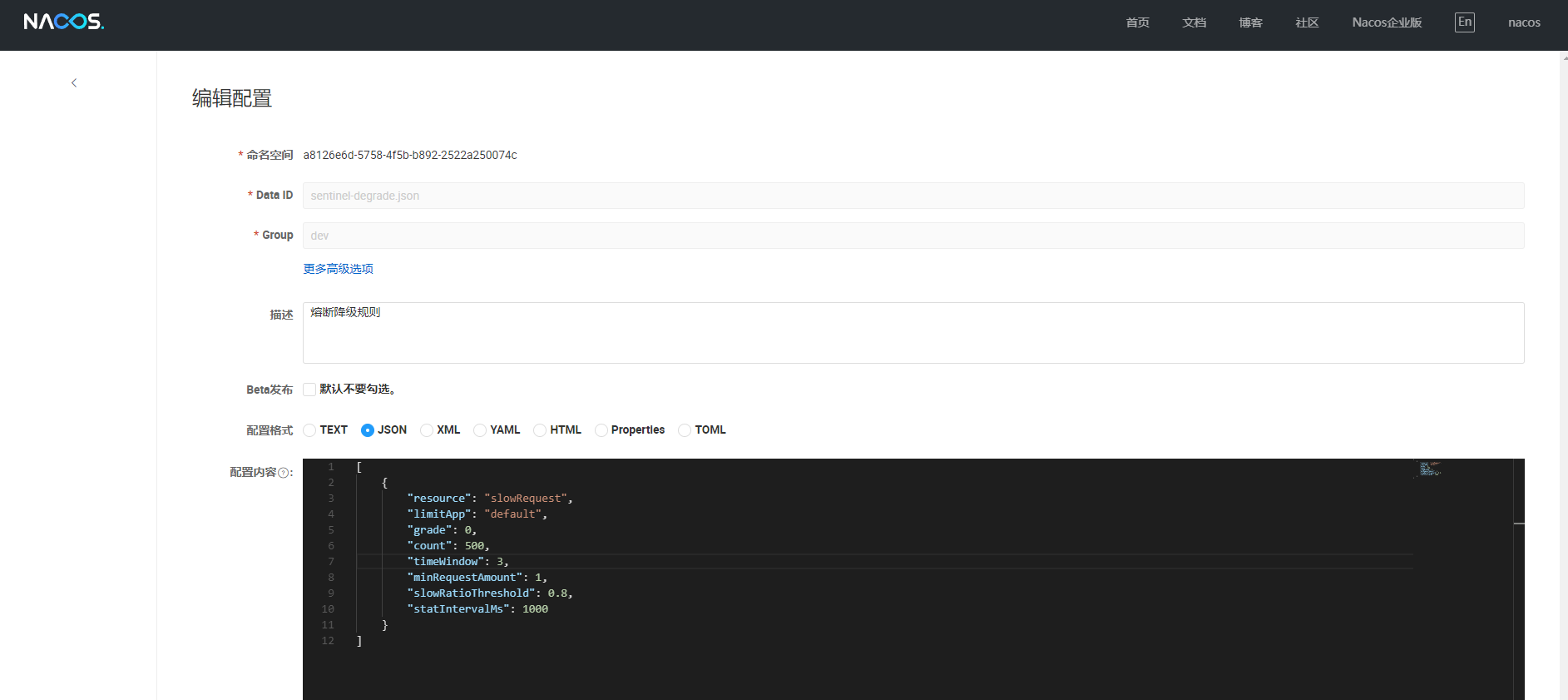
对应控制台参数,对于其他参数设置可以在dashboard中新增,浏览器使用调试(快捷键F12)查看接口调用的相关参数
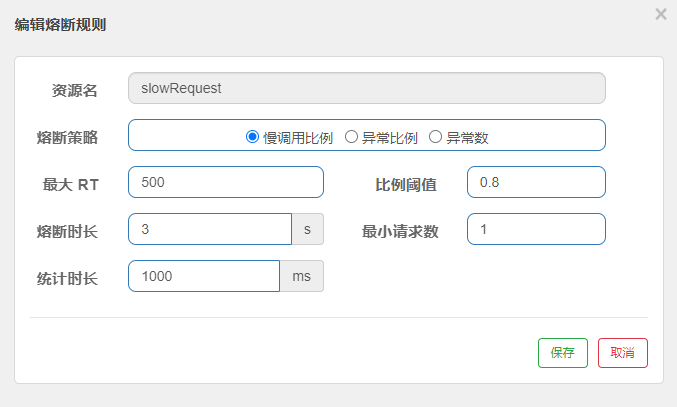
参数详解
| 参数 | 类型 | 含义 | 可选值 |
|---|---|---|---|
resource | String | 受保护的资源(接口/方法名) | 例如 "hello" |
grade | int | 熔断策略 | 0(响应时间) 1(异常比例) 2(异常数) |
count | double | 熔断阈值 | 随 grade 变化(响应时间/ms、异常比例、异常数) |
timeWindow | int | 熔断恢复时间(秒) | 超出阈值后,熔断多久恢复 |
minRequestAmount | int | 最小请求数 | 触发熔断的最小请求量 |
slowRatioThreshold | double | 慢调用比例阈值 | 仅在 grade=0 时生效 |
statIntervalMs | int | 统计窗口时间(ms) | 用于计算失败率 |
访问接口
http://localhost:11008/sentinel/slowRequest接口访问超时或异常都会触发熔断降级
热点参数限流规则(Param Flow Rule)
针对请求中某些重要参数(如商品ID、用户ID)进行限流。若某个参数的访问频率过高,可单独限制它的请求量,避免个别热点数据导致系统负载过高。
Nacos配置
在 Nacos 中添加配置,添加这个后需要重启相关的应用
---
# 热点参数限流规则
spring:
  cloud:
    sentinel:
      datasource:
        param-flow:
          nacos:
            serverAddr: ${spring.cloud.nacos.server-addr}
            namespace: ${spring.cloud.nacos.config.namespace}
            username: ${spring.cloud.nacos.username}
            password: ${spring.cloud.nacos.password}
            groupId: ${spring.cloud.nacos.config.group}
            dataId: sentinel-param-flow.json
            dataType: json
            rule-type: param-flow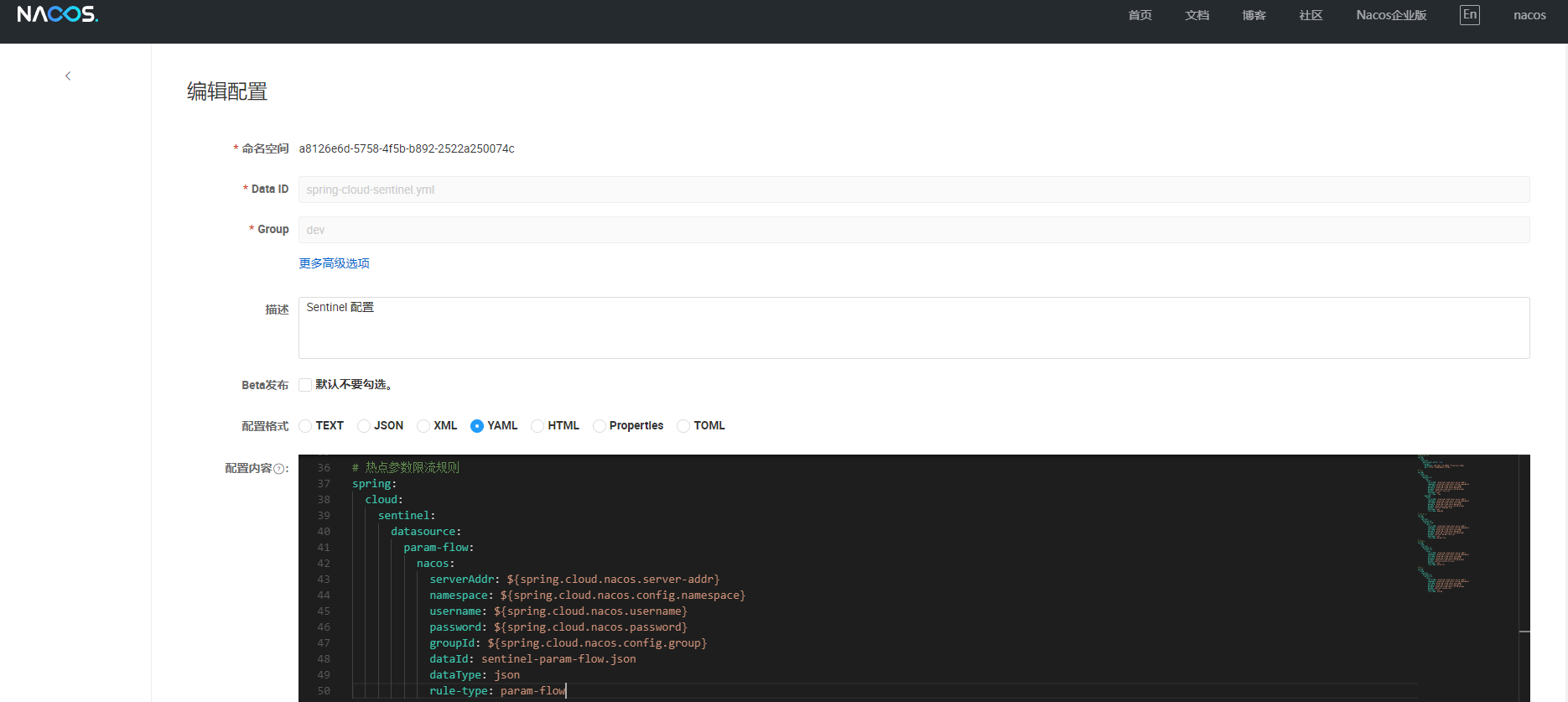
添加规则
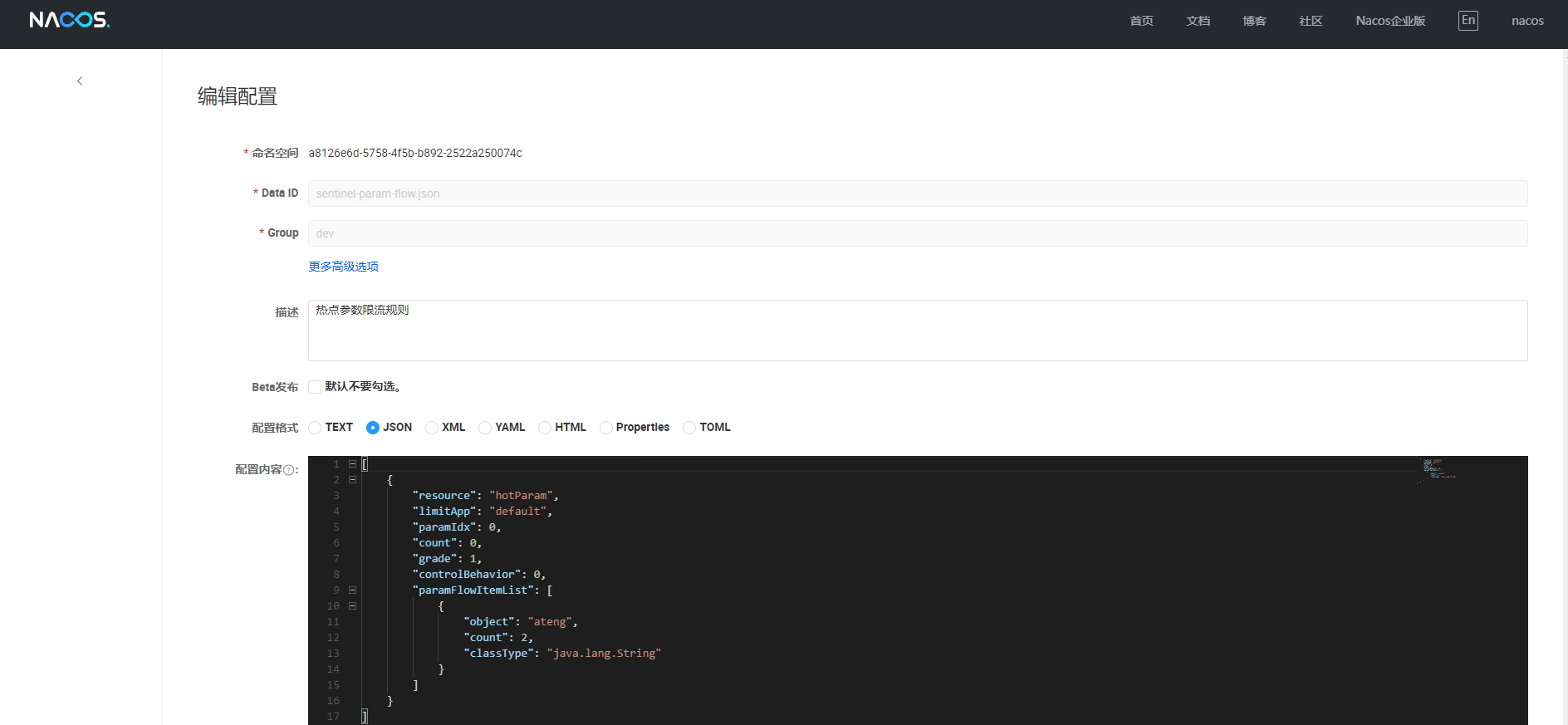
在以上配置的 dataId 创建规则配置,添加后立即生效
对
hotParam方法的第一个参数进行热点限流,仅当参数值为"ateng"时,最大允许 QPS 为2,超出后直接拒绝,而其他参数值不受限流影响。
[
    {
        "resource": "hotParam",
        "limitApp": "default",
        "paramIdx": 0,
        "count": 0,
        "grade": 1,
        "controlBehavior": 0,
        "paramFlowItemList": [
            {
                "object": "ateng",
                "count": 2,
                "classType": "java.lang.String"
            }
        ]
    }
]
对应控制台参数
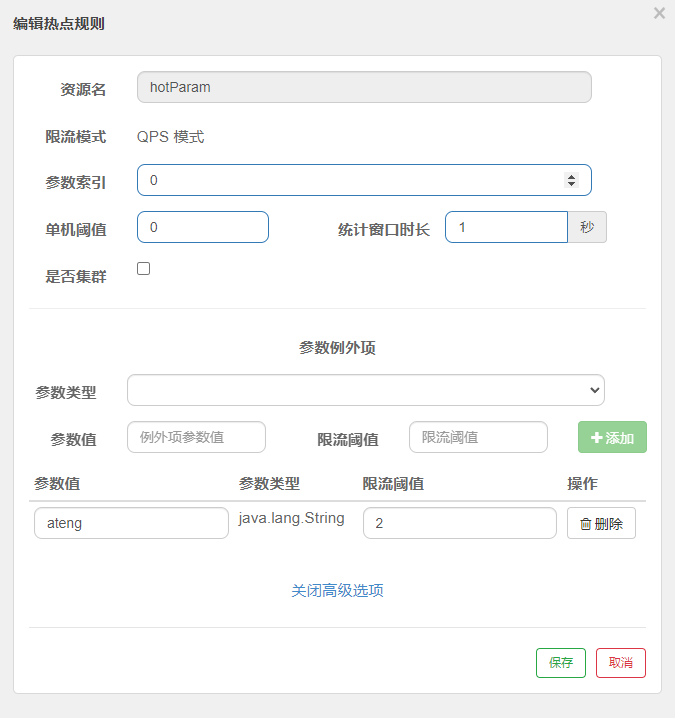
参数详解
| 参数名 | 类型 | 默认值 | 含义 |
|---|---|---|---|
resource | String | 无 | 资源名称(接口或方法名),必填项 |
paramIdx | int | -1 | 热点参数索引(从 0 开始),-1 表示所有参数 |
grade | int | 1 | 限流模式:1 表示 QPS 模式(每秒请求数) |
count | double | 1.0 | 默认情况下的 QPS 限流阈值(即参数值未命中 paramFlowItemList 时适用) |
durationInSec | int | 1 | 统计时间窗口(单位:秒),超过 count 限流 |
controlBehavior | int | 0 | 流控效果:0=直接拒绝,1=匀速排队 |
burstCount | int | 0 | 令牌桶模式下的突发流量(未开启时填 0) |
maxQueueingTimeMs | int | 500 | 匀速排队模式下的最大排队等待时间(单位:毫秒) |
clusterMode | boolean | false | 是否启用集群模式(默认为单机模式) |
paramFlowItemList | List<Object> | [] | 针对特定参数值的限流规则(参数值、对应的 count) |
regex | boolean | false | 是否使用正则匹配参数值 |
limitApp | String | "default" | 适用的调用来源(default 代表适用于所有来源) |
参数例外项
该参数用于对 特定热点参数值 设定不同的限流阈值。
| 字段名 | 类型 | 含义 |
|---|---|---|
object | Object | 指定的参数值(如 "admin"、1001 等) |
count | double | 该参数值的单独 QPS 限流阈值 |
classType | 参数类型,表明该参数是字符串类型。 |
访问接口
http://localhost:11008/sentinel/hotParam?item=ateng频繁访问使用接口并且第一个参数是ateng的就会限流

访问控制规则(Authority Rule)
根据调用方身份、用户标签等维度限制访问权限。可通过黑名单、白名单方式控制哪些用户或服务可访问特定接口,确保敏感接口或资源的安全性。
配置 RequestOriginParser
package local.ateng.java.cloud.sentinel;

import com.alibaba.csp.sentinel.adapter.spring.webmvc_v6x.callback.RequestOriginParser;
import jakarta.servlet.http.HttpServletRequest;
import org.springframework.stereotype.Component;
import org.springframework.util.StringUtils;

/**
 * 自定义 RequestOriginParser 实现,用于解析 HTTP 请求中的 "origin" 请求头。
 * 该类可用于结合 Sentinel 授权规则,根据请求来源进行访问控制。
 * 如果 "origin" 请求头为空,返回默认值 "blank"。
 *
 * @author Ateng
 * @email 2385569970@qq.com
 * @since 2025-03-18
 */
@Component
public class HeaderOriginParser implements RequestOriginParser {

    /**
     * 解析请求头中的 "origin" 字段,返回其值;若为空,则返回 "blank"。
     *
     * @param request 当前 HTTP 请求
     * @return 请求来源标识
     */
    @Override
    public String parseOrigin(HttpServletRequest request) {
        String origin = request.getHeader("origin");
        if (StringUtils.isEmpty(origin)) {
            origin = "blank";
        }
        return origin;
    }
}Nacos配置
在 Nacos 中添加配置,添加这个后需要重启相关的应用
---
# 访问控制规则
spring:
  cloud:
    sentinel:
      datasource:
        authority:
          nacos:
            serverAddr: ${spring.cloud.nacos.server-addr}
            namespace: ${spring.cloud.nacos.config.namespace}
            username: ${spring.cloud.nacos.username}
            password: ${spring.cloud.nacos.password}
            groupId: ${spring.cloud.nacos.config.group}
            dataId: sentinel-authority.json
            dataType: json
            rule-type: authority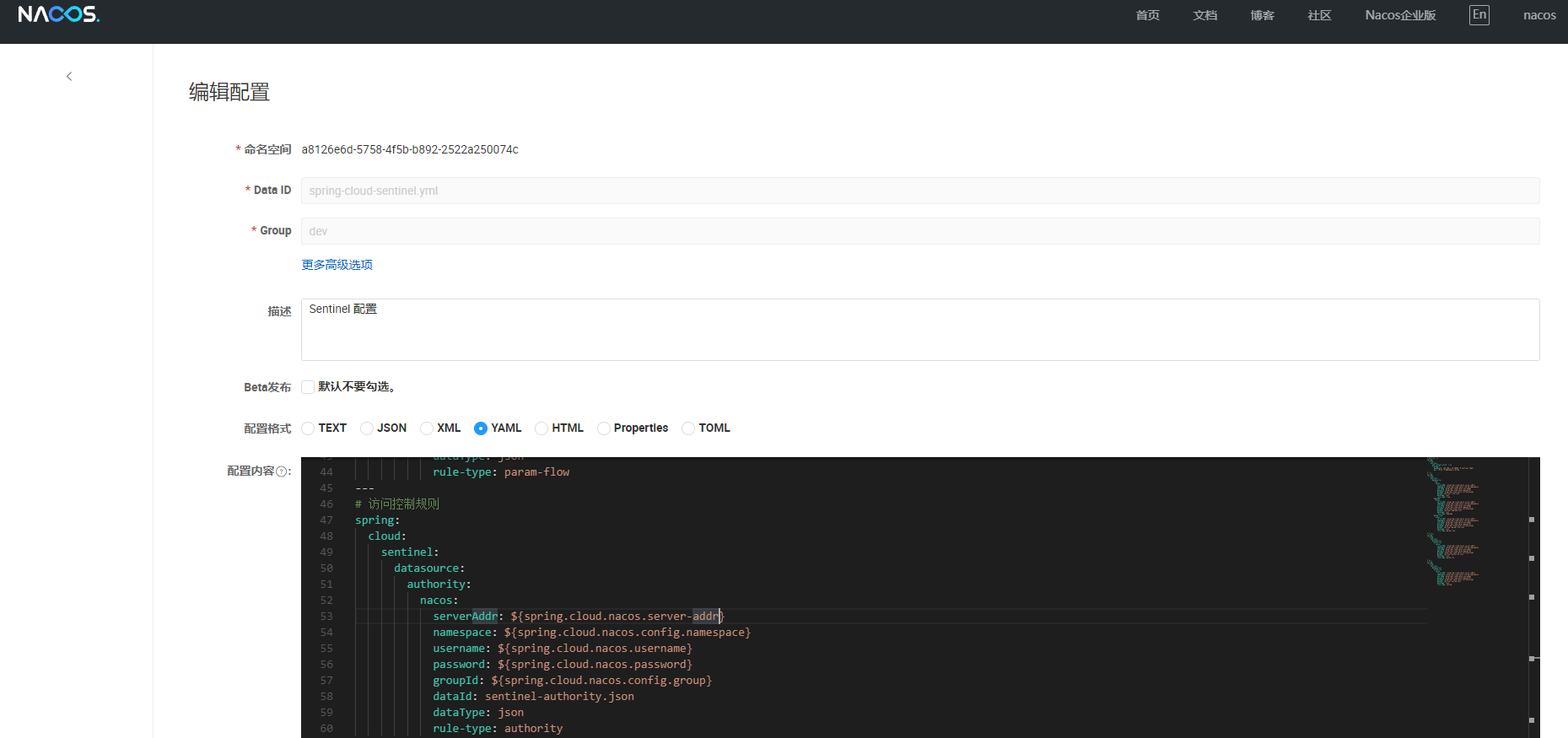
添加规则
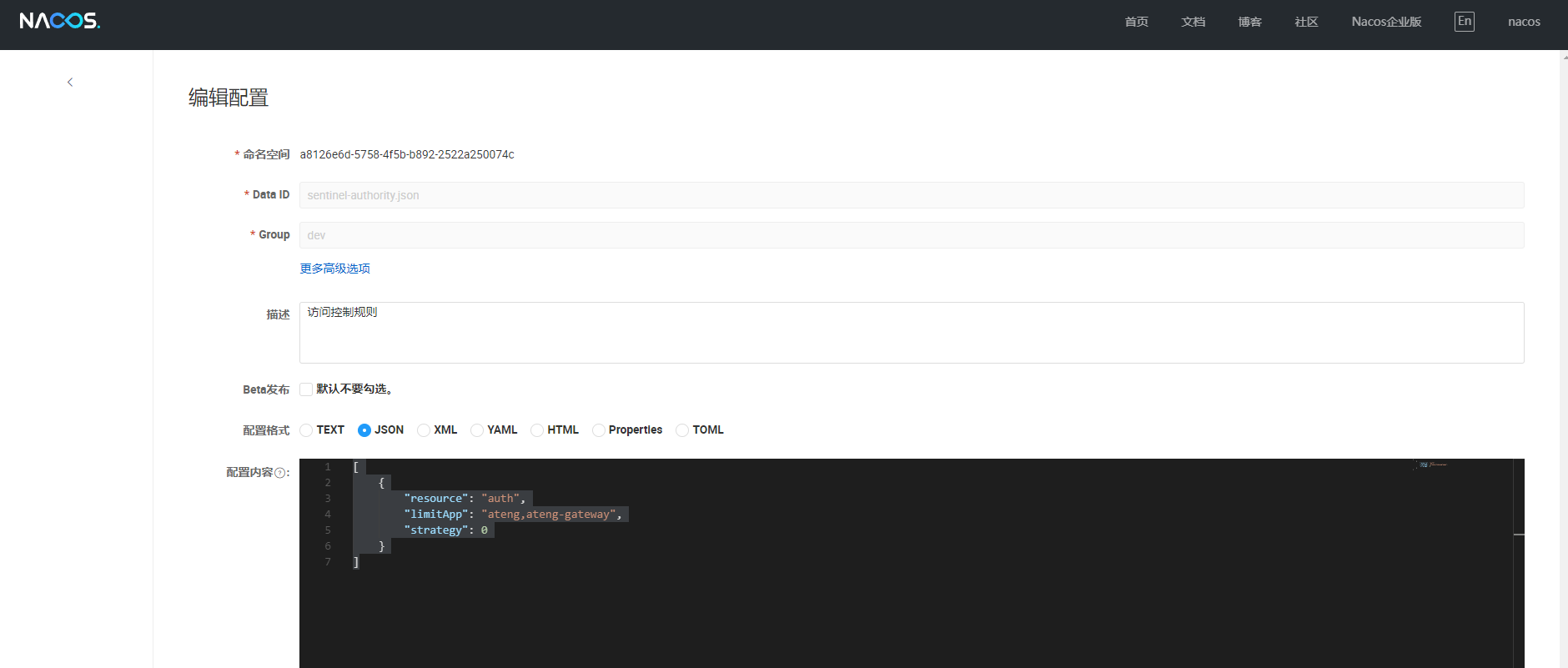
在以上配置的 dataId 创建规则配置,添加后立即生效
该配置定义了名为
auth的接口访问控制规则,采用白名单策略 (strategy: 0),只有ateng和ateng-gateway应用可以访问该接口。
[
    {
        "resource": "auth",
        "limitApp": "ateng,ateng-gateway",
        "strategy": 0
    }
]
对应控制台参数
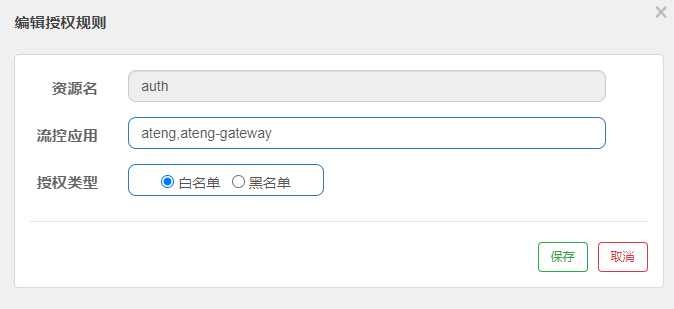
参数详解
| 参数名称 | 说明 | 示例值 |
|---|---|---|
resource | 资源名称,指定要应用授权控制的接口资源。 | "auth" |
limitApp | 限制的应用名称列表,多个应用之间使用逗号分隔。表示哪些应用可以访问该资源。 | "ateng,ateng-gateway" |
strategy | 授权策略,决定是白名单策略还是黑名单策略: 0:白名单策略(默认) 1:黑名单策略 |
访问接口
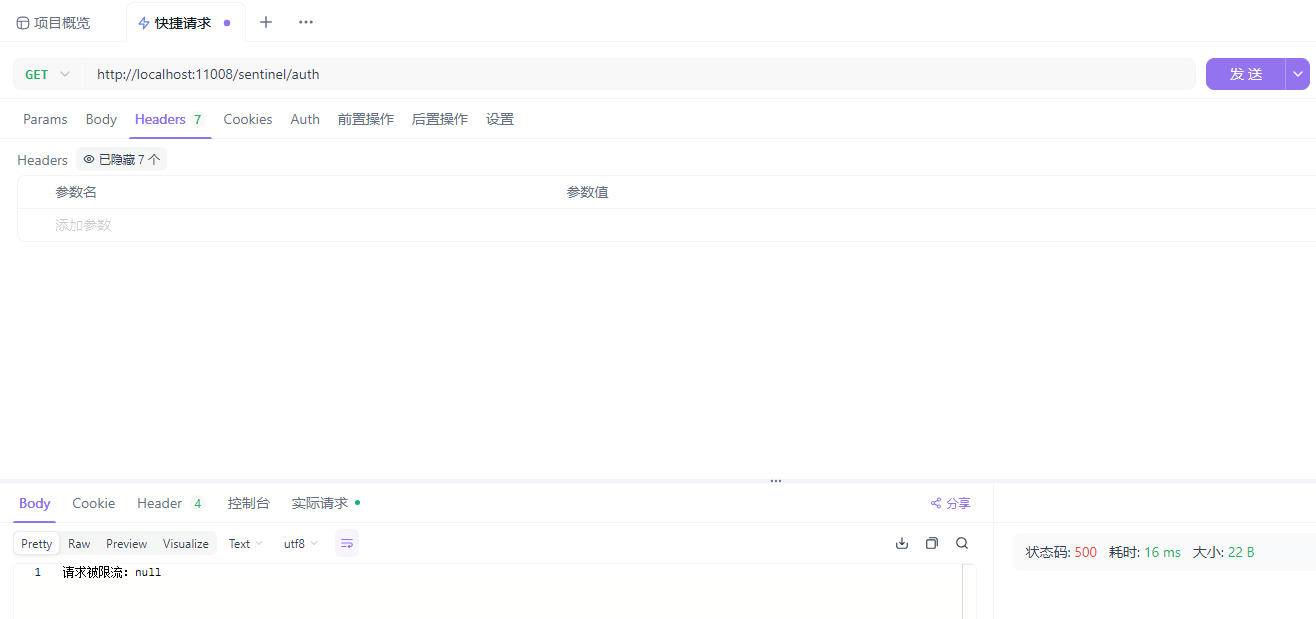
http://localhost:11008/sentinel/auth只允许Header中存在 origin: ateng 或者 origin: ateng-gateway 的请求
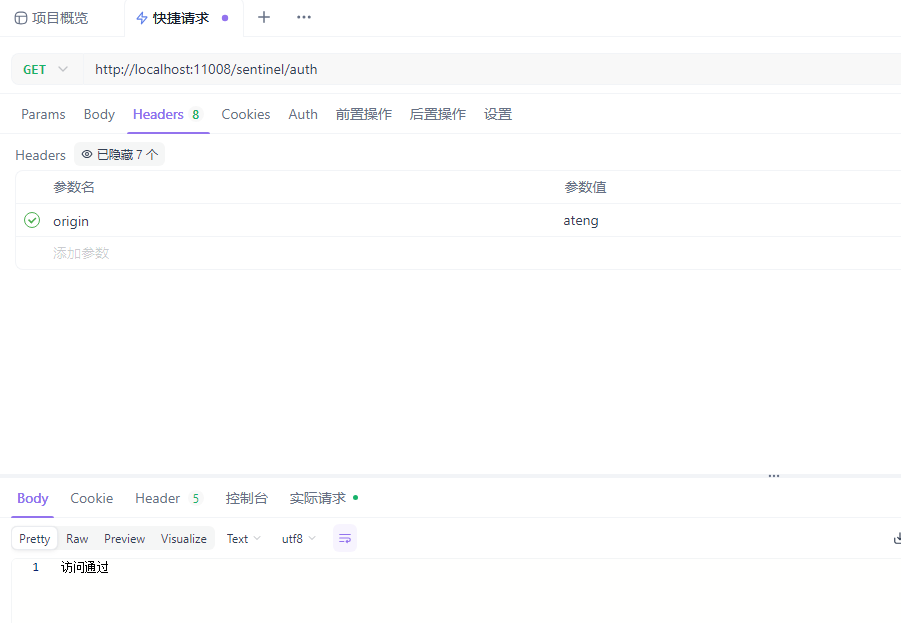
如果没有相关Header就会被拦截
系统规则(Systen Rule)
基于整体系统负载进行限流保护。当CPU使用率、内存占用或入口QPS超过设定阈值时,系统会自动触发限流或拒绝部分请求,优先保障核心功能的稳定运行。
Nacos配置
在 Nacos 中添加配置,添加这个后需要重启相关的应用
---
# 系统规则
spring:
  cloud:
    sentinel:
      datasource:
        system:
          nacos:
            serverAddr: ${spring.cloud.nacos.server-addr}
            namespace: ${spring.cloud.nacos.config.namespace}
            username: ${spring.cloud.nacos.username}
            password: ${spring.cloud.nacos.password}
            groupId: ${spring.cloud.nacos.config.group}
            dataId: sentinel-system.json
            dataType: json
            rule-type: system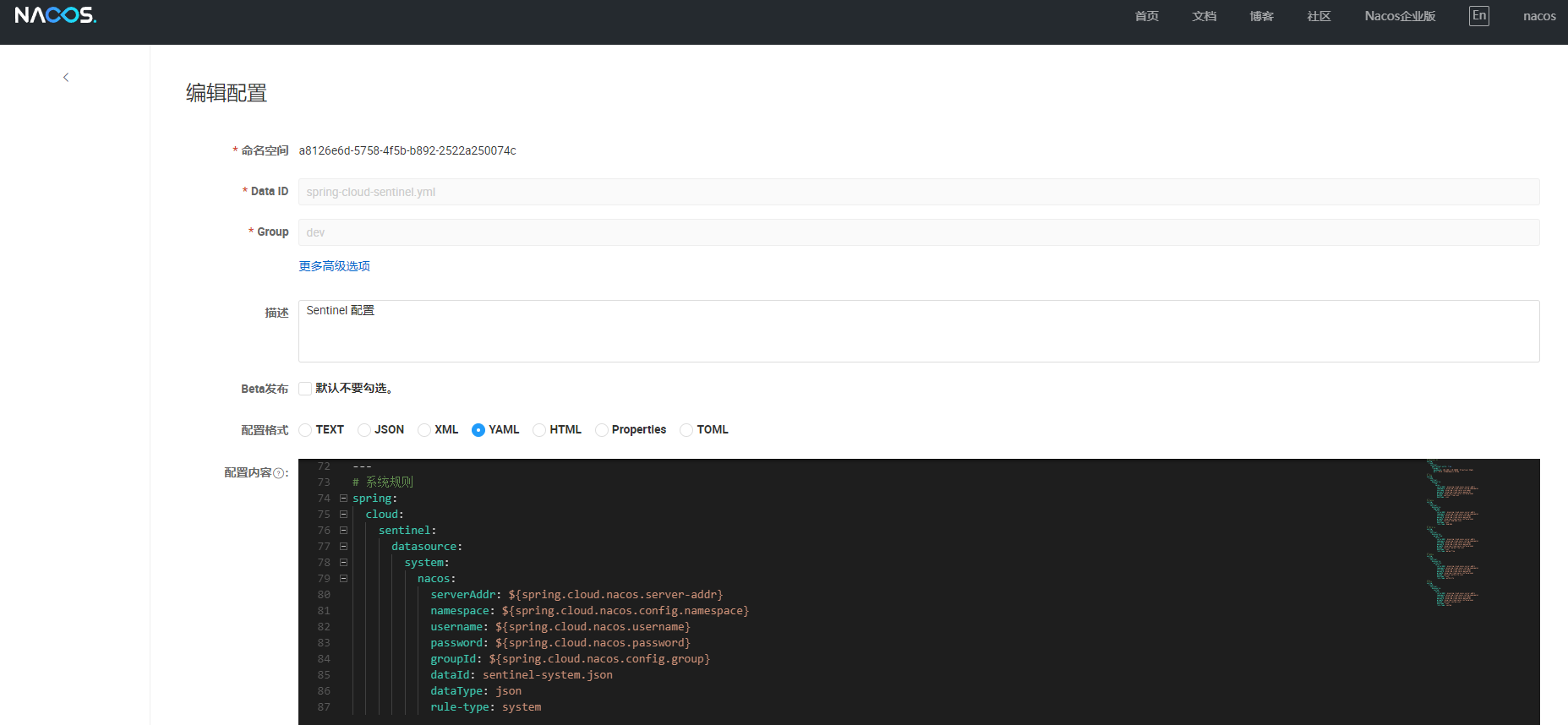
添加规则
在以上配置的 dataId 创建规则配置,添加后立即生效
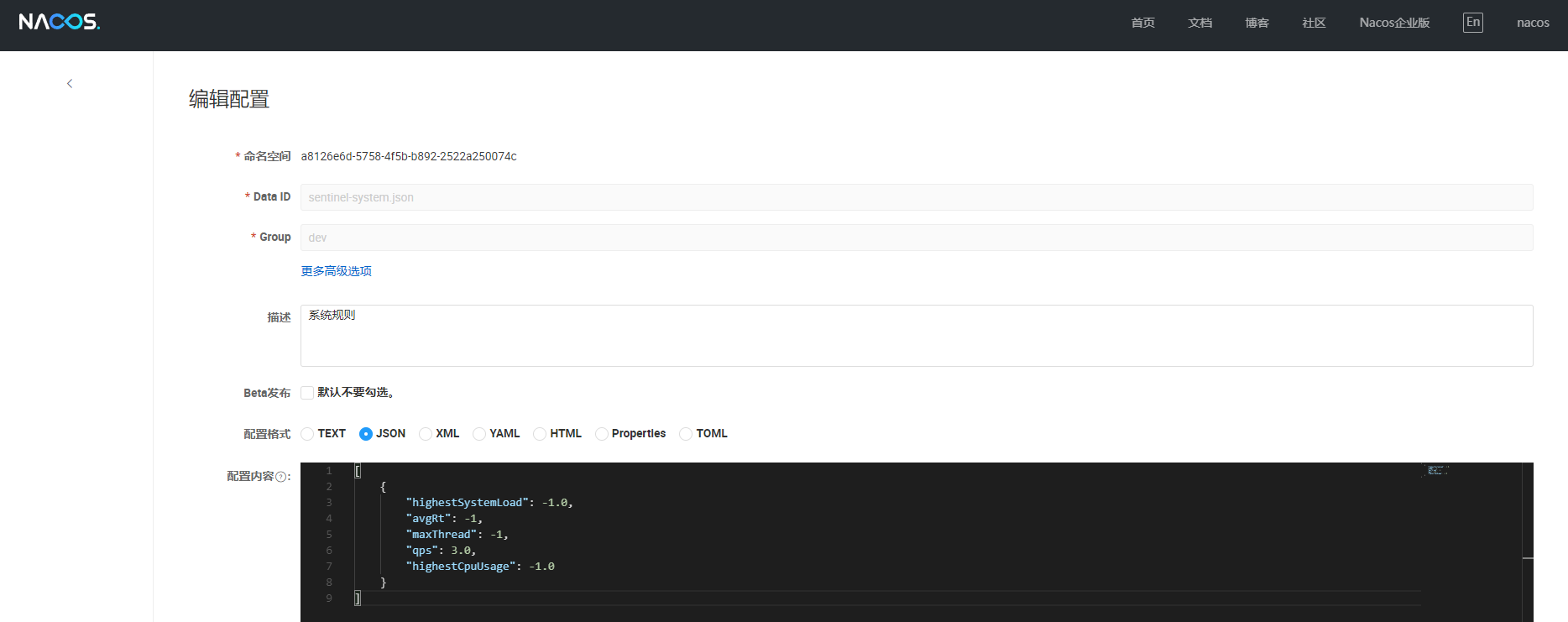
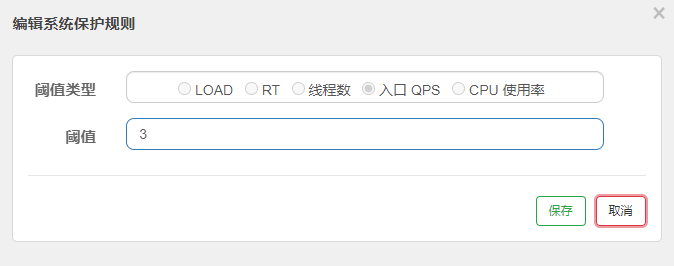
该配置将系统的 QPS 限制为 3,而其他参数(如系统负载、平均响应时间、线程数和 CPU 使用率)均不设置限制。
[
    {
        "highestSystemLoad": -1.0,
        "avgRt": -1,
        "maxThread": -1,
        "qps": 3.0,
        "highestCpuUsage": -1.0
    }
]
对应控制台参数
参数详解
以下是 Sentinel 系统规则中这些参数的配置实例及解释,以表格形式呈现:
| 参数类型 | 配置示例 | 解释 |
|---|---|---|
| LOAD | 5 | 系统负载阈值。通常设置为 CPU 核数的 2-3 倍,当系统负载超过该值时进行限流。 |
| RT | 1000 | 响应时间阈值,单位为毫秒。当接口的平均响应时间超过该值时触发限流。 |
| 线程数 | 200 | 并发线程数阈值。当接口的并发线程数超过该值时执行限流。 |
| 入口 QPS | 3000 | 每秒查询数(QPS)阈值。限制进入系统的请求数,避免系统过载。 |
| CPU 使用率 | 80 | CPU 使用率阈值,百分比形式。当 CPU 使用率超过该值时触发限流。 |
整合远程调用
整合OpenFeign
参考 OpenFeign使用文档 整合
添加配置文件,开启feign对sentinel的支持
---
# 开启feign对sentinel的支持
feign:
  sentinel:
enabled: true使用OpenFeign
@FeignClient(name = "spring-cloud-nacos", fallback = FeignLoadBalancerServiceFallback.class)
public interface FeignLoadBalancerService {

    @GetMapping("/config/get")
    String get();

}

@RestController
@RequestMapping("/loadbalancer")
@RequiredArgsConstructor(onConstructor = @__(@Autowired))
public class LoadBalancerController {

    private final FeignLoadBalancerService feignLoadBalancerService;

    @GetMapping("/get")
    public String get() {
        return feignLoadBalancerService.get();
    }

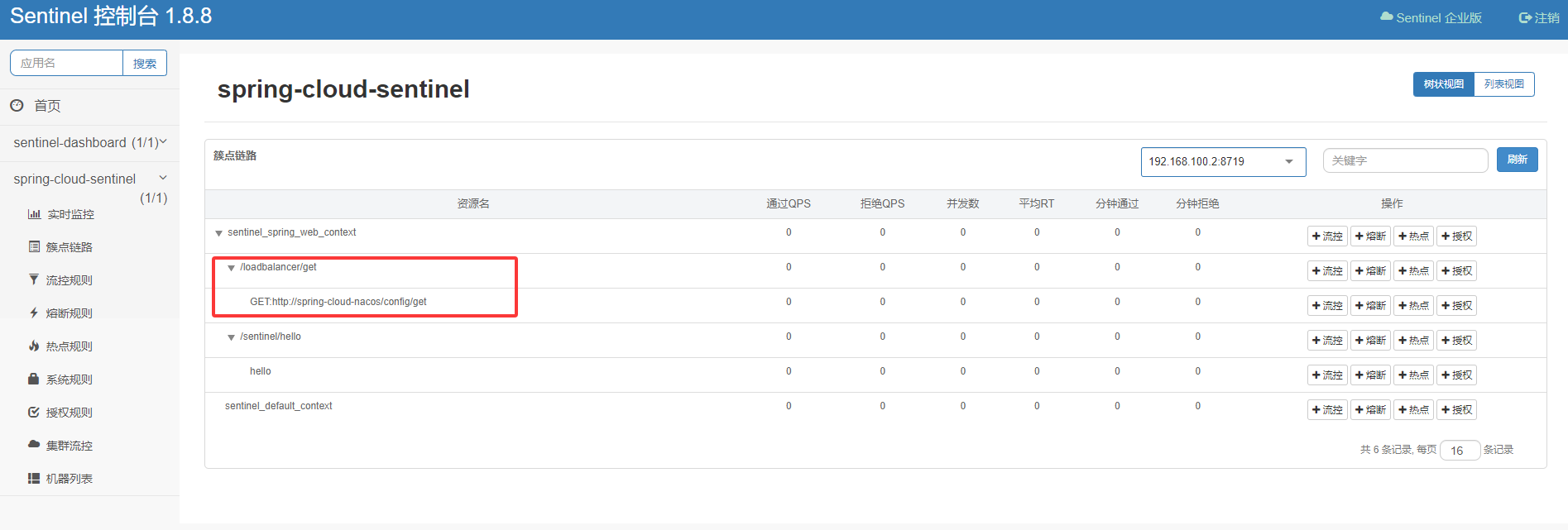
}有调用到OpenFeign的地方就会这样显示,按照以上的操作进行相应的配置即可
整合Dubbo
参考 Dubbo使用文档 整合
添加依赖
<!-- Sentinel 集成 Dubbo -->
<dependency>
    <groupId>org.apache.dubbo</groupId>
    <artifactId>dubbo-sentinel-spring-boot-starter</artifactId>
</dependency>使用Dubbo
@RestController
@RequestMapping("/dubbo")
public class DubboController {

    @DubboReference
    private RemoteUserService remoteUserService;

    @GetMapping("/get")
    public RemoteUser get() {
        return remoteUserService.getUser();
    }

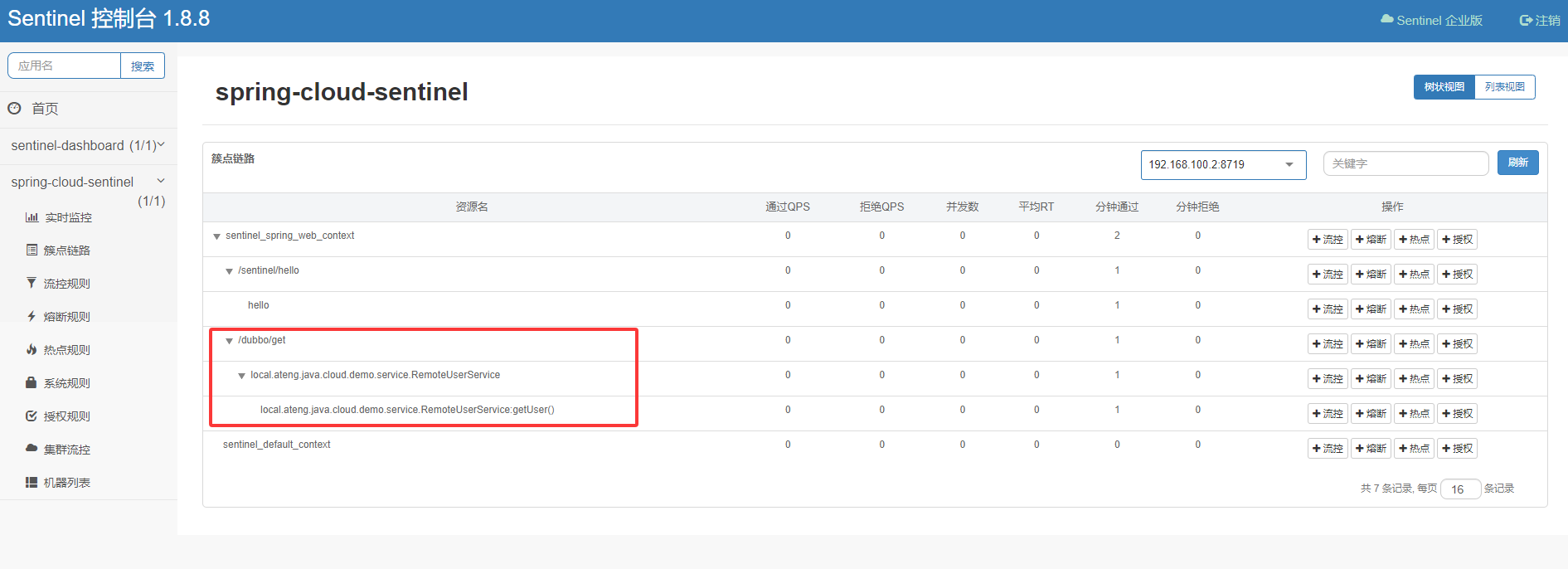
}有调用到Dubbo的地方就会这样显示,按照以上的操作进行相应的配置即可