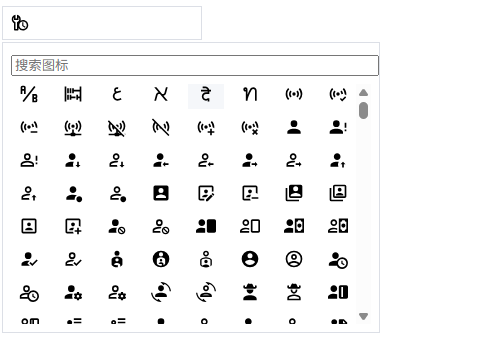
Iconify
Iconify 是一个统一的图标框架,支持 150+ 图标集、200,000+ 图标(如 Material Design Icons、FontAwesome、Feather 等),并且可按需加载 SVG 图标。
基础配置
安装依赖
pnpm add @iconify/vue@5.0.0在 main.ts 中注册插件:
ts
import { createApp } from 'vue'
import App from './App.vue'
import { Icon } from '@iconify/vue';

const app = createApp(App)
app.component('Icon', Icon);

app.mount('#app')注册完成后,即可在任意组件中直接使用图标组件,无需单独引入。
基础使用
vue
<template>
  <div class="p-4">
    <!-- 使用图标: mdi:home 是图标前缀 + 名称 -->
    <Icon icon="mdi:home" width="24" height="24" />
    <Icon icon="fa-solid:user" width="24" height="24" />
  </div>
</template>

<script lang="ts" setup>
</script>自定义选择图标
添加依赖
pnpm add @iconify/json@2.2.425封装组件
src/components/icon/IconPicker.vue
vue
<template>
  <div class="icon-picker">
    <!-- 触发器 -->
    <div class="trigger" @click="open = !open">
      <Icon
          v-if="modelValue"
          :icon="modelValue"
          width="18"
      />
      <span v-else class="placeholder">选择图标</span>
    </div>

    <!-- 面板 -->
    <div v-if="open" class="panel">
      <input
          v-model="keyword"
          class="search"
          placeholder="搜索图标"
      />

      <div class="grid">
        <div
            v-for="icon in filteredIcons"
            :key="icon"
            class="item"
            @click="select(icon)"
        >
          <Icon :icon="icon" width="20" />
        </div>
      </div>
    </div>
  </div>
</template>

<script setup lang="ts">
import { ref, computed } from 'vue'
import { Icon } from '@iconify/vue'
import mdi from '@iconify/json/json/mdi.json'

defineProps<{
  modelValue: string
}>()

const emit = defineEmits<{
  (e: 'update:modelValue', value: string): void
}>()

const open = ref(false)
const keyword = ref('')

const icons = Object.keys(mdi.icons).map(
    name => `mdi:${name}`
)

const filteredIcons = computed(() =>
    keyword.value
        ? icons.filter(i => i.includes(keyword.value))
        : icons
)

function select(icon: string) {
  emit('update:modelValue', icon)
  open.value = false
}
</script>

<style scoped>
.icon-picker {
  position: relative;
  width: 200px;
}

.trigger {
  display: flex;
  align-items: center;
  gap: 8px;
  height: 32px;
  padding: 0 8px;
  border: 1px solid #dcdfe6;
  cursor: pointer;
}

.placeholder {
  color: #999;
}

.panel {
  position: absolute;
  z-index: 1000;
  top: 36px;
  width: 360px;
  background: #fff;
  border: 1px solid #dcdfe6;
  padding: 8px;
}

.search {
  width: 100%;
  margin-bottom: 8px;
}

.grid {
  display: grid;
  grid-template-columns: repeat(8, 1fr);
  gap: 8px;
  max-height: 240px;
  overflow: auto;
}

.item {
  cursor: pointer;
  text-align: center;
}

.item:hover {
  background: #f5f7fa;
}
</style>页面使用
vue
<template>
  <IconPicker v-model="icon" />

  <p style="margin-top: 12px">
    当前选择:
    <Icon :icon="icon" width="20" />
    {{ icon }}
  </p>
</template>

<script setup lang="ts">
import { ref } from 'vue'
import { Icon } from '@iconify/vue'
import IconPicker from '@/components/icon/IconPicker.vue'

const icon = ref('')
</script>